The short version
- Apple was faster at every length. Used live, SpeechAnalyzer had the final text ready about 0.2 seconds after the speech ended, whether we talked for 5 seconds or 51.
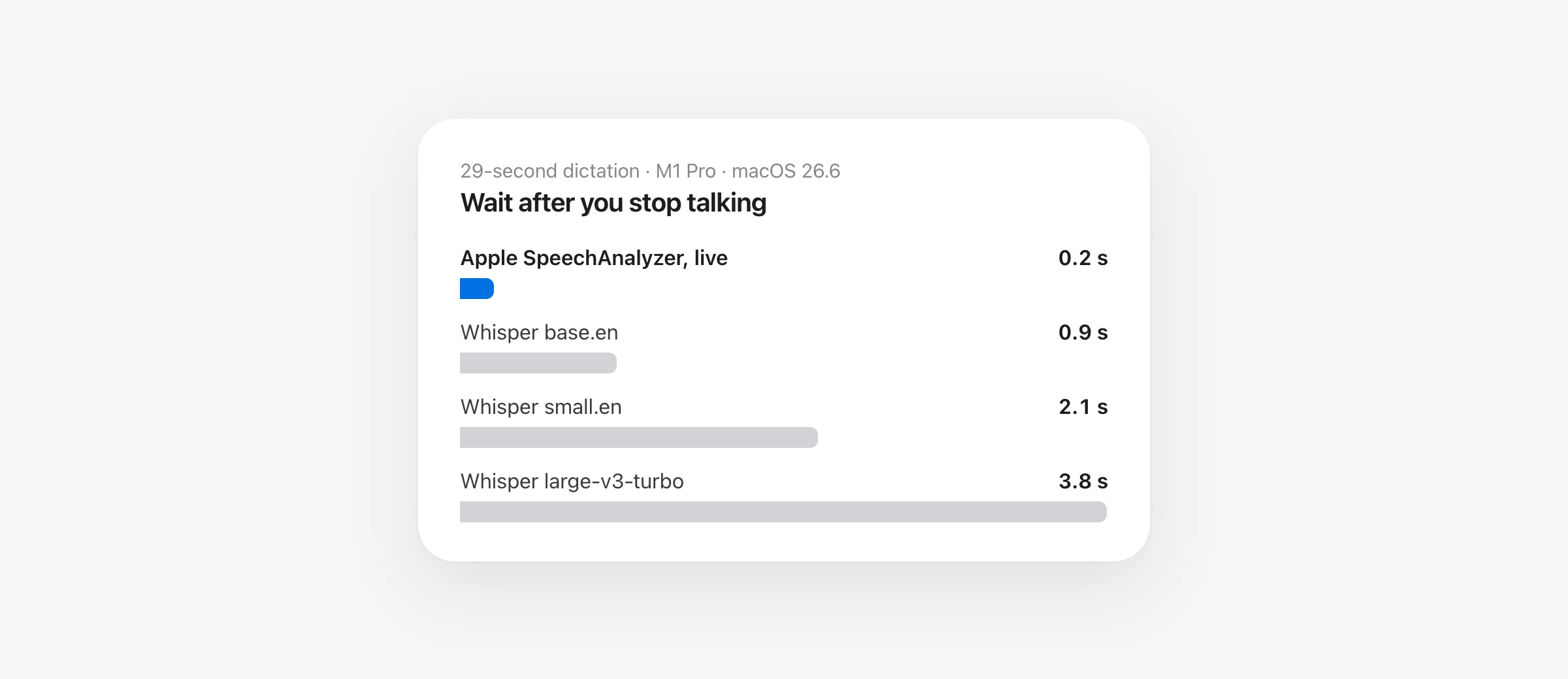
- Whisper’s wait grows with what you said. After a 29-second dictation, large-v3-turbo took 3.8 s, small.en 2.1 s and base.en 0.9 s on the same Mac.
- Even run like Whisper (whole clip, after it ended), Apple took 0.64 s for the 29-second clip, faster than the smallest Whisper we tried.
- Whisper was more accurate on our clean audio. Every Whisper model was word-perfect; Apple made 2–3% word errors. For most dictation that’s a wash, but it is a real difference.
Since macOS 26 Tahoe, every Mac app can use SpeechAnalyzer, Apple’s new on-device speech-to-text engine. Apple says it is built for “long-form and conversational audio” and gives fast results, but it published no numbers. Most Mac dictation apps still run OpenAI’s Whisper locally or send your voice to a server.
For dictation, one number matters more than any other: how long you wait after you stop talking. A wait of half a second feels instant; three seconds feels like the app is thinking. So we timed it.
What we tested, and how
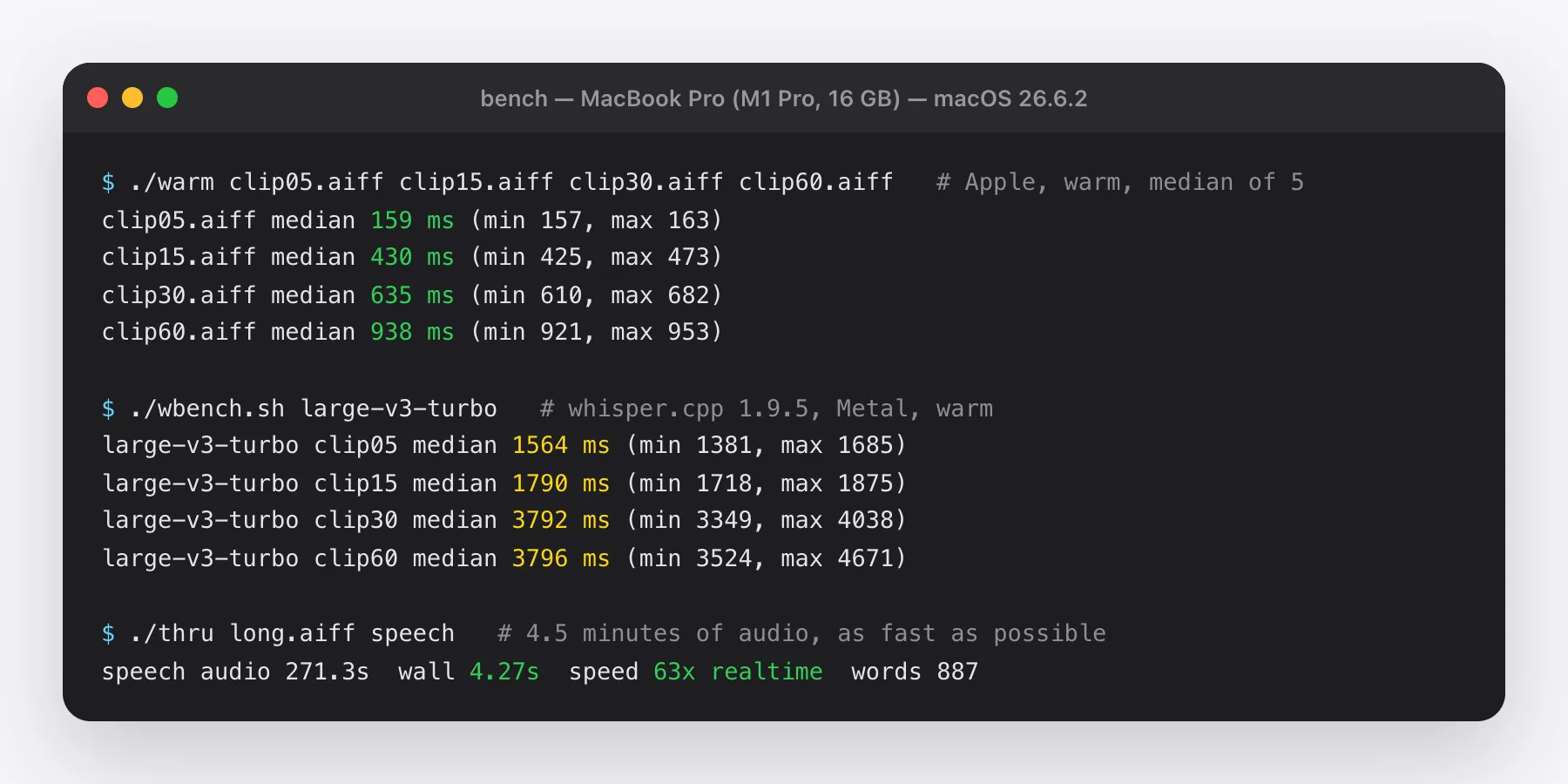
Everything ran on one machine: a 2021 MacBook Pro with an M1 Pro and 16 GB of memory, on macOS 26.6.2. That’s a four-year-old chip, so a newer Mac will be quicker across the board. The relative results are what to look at.
- Apple SpeechTranscriber, the general model inside SpeechAnalyzer, English (US), run two ways: live (audio fed in real time in 100 ms chunks, like a dictation app) and batch (the whole clip at once, after it ended).
- Whisper via whisper.cpp 1.9.5 with Metal GPU acceleration, in three sizes:
base.en,small.enandlarge-v3-turbo. Each ran as a server with the model already loaded, which is how dictation apps keep Whisper warm. - Audio: four clips of a spoken team update, 5, 19, 29 and 51 seconds long, plus a 4.5-minute recording. To keep the input identical and repeatable, we generated it with macOS’s built-in Samantha voice at a normal speaking pace (165 words per minute).
- Every number is the median of five runs after a warm-up run. We timed from “audio is finished” to “final text is ready”.
Result 1: the wait after you stop talking
This is what you feel every time you dictate. Apple’s engine transcribes while you talk, so when you stop it only has to finish the last fraction of a second. Whisper apps typically transcribe the whole recording once you stop, so the wait grows with the length of what you said.
Source: Murmur benchmark, October 11, 2026. whisper.cpp 1.9.5 (Metal) vs Apple SpeechTranscriber on macOS 26.6.2.
Show the numbers
| 5.4 s | 19.1 s | 29.4 s | 51.2 s | |
|---|---|---|---|---|
| Whisper large-v3-turbo | 1.6 s | 1.8 s | 3.8 s | 3.8 s |
| Whisper small.en | 0.56 s | 1.2 s | 2.1 s | 2.6 s |
| Whisper base.en | 0.20 s | 0.63 s | 0.92 s | 1.9 s |
| Apple, live | 0.10 s | 0.23 s | 0.21 s | 0.14 s |
At 51 seconds of speech, large-v3-turbo made us wait 3.8 seconds; Apple’s live engine about 0.2. The live numbers hover between 0.1 and 0.25 seconds no matter how long we spoke, because the work happens while you’re still talking.
Apple ships a second engine, DictationTranscriber, as a fallback for languages the main model doesn’t cover. It did not stay flat: its wait grew from 0.1 s on the shortest clip to 1.26 s on the longest. If you build on SpeechAnalyzer, use SpeechTranscriber where your language supports it.
One caveat in Whisper’s favor: some apps run Whisper in a streaming mode too, or use NVIDIA’s Parakeet, which is much faster than Whisper. We tested the setup most local Whisper dictation apps ship by default.
Result 2: same job, same conditions
The comparison above favors Apple’s design, so here is the fairest one we could run: every engine gets the whole clip after it ends and must transcribe it from scratch.
Source: Murmur benchmark, October 11, 2026, MacBook Pro M1 Pro, macOS 26.6.2.
Show the numbers
| Seconds | |
|---|---|
| Apple SpeechTranscriber | 0.64 s |
| Whisper base.en | 0.92 s |
| Whisper small.en | 2.1 s |
| Whisper large-v3-turbo | 3.8 s |
Apple still wins: it needs about 30% less time than the smallest Whisper model and a sixth of the time large-v3-turbo needs. The gap holds across all four lengths:
| Clip | Apple batch | Apple live | base.en | small.en | large-v3-turbo |
|---|---|---|---|---|---|
| 5.4 s | 0.16 s | 0.10 s | 0.20 s | 0.56 s | 1.6 s |
| 19.1 s | 0.43 s | 0.23 s | 0.63 s | 1.2 s | 1.8 s |
| 29.4 s | 0.64 s | 0.21 s | 0.92 s | 2.1 s | 3.8 s |
| 51.2 s | 0.94 s | 0.14 s | 1.9 s | 2.6 s | 3.8 s |
Result 3: long recordings
We also gave Apple’s engine a 4.5-minute recording and let it run as fast as it could. It finished in 4.3 seconds, about 63× faster than real time, with 887 words and a 0.7% word error rate.
whisper.cpp’s command-line tool struggled with the same file: small.en skipped whole stretches of the recording and repeated the word “the” over and over. Hallucinations like this are a known Whisper weakness on long audio, and good apps work around them by splitting the audio into chunks, but it’s a reminder that “runs Whisper” isn’t a guarantee of quality on its own.
Our long-file result lines up with earlier tests. MacStories timed Apple’s engine (through Finn Voorhees’ Yap tool) on a 34-minute video: 45 seconds, against 1 minute 41 seconds for MacWhisper running Whisper Large V3 Turbo, “2.2× faster” with no noticeable quality difference.
Accuracy: where Whisper wins
Speed isn’t everything. On our test audio, all three Whisper models transcribed every clip word for word. Apple’s SpeechTranscriber made a handful of mistakes:
| We said | Apple heard |
|---|---|
| read through the help articles | read through the health articles |
| the marketing site goes live | the marketing psychos live |
| ask questions second | ask question second |
That works out to a word error rate of 1.5–2.9% on the longer clips, versus 0% for Whisper. Synthetic audio is clean and predictable, so treat this as a sanity check, not a verdict. Published tests on real recordings point both ways:
- Inscribe (LibriSpeech, M2 Pro): SpeechAnalyzer 2.12% word error rate on clean speech vs 3.74% for Whisper Small; 4.56% vs 7.95% on harder speech.
- Argmax (earnings calls, M4 Mac mini): Apple 14.0%, Whisper base.en 15.2%, Whisper small.en 12.8%. Apple was 2× faster than small.en.
The fair summary: Apple’s engine is in the same accuracy class as small Whisper models and much faster than large ones. If you transcribe noisy interviews or heavy accents, a large Whisper model is still the safer choice. For dictating messages, notes and email, the speed difference is the one you’ll notice.
Names and jargon are where any engine slips. That’s why a custom vocabulary matters more than a model’s headline accuracy: Apple’s engine accepts custom words, and apps like Murmur add a dictionary on top that corrects sound-alikes (“clot” → “Claude”).
What this means if you dictate on a Mac
- If you want instant results, an app built on SpeechAnalyzer streams text while you talk and has it ready a fraction of a second after you stop. You need macOS 26 or later.
- If you need maximum accuracy on hard audio, or you’re on macOS 14 or 15, a Whisper or Parakeet app (MacWhisper, Superwhisper, VoiceInk) is the better pick, and worth the extra wait.
- If privacy matters, both options can run entirely on your Mac. The cloud apps (Wispr Flow, Aqua Voice, Typeless) can’t. Our comparison of 10 Mac dictation apps lists which is which.
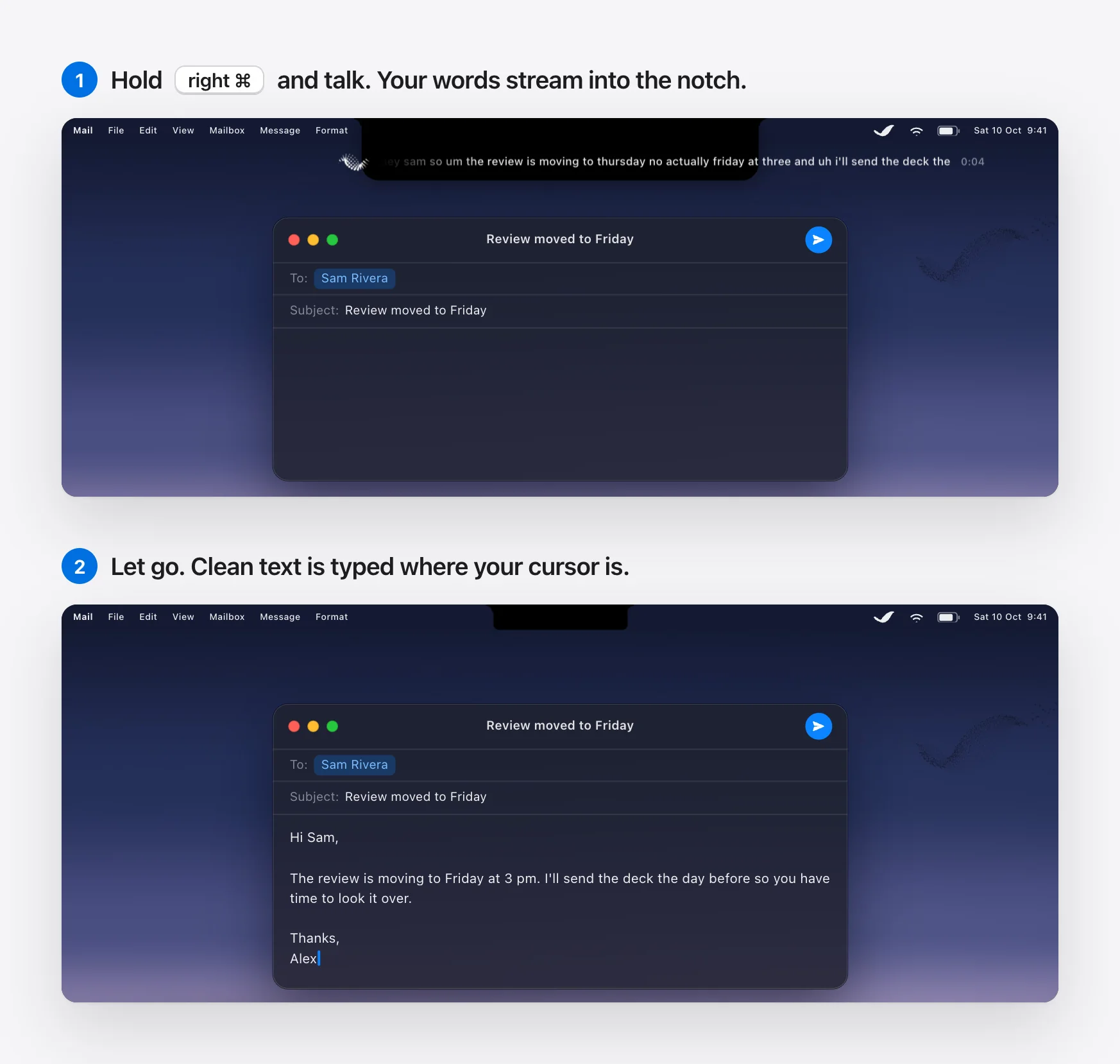
We built Murmur on this engine because of the numbers above. You hold the right ⌘ key, talk, and let go; Apple’s on-device AI then removes filler words and applies your corrections (“at four, no wait, five” becomes “at 5”) before the text is typed. That cleanup is a separate step that adds a little time; Murmur caps it at 1.5 seconds and falls back to the raw transcript rather than keep you waiting.
Repeat the test yourself
The core of the Apple timing is about 15 lines of Swift on macOS 26:
let locale = await SpeechTranscriber.supportedLocale(equivalentTo: Locale(identifier: "en_US"))!
let module = SpeechTranscriber(locale: locale, transcriptionOptions: [],
                               reportingOptions: [], attributeOptions: [])
let analyzer = SpeechAnalyzer(modules: [module],
                              options: .init(priority: .userInitiated, modelRetention: .processLifetime))
let file = try AVAudioFile(forReading: url)
let start = Date()
let text = Task {
    var s = ""; for try await r in module.results where r.isFinal { s += String(r.text.characters) }; return s
}
try await analyzer.start(inputAudioFile: file, finishAfterFile: true)
print(try await text.value, Date().timeIntervalSince(start))
For Whisper we ran whisper-server -m ggml-large-v3-turbo.bin -t 8 from Homebrew’s whisper-cpp package and posted each clip to its /inference endpoint. If you get different numbers on an M3 or M4, write to [email protected] and we’ll add them here.
Frequently asked questions
Is Apple’s SpeechAnalyzer faster than Whisper?
In our test on an M1 Pro, yes. Transcribing the same 29-second clip after it ended took Apple’s SpeechTranscriber 0.64 s, versus 0.92 s for Whisper base.en, 2.1 s for small.en and 3.8 s for large-v3-turbo. Used live, the way dictation apps use it, Apple returned the final text about 0.2 s after the speech ended.
Is Apple’s speech recognition as accurate as Whisper?
Close, but not identical. On our clean test audio every Whisper model was word-perfect and Apple made a few mistakes (2–3% word error rate). Published third-party tests disagree on which wins: one LibriSpeech test found SpeechAnalyzer more accurate than Whisper Small, while Argmax’s test on earnings calls found Whisper Small slightly more accurate. Large Whisper models remain the safer pick for hard audio.
Does SpeechAnalyzer work offline?
Yes. The model runs on the Mac and is stored by the system, not inside the app. After a one-time download per language, transcription works without an internet connection.
Which Macs can run SpeechAnalyzer?
SpeechAnalyzer and SpeechTranscriber are new in macOS 26 Tahoe and also ship in macOS 27. We tested on an Apple silicon Mac; Apple’s DictationTranscriber is the fallback for languages or devices the main model doesn’t support.
Why does Whisper make you wait longer in dictation apps?
Whisper transcribes a recording in chunks, so most apps send the whole clip after you stop talking and the wait grows with its length. SpeechAnalyzer streams: it transcribes while you speak, so when you stop there is only the last moment of audio left to finish.
Sources
- Apple: Bring advanced speech-to-text to your app with SpeechAnalyzer (WWDC25 session 277)
- MacStories: Apple’s new speech APIs outpace Whisper (June 2025)
- Argmax: Apple and Argmax, SpeechAnalyzer benchmark (June 2025)
- Inscribe: Apple speech API benchmark on LibriSpeech (July 2026)
- whisper.cpp (ggml-org), version 1.9.5
- OpenAI Whisper model card: large-v3-turbo

Telman Gadimov builds Murmur, a dictation app for Mac that runs entirely on-device. We make Murmur, which uses Apple’s SpeechAnalyzer, so we have a stake in this result. That’s why the setup, the raw numbers and the cases where Whisper won are all on this page.