Quick picks
- Best private dictation, pay once: Murmur. On-device speech and AI cleanup, $19 once.
- Best cloud dictation: Wispr Flow. Excellent polish on every platform, $12–15 a month.
- Most customizable: Superwhisper. Pick your models and prompts.
- Best free: Apple Dictation, already on your Mac.
- Best open source: VoiceInk. Best for transcribing files: MacWhisper.
Dictation apps on the Mac have split into two camps. Cloud apps like Wispr Flow send your voice to a server and return beautifully cleaned-up text, for a monthly fee. On-device apps keep your voice on your Mac, work offline, and usually cost once. Which one is “best” depends on how you answer three questions:
- Is it OK for your voice, and the text on your screen, to leave your Mac?
- Do you need it on Windows or your phone too?
- Do you want to pay monthly, once, or not at all?
Here’s how the ten best options compare.
How we compared them
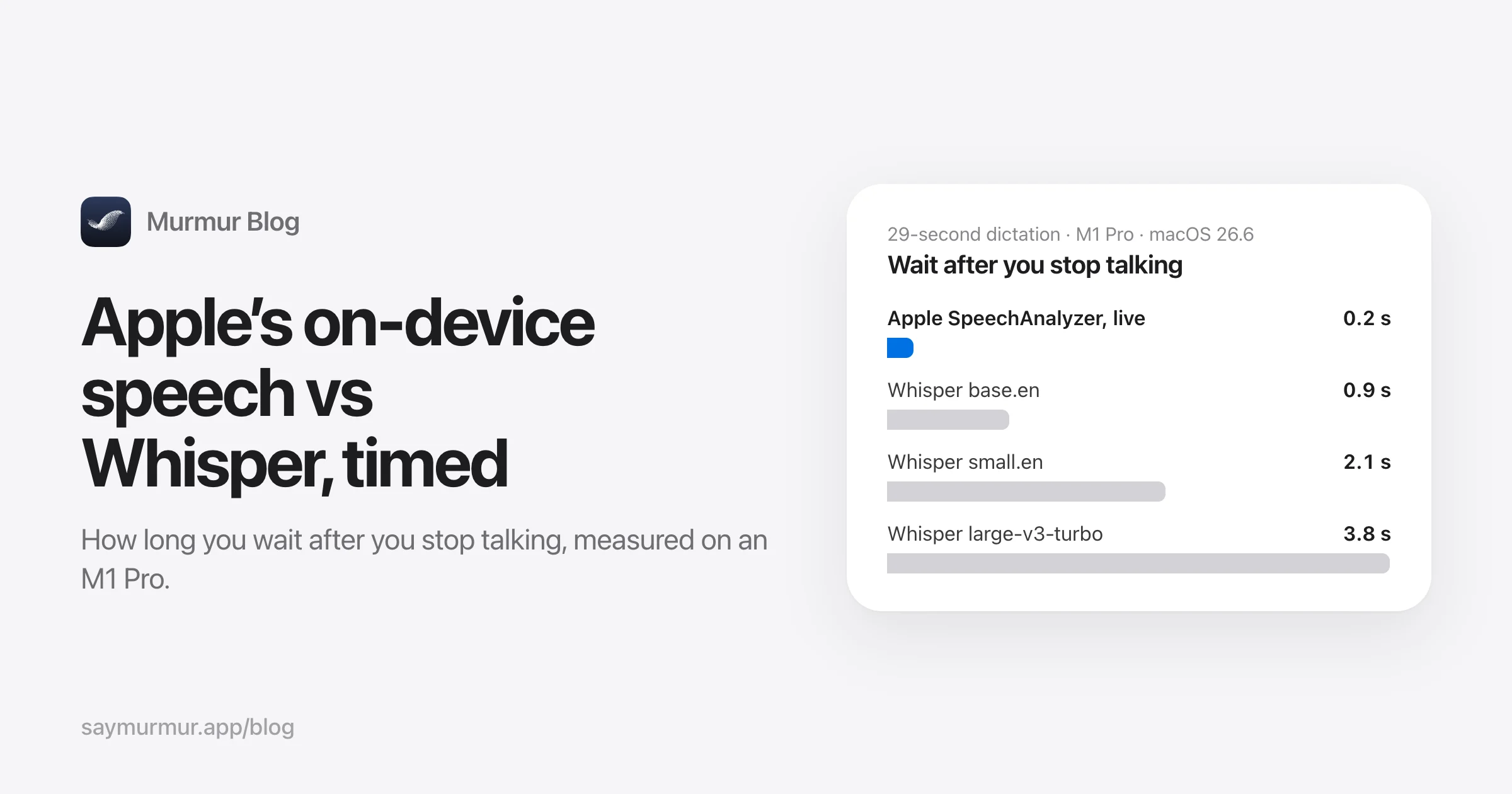
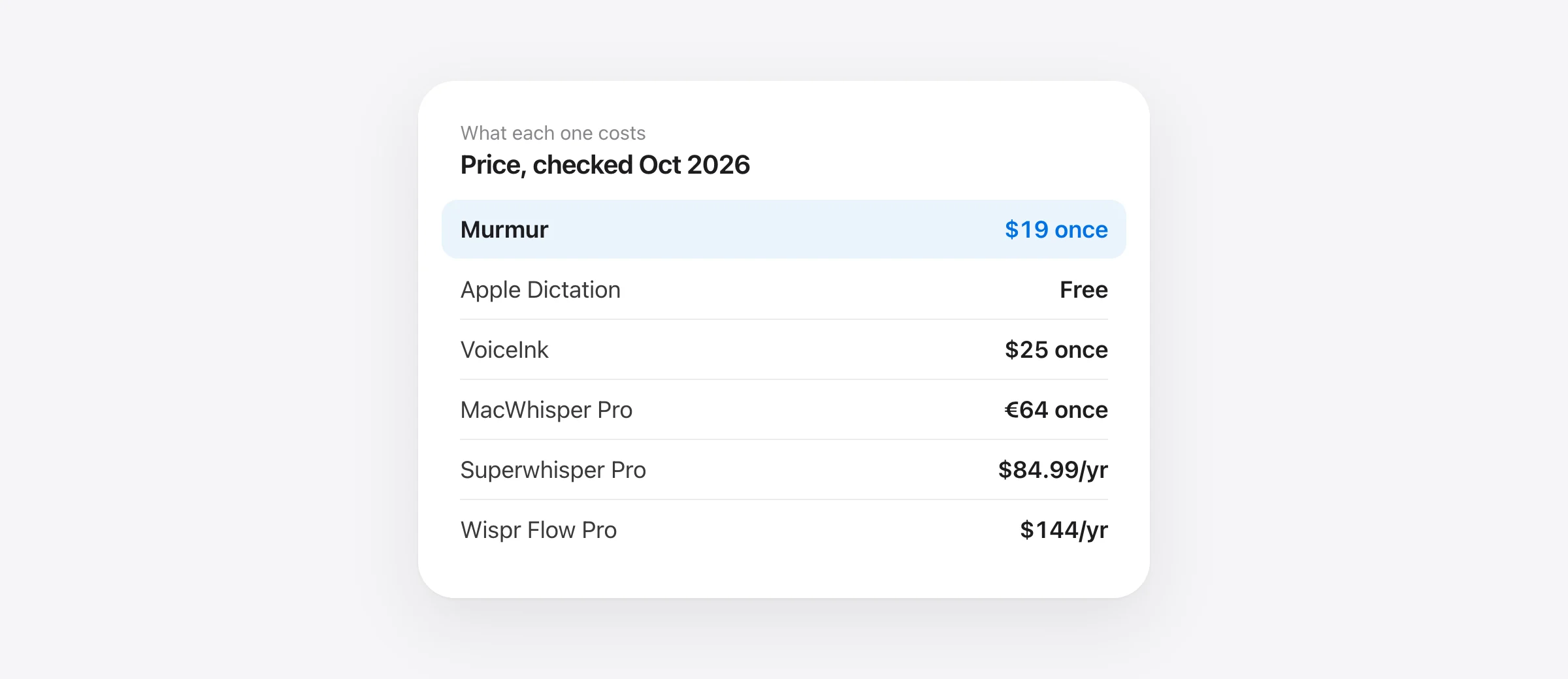
We checked every price, plan and requirement on the vendor’s own website and documentation on October 11, 2026, and linked each source at the end. We measured the two speech engines most of these apps rely on, Apple’s SpeechAnalyzer and OpenAI’s Whisper, ourselves; the full speed test is here.
Disclosure: we make Murmur, and it’s first on this list. We’ve tried to be straight about where it falls short, and about where other apps are the better choice.
Mac dictation apps at a glance
| App | Speech runs | AI cleanup | Price | Free option | Also on |
|---|---|---|---|---|---|
| Murmur | On your Mac | On your Mac | $19 once | 2,000 words | Mac only |
| Wispr Flow | Cloud | Cloud | $144/yr | 2,000 words/week | Windows, iOS, Android |
| Superwhisper | Mac or cloud | Cloud (local in some modes) | $84.99/yr or $249.99 once | Local Whisper, no AI | Windows, iOS, Android |
| Apple Dictation | On your Mac* | macOS 27 on M3+ | Free | Free | iPhone, iPad |
| VoiceInk | On your Mac | Your API key or local | $25 once | 7-day trial | iOS |
| MacWhisper | On your Mac | Your API key or local | €64 once | Free tier | iOS |
| Aqua Voice | Cloud | Cloud | $96/yr | 1,000 words | Windows, iOS, Android |
| Spokenly | Mac or cloud | Your API key or Pro | $99.99/yr Pro | Unlimited local | Windows, Linux, iOS |
| Willow Voice | Cloud (offline mode) | Cloud | $144/yr | Basic model | Windows, iPhone |
| Monologue | Cloud (local option) | Cloud | $144/yr | 1,000 words | iPhone, iPad, Watch |
Yearly prices are the annual-billing rate of each app’s main paid plan. *Apple Dictation runs on-device on Apple silicon in many languages; others go through Apple’s servers. Checked October 11, 2026.
Sources: each vendor’s pricing page, October 11, 2026. MacWhisper converted from €64.
Show the numbers
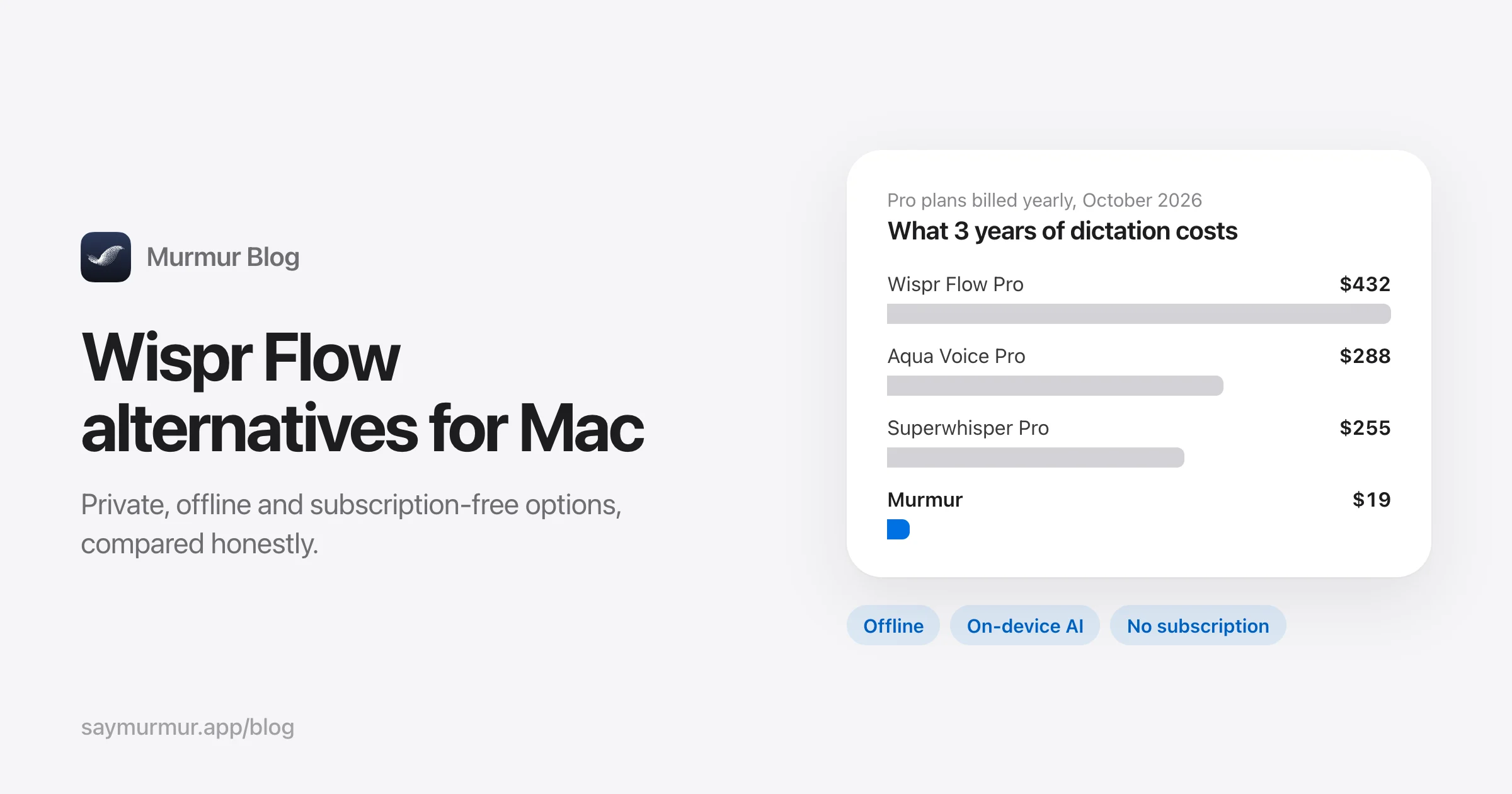
| 3-year cost (USD) | |
|---|---|
| Wispr Flow Pro | $432 |
| Willow Pro | $432 |
| Monologue Pro | $432 |
| Spokenly Pro | $300 |
| Aqua Voice Pro | $288 |
| Superwhisper Pro | $255 |
| MacWhisper Pro | ≈ $70 |
| VoiceInk | $25 |
| Murmur | $19 |
| Apple Dictation | Free |
The 10 best dictation apps for Mac
Murmur
Best private, pay once- Price
- $19 once, up to 3 Macs. First 2,000 words free, no account
- Runs
- Entirely on your Mac: Apple SpeechAnalyzer + Apple Intelligence
- Needs
- macOS 26 or later, Apple silicon. AI cleanup needs Apple Intelligence
- Shortcut
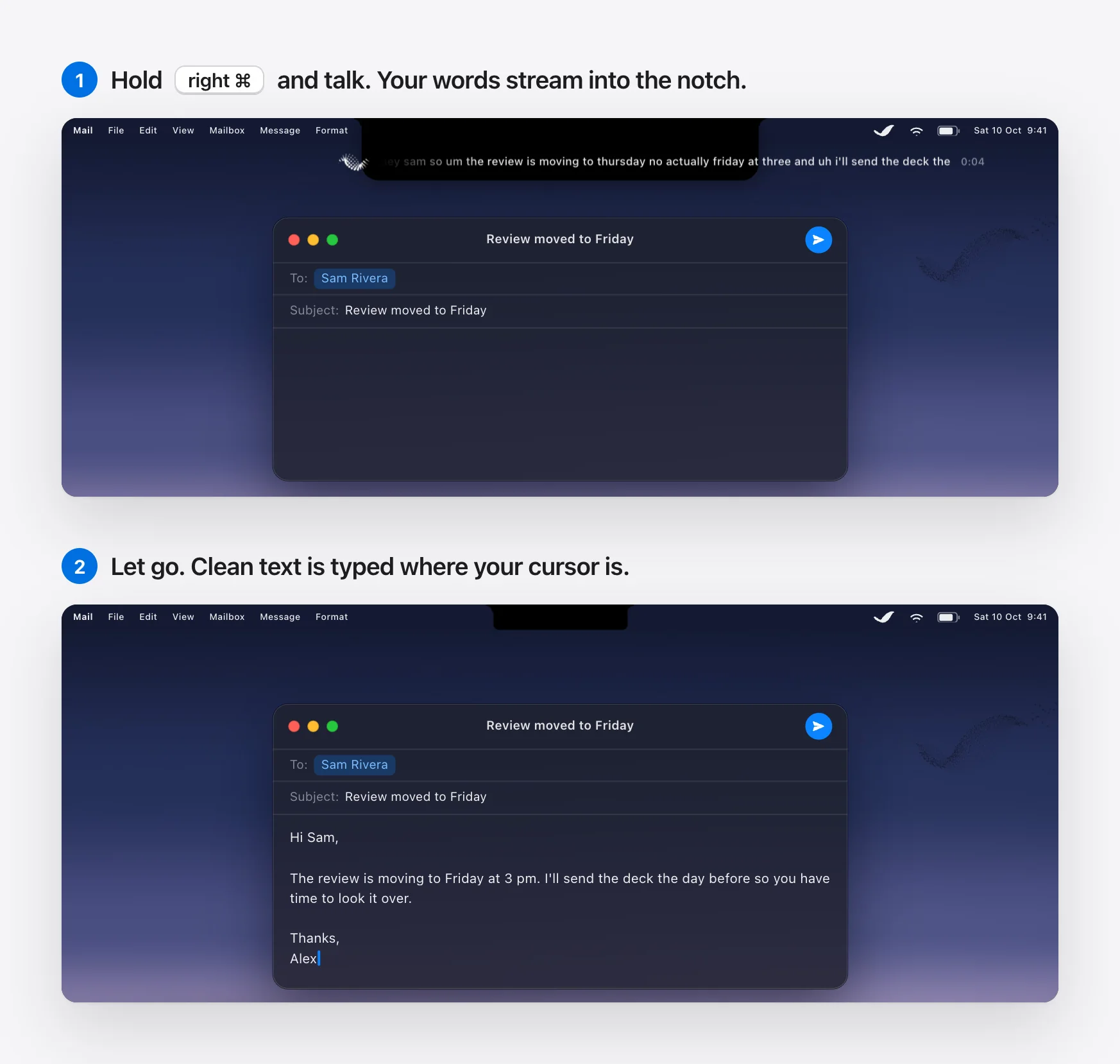
- Hold right ⌘ to talk; double-tap for hands-free
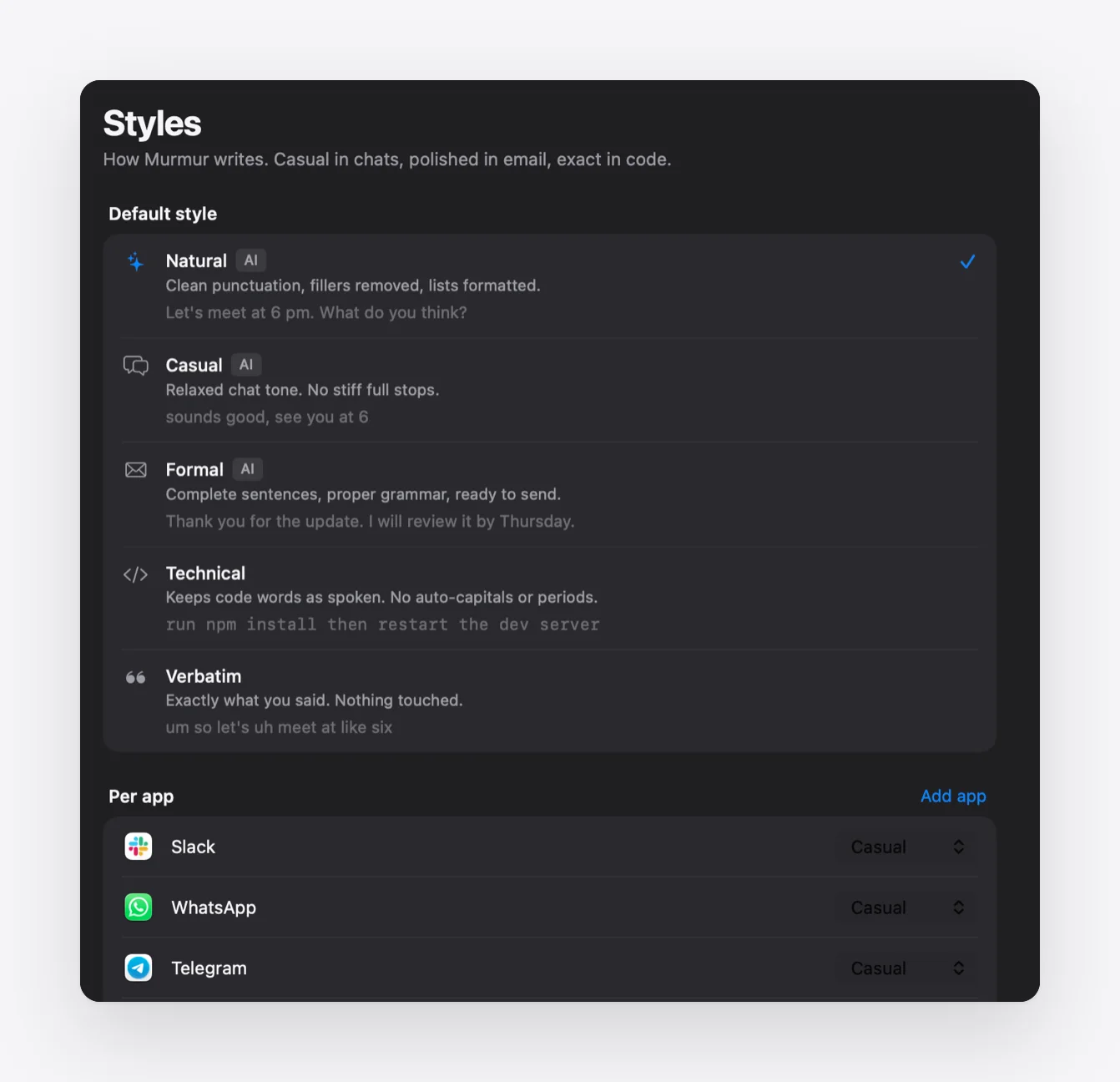
Murmur is our app. You hold the right ⌘ key anywhere on your Mac, talk, and let go; the text is typed where your cursor is. Apple’s on-device AI removes filler words and applies your spoken corrections, and a different style can apply per app: casual in Slack, formal in Mail, technical in your code editor. Hold right ⌥ instead to rewrite selected text by voice (“make this friendlier”).
Good
- Voice and text never leave the Mac; works in Airplane Mode
- Text is ready about 0.2 s after you stop talking
- Per-app styles, voice editing, snippets, custom dictionary
- Cheapest one-time price here; 30-day refund
Not so good
- Mac only, and only macOS 26 or later on Apple silicon
- No file or meeting transcription
- AI cleanup languages are limited to Apple Intelligence’s
- New app (2026) without a long track record
Wispr Flow
Best cloud dictation- Price
- Free: 2,000 words/week. Pro: $15/month or $12/month billed yearly
- Runs
- In the cloud (“transcription always occurs on the cloud”)
- Needs
- macOS 12 or later; account required
- Shortcut
- Hold Fn; Fn+Space for hands-free
Wispr Flow is the best-known AI dictation app and, judging by its $2B valuation, the most successful. The text it produces is genuinely excellent: it formats lists, fixes grammar, and adapts to the app you’re in. Command Mode (Pro) edits selected text by voice.
Good
- Very polished output and formatting
- Works on Mac, Windows, iPhone and Android
- Team features, SOC 2 Type II and HIPAA BAA available
Not so good
- Needs an internet connection; no offline mode
- Context Awareness is on by default and sends on-screen text to its servers
- $432 over three years on the Pro plan
Superwhisper
Most customizable- Price
- Free with local Whisper models. Pro: $8.49/month, $84.99/year or $249.99 lifetime
- Runs
- Your choice: local Whisper or Parakeet, or cloud models
- Needs
- macOS 14 or later; Apple silicon recommended
- Shortcut
- ⌥Space by default; push-to-talk configurable
Superwhisper is the power user’s pick. Custom “modes” combine a speech model, a language model and a prompt, so you can have one mode for email and another that turns rambling into bullet points. You can keep everything local or route the AI step to Claude, GPT, Gemini or your own API key.
Good
- Deep customization: models, prompts, per-mode context
- Fully local setup possible
- Lifetime license available
Not so good
- The most complex setup on this list
- AI modes and context need Pro
- Cloud AI is the default for the language step
Apple Dictation
Best free- Price
- Free, built into macOS
- Runs
- On-device on Apple silicon in many languages
- Needs
- Any Mac. AI dictation needs macOS 27, M3 or later, 12 GB memory (reported)
- Shortcut
- Microphone key (F5), or press a key twice
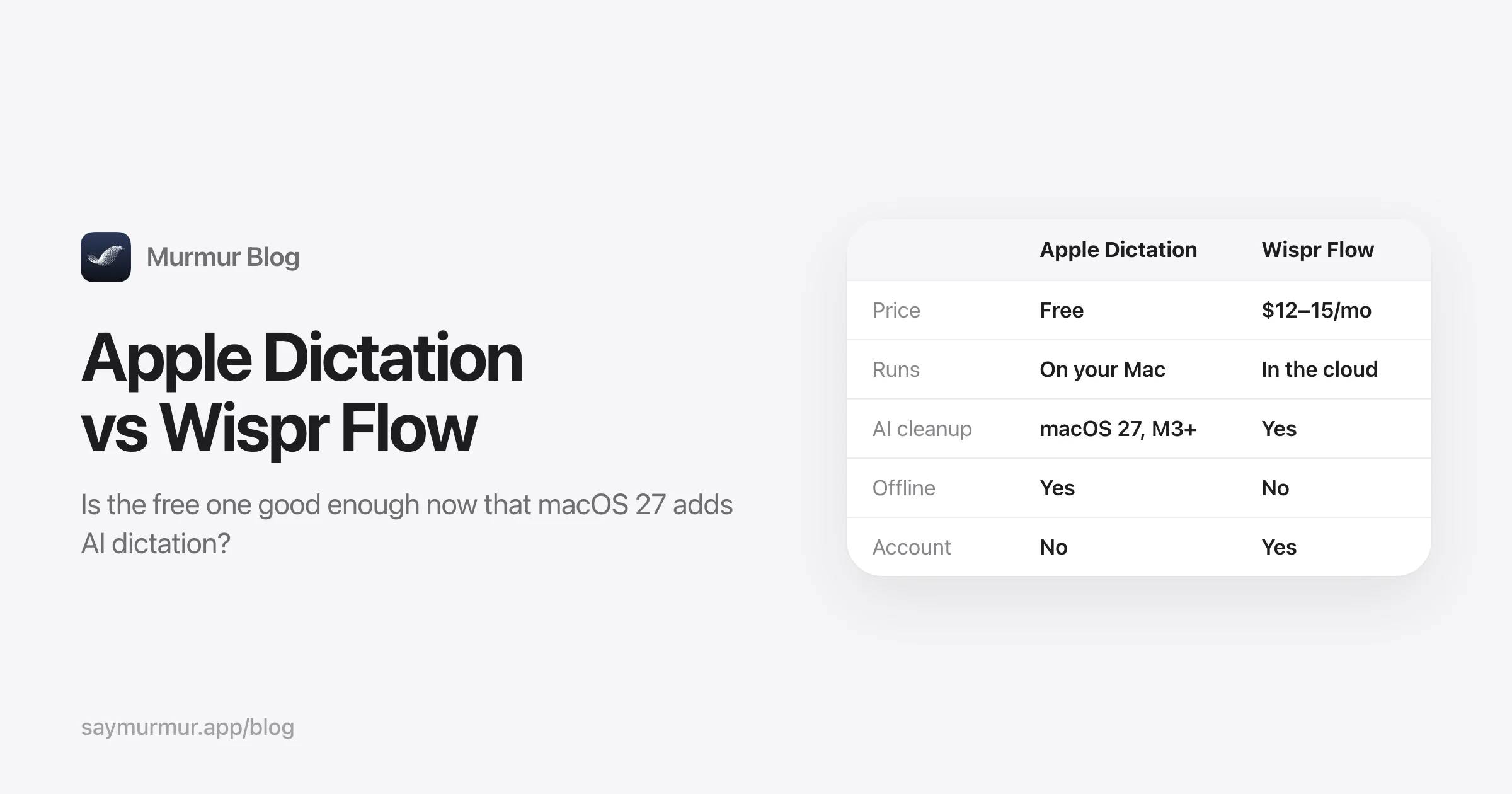
If you dictate a few sentences a day, start here. Apple Dictation has no time limit on Apple silicon, punctuates automatically, and lets you keep typing while it listens. macOS 27 adds AI-polished dictation for English on newer Macs. What it lacks is cleanup on older Macs, custom vocabulary, per-app tone and voice editing. Our Apple Dictation vs Wispr Flow comparison goes deeper.
Good
- Free and private, nothing to install
- Unlimited length on Apple silicon
- Works in nearly every text field
Not so good
- Stops after 30 seconds of silence
- No filler removal or rewriting before macOS 27 / M3
- Toggle, not hold-to-talk; no custom words
VoiceInk
Best open source- Price
- $25 once (1 Mac), $39 (2), $49 (3). Open source on GitHub
- Runs
- Locally: Parakeet, Whisper or Apple Speech; cloud optional
- Needs
- Apple silicon, macOS 14.4+ (docs say 15+)
- Shortcut
- Your choice: push-to-talk, toggle or hybrid
Good
- Open source, so you can audit or build it yourself
- Many local models, including NVIDIA Parakeet
- Per-app modes and an auto-learning dictionary
Not so good
- Good AI cleanup needs your own API key or 16 GB of memory
- More settings to tune than most
- 14-day refund window
MacWhisper
Best for transcribing files- Price
- Free tier; Pro €64 once with lifetime updates
- Runs
- Locally: Whisper and Parakeet. AI with your own key or Ollama
- Needs
- macOS (Apple silicon recommended)
- Dictation
- Pro only, in the direct-download version
MacWhisper is the gold standard for turning recordings, meetings and YouTube videos into text, with exports to subtitles and documents. It also does system-wide dictation, but that’s a side feature rather than the focus.
Good
- Best-in-class file and meeting transcription
- One-time price, lifetime updates
- Fully local
Not so good
- Dictation is secondary and Pro-only
- Not in the App Store version
Aqua Voice
Best for technical terms (cloud)- Price
- Free: 1,000 words. Pro: $10/month or $8/month yearly
- Runs
- Cloud, with its own Avalon model
- Needs
- Account; internet
- Shortcut
- Hold Fn
Good
- Strong with code and technical vocabulary
- Optional screen context (off by default)
- Cheaper than Wispr Flow
Not so good
- Tiny free tier
- No offline mode
- Privacy Mode is off by default
Spokenly
Best free local + your own keys- Price
- Free with local models or your API keys. Pro $9.99/month or $99.99/year
- Runs
- Local Whisper/Parakeet, or cloud
- Needs
- macOS 13.3 or later; Intel supported with limits
- Shortcut
- Right ⌘ by default
Good
- Generous free local tier, no account
- Runs on older macOS versions and Intel
- Agentic actions and an MCP tool for coding agents
Not so good
- The managed cloud experience needs Pro
- You manage models and keys yourself on the free tier
Willow Voice
Learns your writing style- Price
- Free basic model. Pro $15/month or $12/month yearly
- Runs
- Cloud by default; offline mode on Mac and iOS
- Needs
- Mac, Windows or iPhone
- Shortcut
- Fn; double-tap for hands-free
Good
- Adapts to your style and vocabulary
- Free tier isn’t word-capped (on the smaller model)
Not so good
- Zero-retention and HIPAA only on the $28–35 Business plan
- $432 over three years on Pro
Monologue
For the Apple ecosystem- Price
- 1,000-word trial. $15/month or $144/year
- Runs
- Cloud by default; local transcription on Apple silicon, but formatting needs the network
- Needs
- Account. Mac, iPhone, iPad, Apple Watch
- Shortcut
- Hold right ⌥
Good
- Meeting notes without a bot
- Notes available to AI agents via MCP and API
Not so good
- Not fully offline
- Subscription only
Also considered: Typeless (cloud, $30/month or $12/month yearly, strong self-correction handling) and Zumbo (fully local, one-time, rule-based cleanup, macOS 14+). Dragon for Mac was discontinued in 2018.
How to choose
| If you… | Choose |
|---|---|
| Want your voice to stay on your Mac, with AI cleanup, and hate subscriptions | Murmur |
| Dictate on Windows or Android too | Wispr Flow, Aqua Voice or Superwhisper |
| Want to tune every model and prompt | Superwhisper or VoiceInk |
| Run macOS 14 or 15, or an Intel Mac | Superwhisper, Spokenly or Wispr Flow |
| Mostly transcribe recordings and meetings | MacWhisper |
| Dictate a few sentences a day | Apple Dictation |
Speed: why on-device can feel faster than the cloud
Cloud apps send audio to a server and wait for a reply; local Whisper apps transcribe the whole clip after you stop. Apps built on Apple’s SpeechAnalyzer transcribe while you speak. In our tests on an M1 Pro, that meant the final text was ready about 0.2 seconds after speech ended, versus 0.9 to 3.8 seconds for local Whisper models on a 29-second dictation. Details in our SpeechAnalyzer vs Whisper benchmark.
Privacy: read the defaults
“Private” means different things. Some cloud apps promise not to store audio, but still send it, and often the text around your cursor, to a server for every dictation. If your work involves client data, health information or unreleased code, prefer an app where processing happens on your Mac. In this list, that’s Murmur, VoiceInk, MacWhisper, Apple Dictation, and Superwhisper or Spokenly with local models.
Frequently asked questions
What is the best dictation app for Mac?
It depends on what you value. For private dictation with AI cleanup and no subscription, Murmur ($19 once, macOS 26+). For the most polished cloud dictation across Mac, Windows and phone, Wispr Flow ($12–15 a month). For the most control over models and prompts, Superwhisper. If you only dictate occasionally, Apple’s built-in Dictation is free and good.
Is there a free dictation app for Mac?
Yes. Apple Dictation is built into macOS and free. Superwhisper, Spokenly and MacWhisper have free tiers that run local Whisper models, and VoiceInk is open source. Wispr Flow’s free plan allows 2,000 words a week on desktop.
Which Mac dictation apps work offline?
Apple Dictation (in most languages on Apple silicon), Murmur, VoiceInk, MacWhisper, Superwhisper and Spokenly with local models, and Zumbo. Wispr Flow, Aqua Voice and Typeless process audio in the cloud and need an internet connection.
Is Wispr Flow worth $144 a year?
If you dictate all day, also use Windows or Android, and are comfortable with cloud processing, its polish is excellent. If you only use a Mac and want your voice to stay on it, a one-time app costs less within a few weeks of a subscription.
Does Apple Dictation use AI now?
In macOS 27, Apple added “more advanced Dictation” powered by Apple Intelligence that captures speech as polished text. Apple lists it for English only, and MacRumors reports it needs a Mac with an M3 chip or later and at least 12 GB of memory. On older Macs and on macOS 26, Apple Dictation transcribes without AI cleanup.
What’s the best dictation app for developers?
Look for a technical mode that doesn’t auto-capitalize or add periods to code, and a custom vocabulary for library names. Murmur has a Technical style per app (for Terminal, VS Code, Xcode), Superwhisper and VoiceInk have configurable modes, and Spokenly offers an MCP voice tool for Claude Code and Cursor.
Sources
- Wispr Flow pricing
- Wispr Flow: Context Awareness
- Superwhisper plans and billing
- MacWhisper
- VoiceInk
- Willow pricing
- Aqua Voice pricing
- Spokenly
- Typeless pricing
- Monologue pricing
- Apple: Use Dictation on your Mac
- Apple: macOS feature availability (More advanced Dictation)
- MacRumors: advanced AI dictation requirements

Telman Gadimov builds Murmur, a dictation app for Mac that runs entirely on-device. We make Murmur, so weigh our take accordingly: every claim here links to a source or to a test you can repeat.