The short version
- Closest match that stays on your Mac: Murmur. Hold-to-talk, AI cleanup, voice editing and per-app tone, all on-device. $19 once.
- Most flexible: Superwhisper, local or cloud, with a $249.99 lifetime option.
- Open source: VoiceInk. Free: Apple Dictation.
- Still want the cloud, but cheaper: Aqua Voice, $8 a month yearly.
Why people look for a Wispr Flow alternative
Wispr Flow turns rambling speech into clean, well-formatted text better than almost anything else, and it works on Mac, Windows, iPhone and Android. The reasons people leave are rarely about quality. They’re about these five things:
- It’s cloud-only. Wispr’s documentation is explicit: transcription “always occurs on the cloud”. No internet, no dictation.
- It reads your screen by default. Context Awareness, on by default, sends the app you’re in, the text before and after your cursor, and other on-screen text with each dictation. Wispr says it “works from text and does not take screenshots”, but for client work, health data or unreleased code, any of that leaving the Mac can be a problem.
- Your data helps train the model unless you opt out. The “Improve the model for everyone” setting is on by default on Free and Pro plans.
- It costs $144 a year on Pro billed yearly, or $180 billed monthly. The free plan stops at 2,000 words a week, which is about 15 minutes of talking.
- It needs an account (Google, Apple, Microsoft or email) before you can dictate a word.
Each alternative below fixes at least one of these.
Sources: vendor pricing pages, October 11, 2026.
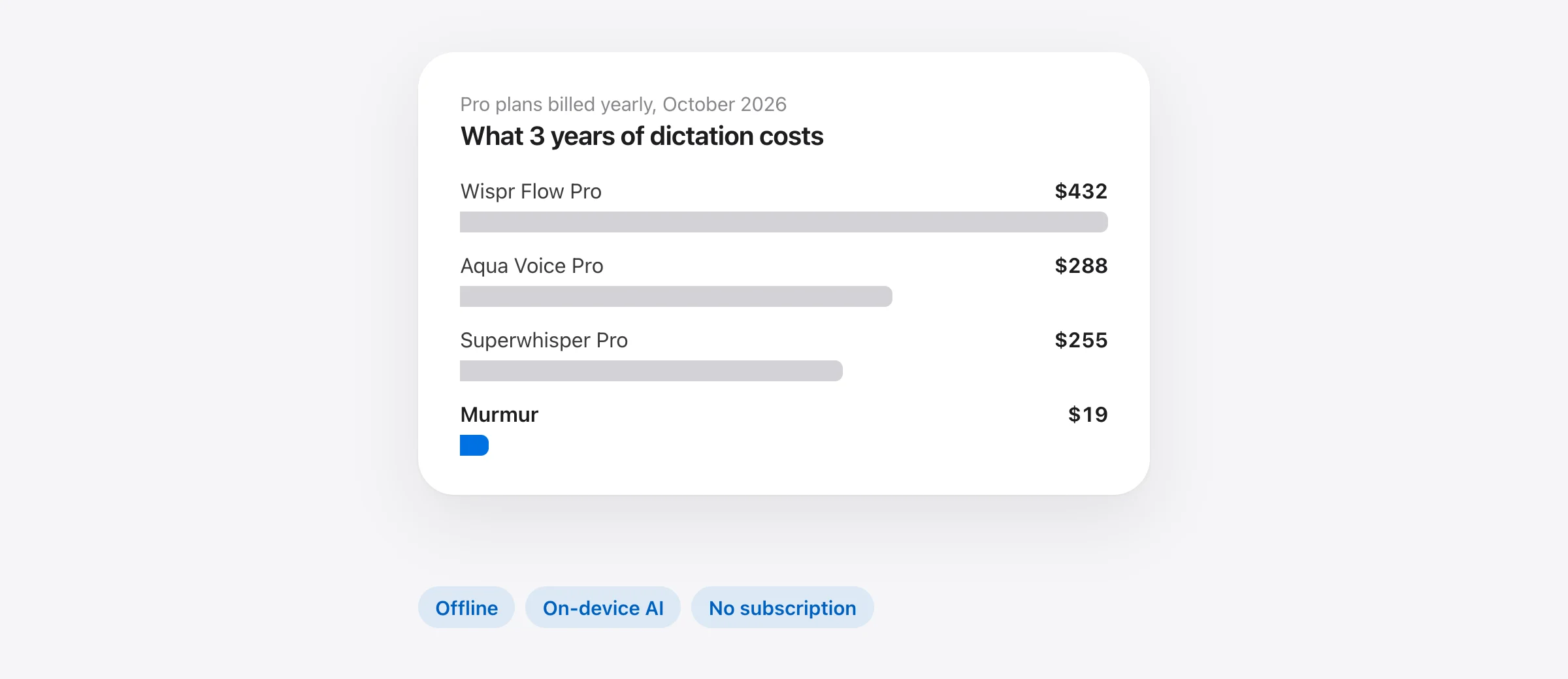
Show the numbers
| 3-year cost (USD) | |
|---|---|
| Wispr Flow Pro | $432 |
| Aqua Voice Pro | $288 |
| Superwhisper Pro | $255 |
| MacWhisper Pro | ≈ $70 |
| VoiceInk | $25 |
| Murmur | $19 |
| Apple Dictation | Free |
Wispr Flow alternatives compared
| Offline | No account | AI cleanup on-device | Edit by voice | Price | |
|---|---|---|---|---|---|
| Wispr Flow | No | No | No | Yes | $144/yr |
| Murmur | Yes | Yes | Yes | Yes | $19 once |
| Superwhisper | Yes, local models | Yes | Some modes | Via modes | $84.99/yr or $249.99 |
| VoiceInk | Yes | Yes | 16 GB Macs | Via modes | $25 once |
| Apple Dictation | Yes* | Yes | macOS 27, M3+ | No | Free |
| Spokenly | Yes, local models | Yes | No | Agent actions | Free / $99.99/yr |
| MacWhisper | Yes | Yes | With Ollama | No | €64 once |
| Aqua Voice | No | No | No | Yes | $96/yr |
*On Apple silicon, in languages Apple processes on-device. “Edit by voice” means rewriting selected text with a spoken instruction. Checked October 11, 2026.
The 7 best Wispr Flow alternatives for Mac
1. Murmur: the closest match that never leaves your Mac
Price: $19 once, up to 3 Macs; first 2,000 words free, no account. Needs: macOS 26 or later on Apple silicon, Apple Intelligence for AI features.
We make Murmur, and we built it for people who like how Wispr Flow works but not where it sends their voice. It works the same way: hold a key (right ⌘), talk, let go, and clean text appears in whatever app you’re in. The difference is that speech recognition runs on Apple’s on-device SpeechAnalyzer engine and the cleanup runs on Apple Intelligence, both on your Mac. There is no server to send anything to, so it works on a plane.
Most of Wispr Flow’s day-to-day features have a direct equivalent:
| In Wispr Flow | In Murmur |
|---|---|
| Hold Fn to dictate | Hold right ⌘ (changeable) |
| Fn + Space for hands-free | Double-tap right ⌘ |
| Command Mode (Pro) | Hold right ⌥ on selected text: “make it shorter”, “translate to Spanish” |
| Styles per app | Natural, Casual, Formal, Technical or Verbatim, per app |
| Dictionary | Dictionary, plus replacements (“chat gpt” → ChatGPT) |
| Snippets | Snippets: say “my email” to insert it |
| Notetaker | Not available. Murmur is for dictation, not meetings |
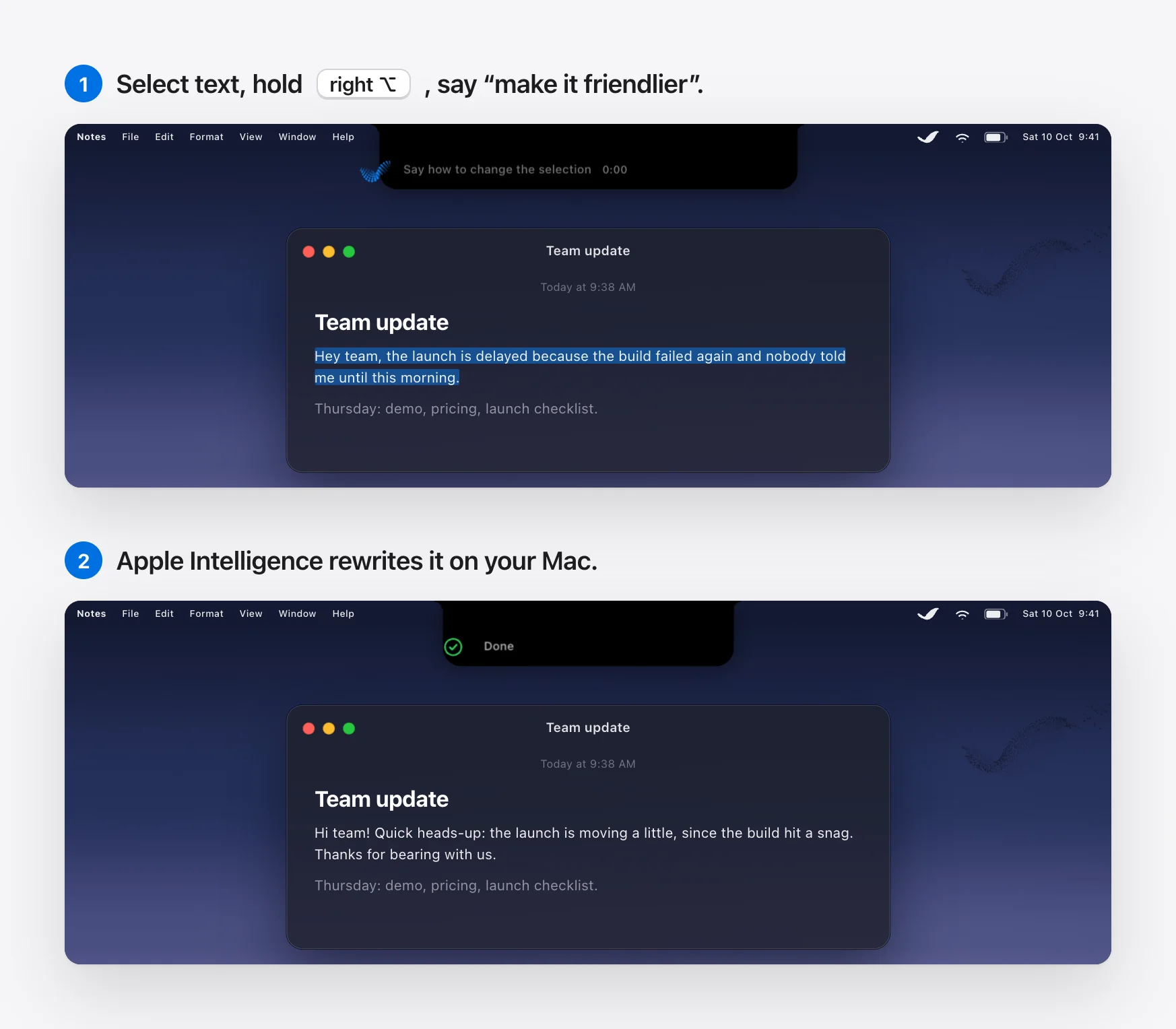
What you give up: Windows, iPhone and Android; meeting notes; and Wispr’s very best formatting on long, messy monologues, where a large cloud model still has the edge over Apple’s on-device one. Murmur also needs macOS 26 or later.
2. Superwhisper: the most flexible
Price: free with local Whisper; Pro $8.49/month, $84.99/year or $249.99 lifetime. Needs: macOS 14+.
Superwhisper lets you choose the speech model (local Whisper or Parakeet, or cloud) and the language model (Claude, GPT, Gemini, a local model, or your own API key) for each “mode”. It’s the best pick if you want Wispr-style AI rewriting but control over where it happens. It also runs on Windows and phones. The trade-off is complexity, and its default AI model runs in the cloud.
3. VoiceInk: open source and one-time
Price: $25 once for 1 Mac ($39 for 2, $49 for 3); open source. Needs: Apple silicon, macOS 14.4+.
VoiceInk transcribes locally with Parakeet, Whisper or Apple’s speech engine, and supports per-app modes and an auto-learning dictionary. Because it’s open source, you can check exactly what it does. AI cleanup needs your own API key, or a local model on a Mac with 16 GB of memory.
4. Apple Dictation: free and already installed
Price: free. Needs: any Mac.
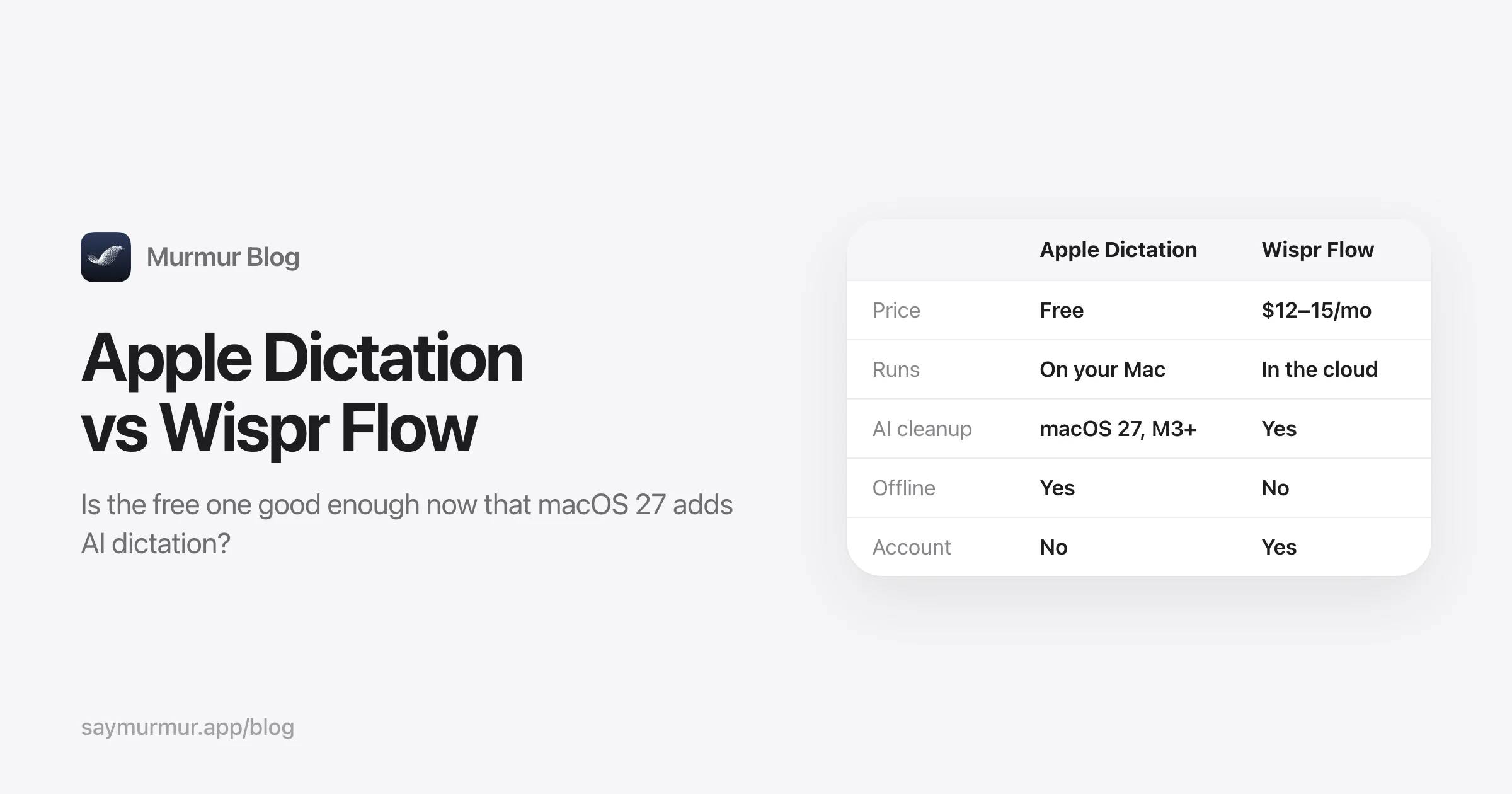
Press the Microphone key (F5) and talk. On Apple silicon, most languages are processed on-device, there’s no time limit, and punctuation is automatic. What it doesn’t do is clean up: “um” and “no wait, Friday” end up on the page. macOS 27 changes that for English on Macs with an M3 or later and 12 GB of memory, with Apple Intelligence-powered dictation. Read our Apple Dictation vs Wispr Flow comparison to see if that’s enough for you.
5. Spokenly: free local dictation for older Macs
Price: free with local models or your own API keys; Pro $9.99/month or $99.99/year. Needs: macOS 13.3+, also Intel.
The best free option if you’re on an older macOS or an Intel Mac. It also has agent features, including an MCP tool for dictating into Claude Code and Cursor.
6. MacWhisper: if you also transcribe recordings
Price: free tier; Pro €64 once. MacWhisper is best known for transcribing files, meetings and videos locally, and Pro adds system-wide dictation. Choose it if transcription is your main job and dictation is a bonus.
7. Aqua Voice: if you’re fine with the cloud
Price: 1,000 words free; Pro $10/month or $8/month yearly. If cloud processing doesn’t bother you and price does, Aqua is the cheapest Wispr-style cloud app, strong on technical vocabulary, with optional screen context that is off by default. Note that its Privacy Mode is also off by default.
What you lose by leaving Wispr Flow
To be fair to Wispr: it’s the most polished product in the category, it’s on every platform, and it has team features, SOC 2 Type II and a HIPAA BAA for companies that need paperwork. If you dictate long, messy paragraphs all day on several devices, it may still be worth $144 a year. If you mostly dictate on one Mac, care about privacy, or just dislike subscriptions, the apps above do the job for less.
How to switch in five minutes
- Write down your Wispr dictionary words and snippets. You’ll re-add them in the new app.
- Quit Wispr Flow so the two apps don’t fight over the Fn key or the microphone.
- Install the new app and grant Microphone and Accessibility access when asked. Accessibility is what lets it type into other apps.
- Re-add your words and snippets, then set a style for the apps you dictate into most.
- Dictate one real message in Slack or Mail to check the output before cancelling your subscription.
If the new app copies text but doesn’t paste it, its Accessibility permission is stale. Our dictation troubleshooting guide has the fix.
Frequently asked questions
Is there a free alternative to Wispr Flow?
Yes. Apple Dictation is built into every Mac and free. Superwhisper and Spokenly have free tiers that run Whisper models locally, and VoiceInk is open source. None of the free options remove filler words with AI the way Wispr Flow does, unless you’re on macOS 27 with an M3 or newer Mac, where Apple Dictation adds AI polish in English.
Is there an offline alternative to Wispr Flow?
Murmur, VoiceInk, MacWhisper and Apple Dictation all transcribe on your Mac without an internet connection, and Superwhisper and Spokenly can with local models. Murmur also runs its AI cleanup on-device with Apple Intelligence, so the whole pipeline works in Airplane Mode.
Does Wispr Flow send my data to the cloud?
Yes. Wispr’s own documentation says transcription always happens in the cloud. Its Context Awareness feature, on by default, also sends the text around your cursor and other on-screen text to improve results. Wispr says audio is deleted once transcribed unless you turn on cloud storage, and that third-party AI providers can’t train on your data.
What’s the cheapest Wispr Flow alternative with AI cleanup?
Murmur costs $19 once and runs AI cleanup on your Mac with Apple Intelligence. VoiceInk costs $25 once but needs your own API key, or a Mac with 16 GB of memory, for AI cleanup. Superwhisper’s Pro plan is $84.99 a year or $249.99 lifetime.
Can I use a Wispr Flow alternative on Windows?
This guide is about the Mac. For Windows, Superwhisper, Aqua Voice, Spokenly and Typeless all have Windows apps; Murmur, VoiceInk and MacWhisper are Mac-only.
Sources

Telman Gadimov builds Murmur, a dictation app for Mac that runs entirely on-device. We make Murmur, so weigh our take accordingly: every claim here links to a source or to a test you can repeat.