The short answer
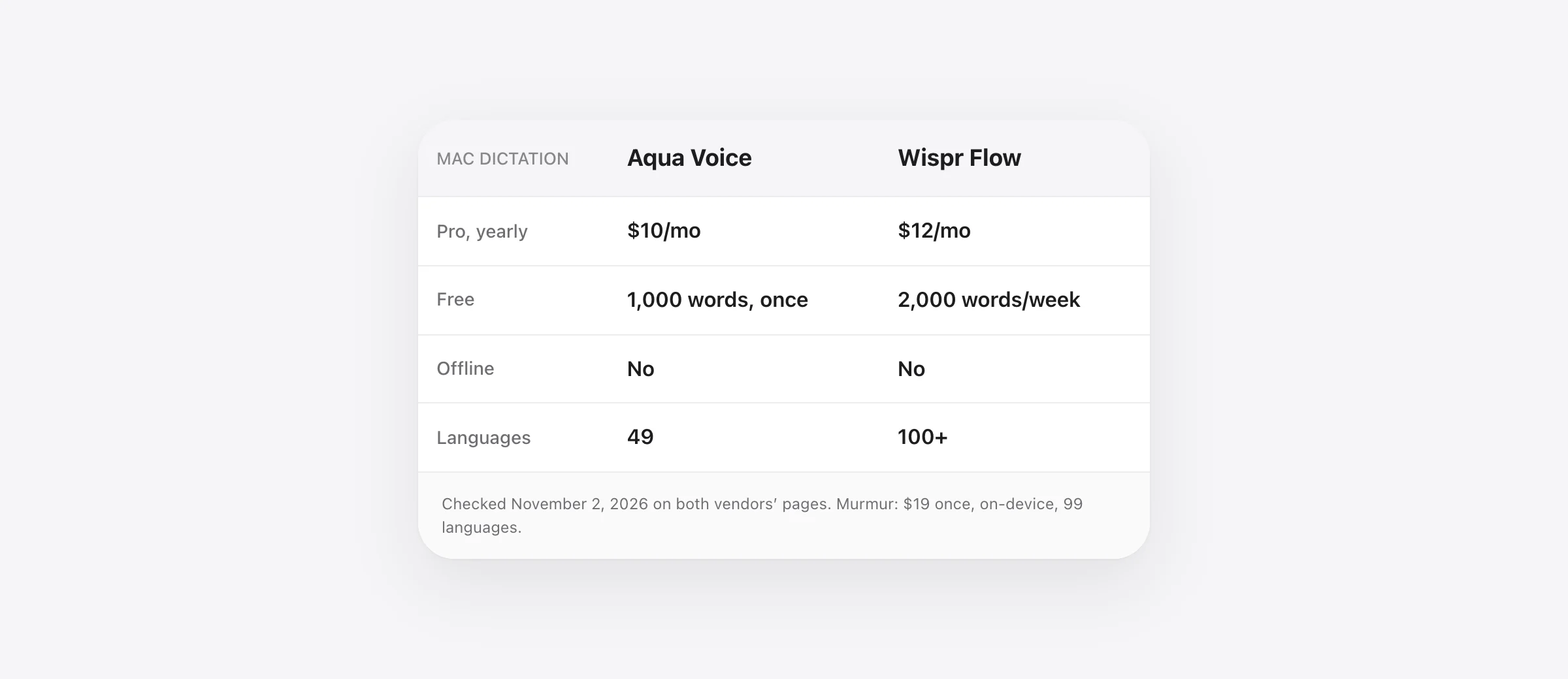
- Pick Aqua Voice if you want the lower price ($10 a month yearly vs $12), you dictate into code editors (file tagging, screen context) and you don’t need a lasting free plan.
- Pick Wispr Flow if you want a free tier you can live on (2,000 words a week), you also dictate on Windows, iPhone or Android, or you need more than 49 languages.
- Pick neither if your audio has to stay on your Mac or you need offline dictation. Both are cloud-only by their own account. An on-device app such as Murmur ($19 once) covers that case.
Everything below was checked on the two vendors’ sites on November 2, 2026.
Aqua Voice and Wispr Flow are the two cloud dictation apps people most often weigh against each other in 2026. They do the same job: hold a key, speak, and polished text appears in whatever app has your cursor. They differ on price, on free allowances, on what they know about your screen, and on how they talk about accuracy. Each has a comparison page about the other; neither page is a fair fight. This one tries to be, with the sources linked so you can check.
Aqua Voice vs Wispr Flow at a glance
| Aqua Voice | Wispr Flow | |
|---|---|---|
| Paid price | Pro $10/mo yearly ($120), $12 monthly. Max $19/mo yearly, $24 monthly | Pro $12/mo yearly ($144), $15 monthly. Growth $23/mo |
| Free | 1,000 words, once | 2,000 words a week on desktop, resets Sunday |
| Where speech is processed | Cloud (Avalon model). No offline mode | Cloud. No offline mode |
| Platforms | Mac (Apple silicon and Intel), Windows 10/11, iOS, Android, CLI and API | Mac 12+, Windows 10/11 x64, iOS 18.3+, Android 13+. No Linux or ARM Windows |
| Languages | 49, auto-detected | 100+ |
| Default shortcut (Mac) | Hold Fn; double-press for hands-free | Hold Fn; Fn-Space for hands-free |
| Context features | Deep Context (one screenshot at start), file tagging in Cursor, Windsurf, Cline, Antigravity | Per-app tone, personal dictionary that learns, snippets, Slack and calendar connections |
| Edit by voice | Edit Mode on every plan; Voice Commands and “Send it” on Max | Command Mode, experimental, Pro only |
| Security | SOC 2 Type II; zero data retention on Business only | SOC 2 Type II, ISO 27001, HIPAA BAA on any plan |
| Company | San Francisco, YC W24, small team | $280M Series B at a $2B valuation, August 2026 |
| Murmur, for comparison | $19 once for 3 Macs. Speech recognition on your Mac, works in Airplane Mode, 99 languages. Mac only. | |
Price: Aqua is cheaper, and just got dearer
Aqua Pro is $10 a month billed yearly or $12 monthly, with unlimited words, custom instructions and a personal dictionary. Max, at $19 yearly or $24 monthly, adds Realtime Mode, Voice Commands and “Send it”. Students get 70% off. Wispr Flow Pro is $15 a month or $144 a year, which works out to $12 a month. Over a year, that is $120 for Aqua against $144 for Wispr.
Two footnotes. First, Aqua raised Pro from $8 to $10 yearly around October 23 to 25, 2026 and lowered Max from $24 to $19 yearly, without a changelog entry; Aqua’s own comparison page still says $8 at the time of writing. Second, both apps cost more through the iOS App Store than on the web: Aqua Pro is $12.99 a month there, and Wispr lists a $4.49 weekly plan. Subscribe on the web if you can. Neither app offers a lifetime license, which is a recurring request on Hacker News and in App Store reviews.
Free plans: a trial vs a tier
Aqua’s free plan is 1,000 words, lifetime. Aqua describes it that way itself. That is enough to decide whether you like it, not enough to use it. Wispr’s free tier is 2,000 words a week on Mac and Windows, with a hard stop at 5,000, resetting every Sunday at midnight Pacific. For someone who dictates a handful of messages a day, that can be enough forever. Wispr also offers a 14-day Pro trial, 30 days by referral and 90 for students.
Accuracy: two benchmarks that can’t be compared
Aqua’s headline is that its Avalon model scored 97.4% key-term accuracy on AISpeak-10, against 65.1% for Whisper Large v3. Note what it measures: whether specific technical terms came out right, not the whole transcript, and on Aqua’s own test set. Wispr’s Canto model, announced September 17, 2026, is described as having “the lowest word error rate among all the models we tested” on ten hours of real dictations, second only to Gemini 3.1 Pro on a harder set, with no number in the announcement. Different metrics, different audio, both from the vendor. Every third-party comparison we found repeats one or the other; none ran the same clips through both apps. The honest advice is to read the same paragraph of your own writing into each app’s free allowance and count the fixes.
Users do describe different failure modes. Aqua reviewers mention wordy, unnatural output after 30 seconds or more of continuous speech. Wispr App Store reviews from 2026 complain that it rewrites rather than transcribes, and about server outages; Wispr’s public status page lists incidents from March to June 2026. Aqua is cloud-only too, so an outage stops it just as surely; it simply has fewer users reporting one.
Context: Deep Context vs tone and snippets
This is where the two apps aim at different people. Aqua’s Deep Context takes one screenshot when you start dictating and reads the whole screen so that names, tickers and identifiers are spelled the way they appear in front of you. It is off until you enable it, works on Mac and Windows on every plan, and Aqua says the image is not kept. Its file tagging turns “main ts” into @main.ts in Cursor, Windsurf, Cline and Antigravity, though Aqua’s guide says it does not work in Claude Code, Codex or the VS Code AI sidebar. There is also a CLI, an MCP server and an OpenAI-compatible API at $0.39 an hour of audio.
Wispr has no screen or file awareness. Its strengths are the everyday ones: a personal dictionary that learns names as you correct them, snippets, and a tone per app (formal in Mail, casual in Slack). Its Command Mode, for editing selected text by voice, is experimental and Pro-only. If you dictate into a code editor all day, Aqua built more for you. If you dictate into email and chat, Wispr’s defaults need less setup.
Privacy: both cloud, with different fine print
Aqua says plainly that audio is processed in the cloud and there is no offline mode. Its privacy policy, effective October 20, 2026, says that with Privacy Mode off, which is the default, transcripts may be stored on Aqua’s servers to improve the product; with it on, transcripts are not collected but metadata still is. The policy does not say how long audio is retained or whether it trains models. Zero data retention is a Business-plan feature with a two-seat minimum.
Wispr says transcription always happens in the cloud and that audio is deleted as soon as it is transcribed unless you turn on cloud storage of dictations. Its training toggle, “Improve the model for everyone”, is on by default; turning it off, Wispr says, means nothing you say is used to train its models, and it is locked off on Growth and Enterprise. Wispr holds SOC 2 Type II and ISO 27001 and offers a HIPAA agreement on any plan. If you want the full list of what Wispr sends and how to lock it down, see Is Wispr Flow safe?.
Either way, your voice leaves the machine. For regulated work, a managed Mac, or just a preference, that is the deciding factor, and it points away from both.
Platforms and languages
Wispr covers more ground: Mac from macOS 12 with separate Apple silicon and Intel builds, Windows 10 and 11 on x64 only, iOS 18.3 and Android 13. It explicitly lists iPad, Linux, Chromebooks and virtual machines as unsupported. Aqua ships one universal Mac build, Windows 10 and 11, iOS, Android (since October 2026), and the command-line tools; no Linux either, which is the most common request in its Product Hunt reviews. On languages, Wispr claims 100-plus to Aqua’s 49 with auto-detection, which matters if you switch languages mid-sentence.
Who should pick which
- Developers in Cursor or Windsurf: Aqua. File tagging and Deep Context are built for you, and it is $24 a year cheaper.
- Light users who won’t pay: Wispr. 2,000 words a week beats 1,000 words once.
- Mac at work, phone on the go, Windows at home: Wispr, for the device coverage and a single account.
- Non-English or multilingual: Wispr, unless your languages are among Aqua’s 49.
- Audio must stay local, or you work offline: neither. Read on.
The option both comparison pages leave out
Aqua’s page about Wispr and Wispr’s page about everyone else share an assumption: dictation means a server. It doesn’t have to. Murmur runs speech recognition on your Mac with Parakeet, Whisper or Apple’s engine, so it works in Airplane Mode and nothing is uploaded. It holds right ⌘ to talk, removes filler words, edits selected text by voice using Apple Intelligence on-device, and costs $19 once for three Macs instead of $120 to $180 a year. It is Mac-only and has no screenshot context, so it is not the pick for the Cursor power user Aqua courts. For everyone whose objection to both apps is the cloud, it is the one to test first. Our Aqua Voice alternatives guide and Wispr Flow alternatives guide cover the other local options.
Frequently asked questions
Is Aqua Voice cheaper than Wispr Flow?
Yes. Aqua Pro is $10 a month billed yearly or $12 monthly; Wispr Flow Pro is $12 a month billed yearly ($144) or $15 monthly. Over a year that is $120 against $144. Aqua raised Pro from $8 to $10 in late October 2026 without an announcement, so some comparison pages, including Aqua’s own, still show the old price.
Which has the better free plan, Aqua Voice or Wispr Flow?
Wispr Flow. Its free tier gives 2,000 words a week on Mac and Windows, resetting every Sunday. Aqua’s free plan is 1,000 words total, once, which is a trial rather than a plan. If you dictate a few emails a week and never want to pay, Wispr’s free tier is the one that lasts.
Does Aqua Voice or Wispr Flow work offline?
Neither. Aqua states that audio is processed in the cloud where its Avalon model runs and that there is no offline mode. Wispr says transcription always happens in the cloud. For offline dictation on a Mac you need an app with local models, such as Murmur, Superwhisper, MacWhisper or VoiceInk.
Is Aqua Voice more accurate than Wispr Flow?
Aqua says its Avalon model scored 97.4% key-term accuracy on its own AISpeak-10 benchmark, against 65.1% for Whisper Large v3. Wispr says its Canto model had the lowest word error rate of the models it tested on ten hours of real dictations, without publishing the number. Both are vendor benchmarks on different data, so they cannot be compared directly. Test both on your own voice; each has a free allowance.
Which is better for coding, Aqua Voice or Wispr Flow?
Aqua has two features aimed at developers: Deep Context, which takes a screenshot when you start dictating so it can spell what is on screen, and file tagging, which turns “main ts” into @main.ts in Cursor, Windsurf, Cline and Antigravity. Aqua says file tagging does not work in Claude Code, Codex or the VS Code AI sidebar. Wispr has per-app tone settings and an experimental Command Mode but no screen or file awareness.
Does Wispr Flow or Aqua Voice train on my voice?
Wispr has a toggle called Improve the model for everyone, on by default; it says turning it off means nothing you say is used for training, and it is locked off on Growth and Enterprise. Aqua’s privacy policy says transcripts may be stored to improve the product unless Privacy Mode is on, and does not state how long audio is kept or whether it trains models. Zero data retention is a Business-plan feature at Aqua.
Sources
- Aqua Voice: pricing
- Aqua Voice: Mac page (cloud processing, no offline mode)
- Aqua Voice: Deep Context
- Aqua Voice: file tagging guide
- Aqua Voice: edit mode guide
- Aqua Voice: privacy policy (effective October 20, 2026)
- Aqua Voice: Aqua vs Wispr Flow (vendor page)
- Wispr Flow: pricing
- Wispr Flow docs: plans and what’s included
- Wispr Flow docs: free tier weekly word cap
- Wispr Flow docs: supported devices and system requirements
- Wispr Flow docs: Command Mode
- Wispr Flow: privacy
- Wispr Flow: Canto model announcement (September 17, 2026)
- Wispr Flow: Series B announcement (August 17, 2026)
- TechCrunch: Wispr Flow raises $30M from Menlo Ventures (June 2025)
- Hacker News: Launch HN, Aqua Voice (YC W24)
- Wispr Flow status page history
- Sayonara Type: Aqua Voice review, noting the October 2026 price change

Telman Gadimov builds Murmur, a dictation app for Mac that runs entirely on-device. We make Murmur, the on-device app mentioned at the end. Aqua Voice and Wispr Flow facts were checked on their official pricing, documentation and privacy pages on November 2, 2026. Accuracy figures are the vendors’ own; we have not run a same-audio test of the two apps, and as far as we can find, nobody independent has.


