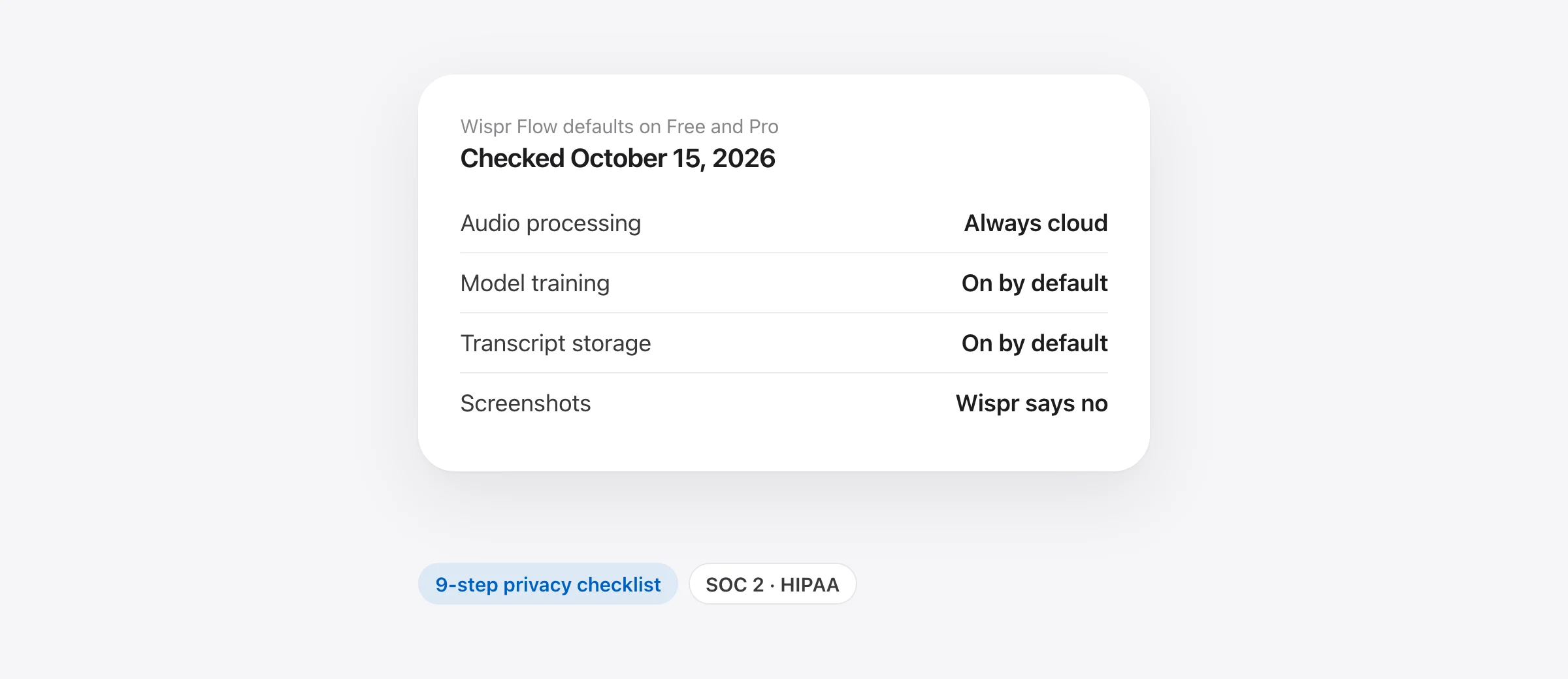
Is Wispr Flow safe? For most everyday dictation, yes, with caveats you should know about: Wispr Flow is an audited cloud service (SOC 2 Type II and ISO 27001, per Wispr), encrypts your data, and has no public record of a customer data breach that we could find. But every dictation’s audio is processed on Wispr’s servers in the US, and on the Free and Pro plans, model training, cloud storage of your transcripts and audio, and Context Awareness (which reads text from the app you’re typing into) all start switched on. Whether that’s “safe” depends on what you dictate, so this review shows the data flow and lets you decide.
The short version (checked October 15, 2026)
- Always cloud: Wispr says transcription “always happens in the cloud”. There is no offline mode.
- On by default (Free and Pro): “Improve the model for everyone”, “Dictation cloud storage” and Context Awareness. All three can be turned off in Settings › Data and Privacy.
- Screenshots: Wispr’s docs now say Context Awareness “does not take screenshots”. Screenshot uploads were the center of a 2025 controversy.
- Paperwork: SOC 2 Type II, ISO 27001 and a HIPAA BAA, re-audited by A-LIGN in 2026 after Wispr’s previous compliance vendor, Delve, was accused of faking audits.
- Who should think twice: anyone dictating client data under NDA, unreleased code, or health data without a BAA, and anyone who needs to work offline.
What leaves your Mac when you dictate with Wispr Flow?
This is the table we couldn’t find anywhere else. It’s built from Wispr’s privacy page, data controls page, help center and privacy policy. “Locked down” means you’ve turned off model training, Dictation cloud storage and Context Awareness.
| Data | Free/Pro default | Locked down | Notes |
|---|---|---|---|
| Audio of each dictation | Sent to Wispr’s cloud and stored on its servers | Sent, then “deleted as soon as it’s transcribed” | Cloud transcription can’t be turned off |
| Transcripts, edits and history | Stored on Wispr’s servers; may be used for training | Kept on your Mac only (keep, auto-delete after 24 hours, or never save) | Turning storage off doesn’t erase what’s already stored |
| Text around your cursor, on-screen text, file and variable names, chat history | Sent with each dictation (Context Awareness) | Not read | Wispr says it’s “cleared when that dictation ends”; skipped in password fields and banking apps |
| App name, URL, word count, duration, language, mic, edit stats | Uploaded | Still uploaded | Wispr: turning training off “does not stop cloud processing” |
| Screenshots | Wispr says no | Wispr says no | Screen Recording “isn’t needed for basic dictation” |
| Dictionary, snippets, account data, diagnostics | Stored | Stored | “Not removed by privacy settings” |
| Content passed to AI providers | Under zero-data-retention terms | Same | Providers “may not use your data to train their models” |
| Notetaker meetings | Transcripts and summaries stored in the cloud | Same, no opt-out | Uploaded meeting audio deleted after 7 days |
| Anything you send with “Report” or feedback | Retained, may train models | Same | Optional; don’t report sensitive dictations |
Sources: Wispr’s privacy page, data controls page (updated August 18, 2026), help center articles on data sharing, Context Awareness and security, and privacy policy (updated August 19, 2026). Wispr’s data is processed and stored in the US on AWS (Northern Virginia, with Northern California failover). Its Trust Center lists AWS, Baseten, Vercel, OpenAI and Supabase as subprocessors.
One naming trap: older guides and Wispr’s own June 2026 release notes call the training switch Privacy Mode and the storage switch Cloud Sync. Wispr’s data controls page says the setting “was previously called ‘Privacy Mode’”, and the help center now calls them “Improve the model for everyone” and “Dictation cloud storage”. Same switches, new names. Turning off training alone does not stop storage.
Does Wispr Flow train on my data?
On Free and Pro, by default, it can. Wispr’s help center says “Improve the model for everyone” “is on by default for Free and Pro, with the choice shown during onboarding”. When it’s on, your audio, transcripts and edits from both dictation and Notetaker may be used to “evaluate, train, or improve” Wispr’s models.
- Growth and Enterprise: training is off and locked. Wispr’s October 2, 2026 release notes say “model training is now off for every member” on those plans.
- Third-party AI providers: Wispr says they can’t train on your content “regardless of your model-improvement setting”, and that it has zero-data-retention agreements with every AI provider used for dictation. Its privacy policy adds that LLM providers generally delete content within 30 days.
- Feedback is the exception: anything you submit with “Report” or a rating “can be used to train and evaluate models”, whatever your setting.
One inconsistency to know about: Wispr’s privacy policy describes training as something that happens “if you choose to share your content with us”, which reads like opt-in. The help center and the app treat it as on by default. Go by what your own toggle shows.
Does Wispr Flow take screenshots?
According to Wispr today, no. Its Context Awareness article states that the feature “works from text and does not take screenshots”. It reads text through the macOS Accessibility permission, and Wispr’s permissions article says “Screen Recording isn’t needed for basic dictation.”
The question keeps coming up because of history. Most accounts place it in 2025: a user who was monitoring Flow’s network traffic posted on Reddit that the app was uploading screenshots of the active window as part of Context Awareness. According to multiple write-ups, Wispr first banned that user, and co-founder and CTO Sahaj Garg later apologized publicly for how the team handled it. eesel AI’s summary says the company also called an auto-start issue a bug and described background traffic as performance metrics. We couldn’t load the original thread, and most retellings come from competing apps (we’re one too), so treat the details as reported rather than confirmed.
Check it yourself: open System Settings › Privacy & Security › Screen & System Audio Recording. macOS requires that permission before an app can capture other apps’ windows. If Wispr Flow isn’t switched on there, it can’t take screenshots of your screen. Wispr says it isn’t needed for basic dictation, so think about what you’re approving if Flow ever asks for it.
Is Wispr Flow SOC 2 and HIPAA compliant?
SOC 2, ISO 27001 and the Delve episode
Wispr’s privacy page lists a SOC 2 Type II report and an ISO 27001 certificate, both from the audit firm A-LIGN, available through its Trust Center at trust.wispr.ai. The reports themselves are gated behind a request, so we haven’t read them. Its help center says the audits covered Flow dictation and that Notetaker “was not assessed”, which conflicts with the privacy page’s claim that SOC 2 covers every product. Check scope in the report if it matters to you.
These are Wispr’s second set of audits. In March 2026, an anonymous investigation accused compliance-automation startup Delve of producing boilerplate and fabricated evidence that partner auditors rubber-stamped (TechCrunch, March 22, 2026; Delve called the claims “misleading”). Wispr had used Delve. On March 27, 2026, Sahaj Garg wrote that “a vendor cut corners on verification”, said Wispr’s controls had been reverified, and announced a switch to Drata for monitoring and A-LIGN for a fresh audit. Wispr’s enterprise page says A-LIGN completed a SOC 2 Type I audit in April 2026; the Type II and ISO 27001 now appear on its privacy page. The Delve reporting didn’t examine Wispr’s own controls; Wispr’s position is that the problem was verification, not the controls themselves.
HIPAA and the BAA
- Individuals can sign a Business Associate Agreement in the app on Mac, Windows and iPhone (not Android). Members of a billed organization ask their admin instead. Growth and Enterprise include an organization BAA.
- What signing does: locks model training and Dictation cloud storage off, and blocks Notetaker recording and meeting sync on Mac and Windows.
- What it doesn’t do: turn off Context Awareness (you must do that separately), filter PHI out of feedback, logs or support messages, or erase history stored before you signed. Wispr also notes it “does not countersign BAAs”, and that signing on iPhone “cannot be undone in the app.”
A BAA makes Flow usable in a HIPAA workflow; it doesn’t make your workflow compliant. That decision belongs to your privacy or compliance officer.
Encryption and data location
TLS 1.2+ in transit and AES-256 at rest. Wispr is clear that this isn’t end-to-end encryption, because its servers have to process your audio, and that it manages the keys (no customer-managed keys). Data is processed and stored in the US only; Wispr says it doesn’t “currently offer data residency outside the US”, and covers EU and UK customers with a DPA and Standard Contractual Clauses. It also runs a paid bug bounty.
What has gone wrong before, and what did Wispr change?
None of these was a reported breach of customer data. They’re the events people mean when they ask whether Flow is safe.
| When | What happened | Wispr’s response |
|---|---|---|
| 2025 (reported) | User reports screenshot uploads, is banned, CTO apologizes | Training and storage controls added; Context Awareness now documented as text-only |
| March 2026 | Its compliance vendor, Delve, is accused of faking audits | Switched to Drata; re-audited by A-LIGN (SOC 2 Type I in April, then Type II and ISO 27001) |
| April 2026 | Engineer’s log analysis of Flow 1.4.752 reports a stuck-spacebar bug from Flow’s keyboard hook, hourly metadata uploads with sharing off, and a large local database of transcripts and text-box contents | No public response that we found |
| April 24, 2026 | Privacy update (v1.5.55) | Local history options: keep, auto-delete after 24 hours, or never save |
| Late May to June 2026 | Several weeks of outages and dictation failures | Release notes owned it; added provider redundancy and monitoring; 99.9% uptime reported by July 9 |
| June 17, 2026 | Privacy update (v1.5.891) | Storage split into its own switch, separate from training |
| October 2, 2026 | Teams and Enterprise update | Training off for every member on Growth and Enterprise |
For context on the April report: every hold-to-talk dictation app (Murmur included) has to watch the keyboard to see its shortcut, which is why they ask for Accessibility access. The metadata uploads match what Wispr’s own data-sharing article says is still sent when training is off.
How to make Wispr Flow more private: a settings checklist
On a Mac, open Flow from the menu bar, then Settings › Data and Privacy (on iPhone: Settings › Data & Privacy). Changes save immediately.
- Turn off “Improve the model for everyone.” Stops your audio, transcripts and edits from being used for training.
- Turn off “Dictation cloud storage.” Audio is then discarded after transcription and your history stays on your device. You lose cross-device history. Wispr notes that signing out resets this switch to on, so check it again after every sign-in.
- Set local history to auto-delete after 24 hours, or never save, if other people use your Mac or you dictate anything sensitive.
- Decide on Context Awareness. Turning it off means Flow reads nothing from your screen. The cost is real: names, jargon and code identifiers get spelled correctly less often.
- Delete what’s already stored. Turning switches off doesn’t erase earlier history. Delete old dictations, or export your data and then delete the account from the same Data and Privacy screen.
- Don’t use “Report” on sensitive dictations. Feedback is kept and can be used for training.
- Review macOS permissions. In System Settings › Privacy & Security, Flow needs Microphone and Accessibility. It doesn’t need Screen & System Audio Recording for dictation.
- For health data: sign the BAA, then turn off Context Awareness yourself.
- For teams: Growth and Enterprise lock training off. Enterprise admins can also enforce cloud storage off, local retention, zero data retention, Context Awareness off and Notetaker off for everyone.
Who should and shouldn’t use Wispr Flow?
| Your situation | Our take |
|---|---|
| Personal use: messages, notes, email | Fine for most people. Turn off training and cloud storage if you’d rather your words weren’t kept. |
| Work email and Slack, no AI policy at your company | Reasonable after the checklist above. Ask IT anyway: many companies have rules about cloud AI tools. |
| Your company has an approved-tools list | Use it only if Flow is on the list, ideally on Growth or Enterprise where training is locked off and admins control the rest. |
| Health data (PHI) | Only with a signed BAA and Context Awareness off, and only if your compliance team approves. |
| Client work under NDA, unreleased code, legal files | Read your contract first. Even locked down, your audio and usage metadata go to a third party. An on-device app avoids the question. |
| EU data residency required | Not available: data is stored in the US only. |
| Offline: flights, secure sites, bad Wi-Fi | Won’t work. There is no local mode. |
| You dictate on Windows or Android too | Flow’s biggest strength. Few rivals cover all four platforms. |
On iPhone, Flow runs as a keyboard that needs “Full Access”, the iOS permission that lets a keyboard use the network. The data rules above apply the same way.
Wispr Flow review: is it good?
Privacy aside, Wispr Flow is one of the best dictation apps you can buy, and the reason most people tolerate the cloud.
- Quality: excellent at turning rambling speech into clean, formatted text, including self-corrections and lists, in 100+ languages. Command Mode rewrites selected text by voice.
- Speed: fast when the service is healthy. Wispr says latency is down 30% since January 2026. It depends entirely on your connection and its servers, and the June 2026 outages showed that cost.
- Platforms: Mac (macOS 12 or later, Intel and Apple silicon), Windows 10 and 11, iPhone and Android, with sync between them.
- Resource use: How-To Geek measured about 800 MB of RAM while idle and an 8 to 10 second startup on Windows in April 2026.
- Price: Free covers 2,000 words a week on desktop. Pro is $15 a month or $144 a year. See our full Wispr Flow pricing breakdown for student, team and three-year costs.
Verdict: if you dictate a lot on several devices and you’re comfortable with a cloud service, Flow is worth trying, and after ten minutes in Data and Privacy it’s a far more private product than its defaults suggest. If you dictate mostly on one Mac, handle confidential material, or simply don’t want your voice leaving the machine, an on-device app is the simpler answer. For a head-to-head with the most configurable rival, read Superwhisper vs Wispr Flow.
What are the fully on-device alternatives?
Local apps don’t need privacy settings, because there’s no server. The trade-off is that on-device models are smaller than Wispr’s cloud models, so very long, messy monologues get lighter cleanup, and most local apps are Mac-only.
- Apple Dictation: free and built in. On Apple silicon, many languages are processed on-device. It doesn’t remove filler words. Our Apple Dictation vs Wispr Flow comparison covers what macOS 27’s AI dictation adds.
- Murmur: our app. Hold right ⌘, talk, let go. Speech runs on Apple’s on-device SpeechAnalyzer and cleanup on Apple Intelligence, so nothing leaves your Mac and it works offline. $19 once; needs macOS 26 and Apple silicon. No Windows or iPhone version.
- VoiceInk: open source, local speech models, $25 once.
- Superwhisper: free with local speech models. Its AI modes can be cloud or local, so pick a local model if privacy is the point.
Our offline dictation apps guide checks which parts of each app really stay local, and the Wispr Flow alternatives roundup compares price and features side by side.
Frequently asked questions
Is Wispr Flow safe to use?
Wispr Flow is a legitimate, funded company with SOC 2 and ISO 27001 audits, encryption in transit and at rest, and no public report of a customer data breach that we could find. It is a cloud service, though: every dictation’s audio goes to Wispr’s servers in the US, and on Free and Pro, model training, cloud storage and Context Awareness are on by default. It’s a reasonable choice for everyday dictation once you’ve set the privacy switches the way you want them.
Does Wispr Flow train on my data?
It can. Wispr’s help center says “Improve the model for everyone” is on by default for Free and Pro, with the choice shown during onboarding, and it covers audio, transcripts and edits. You can turn it off in Settings › Data and Privacy. On Growth and Enterprise, training is off and locked, and Wispr says its third-party AI providers can’t train on your data on any plan.
Does Wispr Flow take screenshots?
Wispr’s current Context Awareness documentation says the feature “works from text and does not take screenshots” and reads text through macOS Accessibility. Screenshot uploads were the core of a widely reported 2025 controversy, so if you want to check for yourself, look at System Settings › Privacy & Security › Screen & System Audio Recording: Wispr says that permission isn’t needed for basic dictation.
Is Wispr Flow HIPAA compliant?
Wispr offers a Business Associate Agreement. Individuals can sign one in the app on Mac, Windows and iPhone, and Growth and Enterprise include an organization BAA. Signing locks model training and cloud storage off and blocks Notetaker recording, but it doesn’t turn off Context Awareness, and whether your use is compliant is still your organization’s call.
Is Wispr Flow getting worse?
Wispr’s own release notes admit Flow “has been less reliable than it should be” in late May and June 2026, after outages it blamed on scaling its infrastructure. By July 9 it reported 99.9% uptime over the previous few weeks, plus dictation latency down 30% since January. Quality complaints since then are anecdotal, so judge it on your own trial.
Do people actually use Wispr Flow?
Yes, at scale. Wispr raised a $280 million Series B at a $2 billion valuation in August 2026, and reports at the time said more than 10,000 enterprises use its products. It runs on Mac, Windows, iPhone and Android.
What is better than Wispr Flow?
It depends on what you need. For the same cloud-quality cleanup on every device, little beats it. If you want dictation that never leaves your Mac, Murmur, VoiceInk, Superwhisper with local models, and Apple Dictation all process speech on-device; our Wispr Flow alternatives guide compares them.
Sources
- Wispr Flow: Privacy and security
- Wispr Flow: Privacy Policy (updated August 19, 2026)
- Wispr Flow: Data controls (updated August 18, 2026)
- Wispr Flow Help Center: Security and privacy overview
- Wispr Flow Help Center: Data sharing, cloud storage and local history
- Wispr Flow Help Center: Understanding the privacy switches
- Wispr Flow Help Center: Context Awareness
- Wispr Flow Help Center: HIPAA compliance and healthcare use
- Wispr Flow Help Center: Re-verify permissions after updating
- Wispr Flow Help Center: Plans and what’s included
- Wispr Flow Help Center: Supported devices and system requirements
- Wispr Flow: Enterprise privacy
- Wispr Flow Trust Center (subprocessors, reports)
- Wispr Flow: Our path to a new, independent audit (March 27, 2026)
- Wispr Flow: What’s new (release notes)
- Wispr Flow: Pricing
- TechCrunch: Delve accused of misleading customers with fake compliance (March 22, 2026)
- eesel AI: Wispr Flow review (summary of the 2025 controversy)
- How-To Geek: 7 voice typing apps on Windows (April 26, 2026)
- Outlook Business: Wispr Flow raises $280M at $2B valuation (August 18, 2026)
- Apple: Use Dictation on your Mac

Telman Gadimov builds Murmur, a dictation app for Mac that runs entirely on-device. We make Murmur, an on-device Mac dictation app that competes with Wispr Flow. Everything about Wispr here comes from Wispr’s own pages and the linked reporting, checked October 15, 2026. We did not run network captures or audit Wispr’s app ourselves, and we don’t claim it is unsafe.


