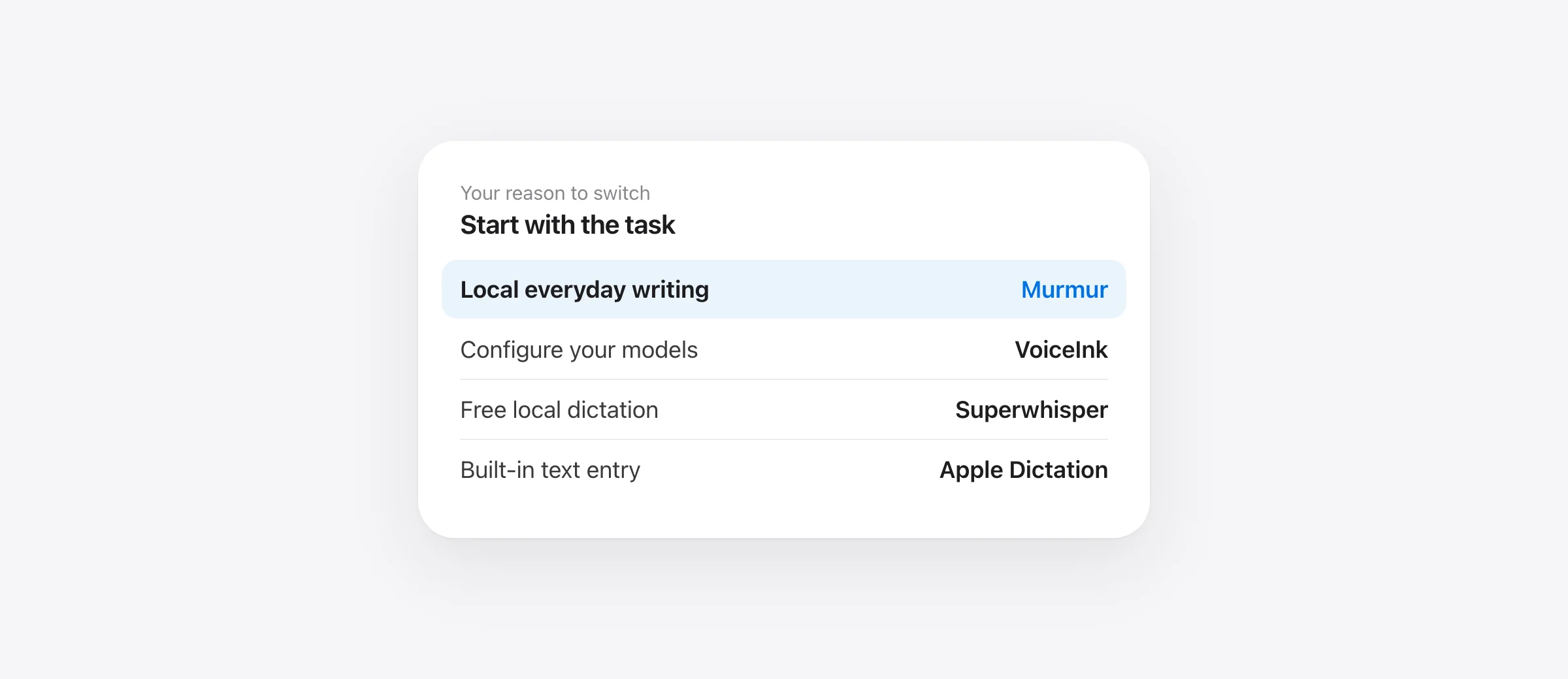
Choose your starting point
- Murmur: local speech and writing cleanup, with a small one-time purchase.
- VoiceInk: a one-time Mac license with configurable processing.
- Superwhisper: free local dictation, with a broader paid package if needed.
- Apple Dictation: built-in text entry for occasional use.
The best Aqua Voice alternative for Mac depends on why you are considering a change. Someone trying to stop a recurring payment has a different problem from someone who needs to dictate without internet. A developer who relies on spoken file references has another requirement again.
This guide compares four realistic replacements and gives you a short test to decide whether switching is worthwhile. We make Murmur, which is included here. The recommendations are based on documented capabilities checked on October 13, 2026, not a claim that our app wins every task.
Before switching, name the problem Aqua needs to solve
Write one sentence: “I want to replace Aqua because…” Be specific enough that you could verify the improvement tomorrow. Good reasons include recurring cost, a workflow that fails when disconnected, repeated corrections to project vocabulary, or a missing output behavior. “Another app has more features” is harder to evaluate.
Also identify the feature you cannot lose. Aqua documents app-aware formatting, a dictionary, plan-dependent custom instructions and optional screen context in its FAQ. If one of those is central to your routine, compare that behavior directly. A clean paragraph in a demo does not prove an equivalent workflow.
For developers, Aqua’s file tagging is a concrete distinction: in supported editors, spoken filenames can become references that invoke editor autocomplete. Merely inserting a filename into a prompt is a different result. Test with a real project containing duplicate filenames, since a tag pointing to the wrong file is a substantive mistake.
Aqua Voice alternatives at a glance
| Alternative | Good starting point for | Price or free route | Check first |
|---|---|---|---|
| Murmur | Local everyday writing | $19 once; 2,000 free trial words | Apple silicon, macOS 26+; Apple Intelligence for AI features |
| VoiceInk | Configurable Mac workflows | $25 / $39 / $49 once for 1 / 2 / 3 Macs | Selected models, hardware and provider charges |
| Superwhisper | Free local speech or a broader Pro package | Free; Pro $8.49/month, $84.99/year or $249.99 lifetime | Free versus paid modes; local cleanup restrictions |
| Apple Dictation | Occasional text entry | Included with macOS | Language, destination field and processing settings |
Published regular US-dollar prices, checked October 13, 2026, before taxes or temporary promotions. Sources: Murmur pricing, VoiceInk pricing and Superwhisper plans. This table compares replacement options; it does not claim a savings amount against an unverified Aqua bill.
1. Murmur: a focused alternative for local Mac writing
Murmur is worth trying if your usual task is speaking a message, email, note or prompt and getting usable text into the active app. Hold right Command, speak, and release. Its speech recognition and AI writing run on the Mac. There is no provider account or model catalog to configure.
The useful distinction is what happens after recognition. Per-app styles let you choose more formal output for correspondence or a different treatment for chats and technical work. A custom dictionary helps with recurring vocabulary. Snippets replace a spoken trigger with saved text, which is useful for addresses, project names or a standard sign-off.
For example, suppose every customer reply ends with the same two-sentence scheduling note. Saving that text as a snippet gives you a repeatable insertion instead of asking a writing model to recreate it each time. That is a narrower, easier-to-check task than asking for an entire reply to be rewritten perfectly.
You can also select text and hold right Option to request an edit, such as shortening a paragraph. Review the change before sending it. An instruction to make writing more concise should not remove a deadline, qualification or exception that the reader needs.
Requirements matter: Murmur needs an Apple silicon Mac with macOS 26 or later. AI features require Apple Intelligence to be enabled and ready. It is not a suitable recommendation for an Intel Mac or a machine that must stay on an older operating system.
The regular purchase is $19 for up to three Macs, with the first 2,000 words available without an account. The license includes version 1 updates; a future major version may be a paid upgrade. Do not interpret a one-time license as a promise of every future version at no cost.
Choose Murmur when you want a focused local writing tool on supported hardware. Choose another option if your priority is provider selection, audio-file transcription, or a specific Aqua editor integration. Those are different jobs, and a lower price does not make a missing capability appear.
2. VoiceInk: a one-time license for configurable workflows
VoiceInk is a useful candidate if you want to decide how transcription and enhancement work. Its Mac licenses scale by device count, so compare the tier for both your desktop and laptop if you use two machines.
Its Refine model performs a fixed cleanup task locally and requires Apple silicon with at least 16 GB of RAM. It does not accept custom prompts or selected-text, clipboard or screen context. That makes it a different tool from a mode that follows arbitrary instructions.
VoiceInk’s privacy documentation separates transcription, enhancement and dictionary learning. Review all three when configuring a local setup. Its model guide also distinguishes the app purchase from separately billed third-party API usage.
The practical question is whether configuration is useful to you. If you already know the provider and processing prompt you want, control can be an advantage. If you want to install an app and stop thinking about models, include setup effort in the comparison.
Choose VoiceInk when you have a specific workflow to configure and its selected models fit your hardware. Start with one mode and one destination. Only add a second mode after you can describe what the first one does badly. For the direct two-product decision, read VoiceInk vs Superwhisper.
3. Superwhisper: start with its free local plan
Superwhisper’s free plan includes unlimited local Whisper dictation, custom vocabulary, replacements and up to two modes without AI processing. It is an ongoing free option, rather than merely an introductory word allowance.
Pro adds capabilities including AI modes and file transcription. Its monthly, annual and lifetime billing choices cover the same Pro feature set. Evaluate the free configuration first if your main need is straightforward transcription; you may not need a paid replacement at all.
For local cleanup, the S1-mini documentation specifies English Message and Mail modes. It does not cover every custom transformation. If you want a local mode that reorganizes a long spoken brief, verify that exact task rather than assuming “local AI” is one universal feature.
Choose Superwhisper when its free local workflow meets your needs, or when you can identify a Pro capability worth paying for. A common evaluation mistake is comparing a replacement’s simplest mode against your existing app’s most elaborate one. Test equivalent output goals before interpreting the difference.
4. Apple Dictation: the built-in option for occasional use
Apple Dictation is included with macOS. Enable it in System Settings → Keyboard → Dictation, place the cursor in a text field, and use the configured shortcut. Apple’s Dictation guide explains where to check whether your setup processes general dictation on-device or needs internet.
It is a reasonable starting point if you speak a few paragraphs a week and can make corrections yourself. Try it in the application you actually use, rather than treating success in a scratch note as proof that every destination behaves identically.
Choose Apple Dictation when basic text entry covers the job. If your primary writing destination is a browser document, our Google Docs voice typing guide for Mac also explains the built-in Google Docs option. Test the free route before deciding a separate purchase is necessary.
Which alternative works offline?
First verify your premise: Aqua’s current FAQ says offline availability depends on platform, version and mode. Do not treat an old cloud-only description as a definitive statement about your current installation.
Then test the replacement as a complete workflow. Download any required assets while connected. Disconnect, dictate into a local document, apply the cleanup you plan to use, and verify that the final text appears. Reconnect only after recording what succeeded and what failed.
This is a functionality test, not a network-privacy audit. An app working offline does not establish what it sends while connected. Likewise, local speech processing does not prevent a destination such as a shared document or messaging service from syncing the inserted text.
A useful offline test has an ordinary task and a difficult one. Start with a short note. Then try an unfamiliar name, a number, a spoken correction and a paragraph that needs formatting. A replacement that works only with its simplest mode may not replace your normal routine. Our offline dictation comparison covers that configuration question in more detail.
A 15-minute test before you replace Aqua Voice
Allow about 15 minutes after installation and downloads. Use Aqua and one shortlisted alternative with the same microphone in the same room. These are proposed test materials, not reported benchmark results.
- Spend two minutes recording your baseline. Note the app version, microphone, mode and destination. Choose one ordinary message and one work paragraph you could plausibly send today.
- Spend four minutes on meaning. Dictate both samples into each app. Check names, amounts, dates and negations before judging punctuation.
- Spend three minutes on your difficult case. Use a project name, repeated filename or saved snippet. Test the feature that originally justified using Aqua.
- Spend three minutes on insertion and connectivity. Switch between your two main apps. If offline use matters, repeat a sample in a local document while disconnected.
- Spend three minutes comparing finished output. Correct each draft and record editing time. Keep the tool that solves your named problem without introducing a more expensive one.
“Send the revised brief to Narin on Thursday, not Tuesday. Include the draft diagram, but do not promise a release date. The review is at 14:30.”
This original sample deliberately contains a name, a correction, a negation and a time. Replace them with details from your work. The test is whether the output preserves the instruction, not whether the paragraph sounds unusually polished.
| Record this | Aqua | Replacement |
|---|---|---|
| Meaning-changing errors | Count after review | Count after review |
| Time to a usable draft | Include corrections | Include corrections |
| Required integration works | Describe the result | Describe the result |
| Preferred mode works offline | Test or mark not needed | Test or mark not needed |
How to switch without losing the useful parts
Make a short inventory of the vocabulary, replacements, shortcuts and instructions you use. Recreate only the entries that solve a repeated problem. Do not assume apps share an import format, or paste a large configuration into a new tool without checking what its fields mean.
Keep your first comparison small: one writing style, one paragraph, one destination. If the result fails, change one setting and repeat the sample. Changing the microphone, mode and language together leaves you unable to tell which change helped.
Once a candidate passes, use it for an ordinary workday before changing a paid renewal. Your existing subscription terms determine when cancellation takes effect; deleting an app is not a billing instruction. The reason to wait for a real workday is practical: a missed shortcut during a normal task matters more than a smooth demonstration.
For a no-subscription purchase, calculate the total for the Macs you use and any services you enable. Compare it with your own current bill, including a student or team discount if applicable. The Mac dictation guide without subscriptions explains the longer-term purchase tradeoffs.
The strongest reason to switch is a verified improvement: fewer corrections, a needed local workflow, simpler operation or lower total cost for the same work. If Aqua already handles your difficult tasks well and the alternative adds friction, keeping it is a valid result.
Frequently asked questions
What is a good Aqua Voice alternative for Mac?
For local everyday writing on a compatible Mac, try Murmur. For configurable providers, consider VoiceInk. For free local Whisper dictation, evaluate Superwhisper Free. For occasional text entry without another installation, start with Apple Dictation. These are workflow recommendations, not accuracy rankings.
Is there a free Aqua Voice alternative?
Apple Dictation is included with macOS. Superwhisper also documents an ongoing free plan with local Whisper models. A permanent free plan is different from a limited trial, so check which features remain after any introductory allowance.
Which Aqua Voice alternatives have no subscription?
Murmur costs $19 once for up to three Macs. VoiceInk sells one-time Mac licenses, and Superwhisper offers a lifetime Pro option alongside its free plan and subscriptions. Compare device limits, included services and upgrade terms before buying.
Is Aqua Voice always cloud-only?
Do not assume that. Aqua’s FAQ says cloud dictation needs internet and offline availability depends on platform, version and mode. Confirm the setup you use before making offline access your reason to switch.
Will another dictation app replace Aqua’s file tagging?
Ordinary text insertion does not establish equivalent file tagging. If you use spoken file references, test whether the alternative creates the correct editor reference, not just a readable filename. Keep Aqua if this feature saves more work than the replacement removes.
Sources
- Aqua Voice: features and offline availability
- Aqua Voice: file tagging
- VoiceInk: Mac pricing
- VoiceInk: local Refine requirements
- VoiceInk: privacy and data paths
- VoiceInk: model selection and provider billing
- Superwhisper: free and paid plans
- Superwhisper: local and cloud language models
- Apple: Dictation on Mac
- Murmur: license and upgrade terms
- Murmur: privacy

Telman Gadimov builds Murmur, a dictation app for Mac that runs entirely on-device. We make Murmur, one of the alternatives here. Recommendations use official documentation checked October 13, 2026 and our own product implementation. We have not run a controlled accuracy or latency comparison of these apps.


