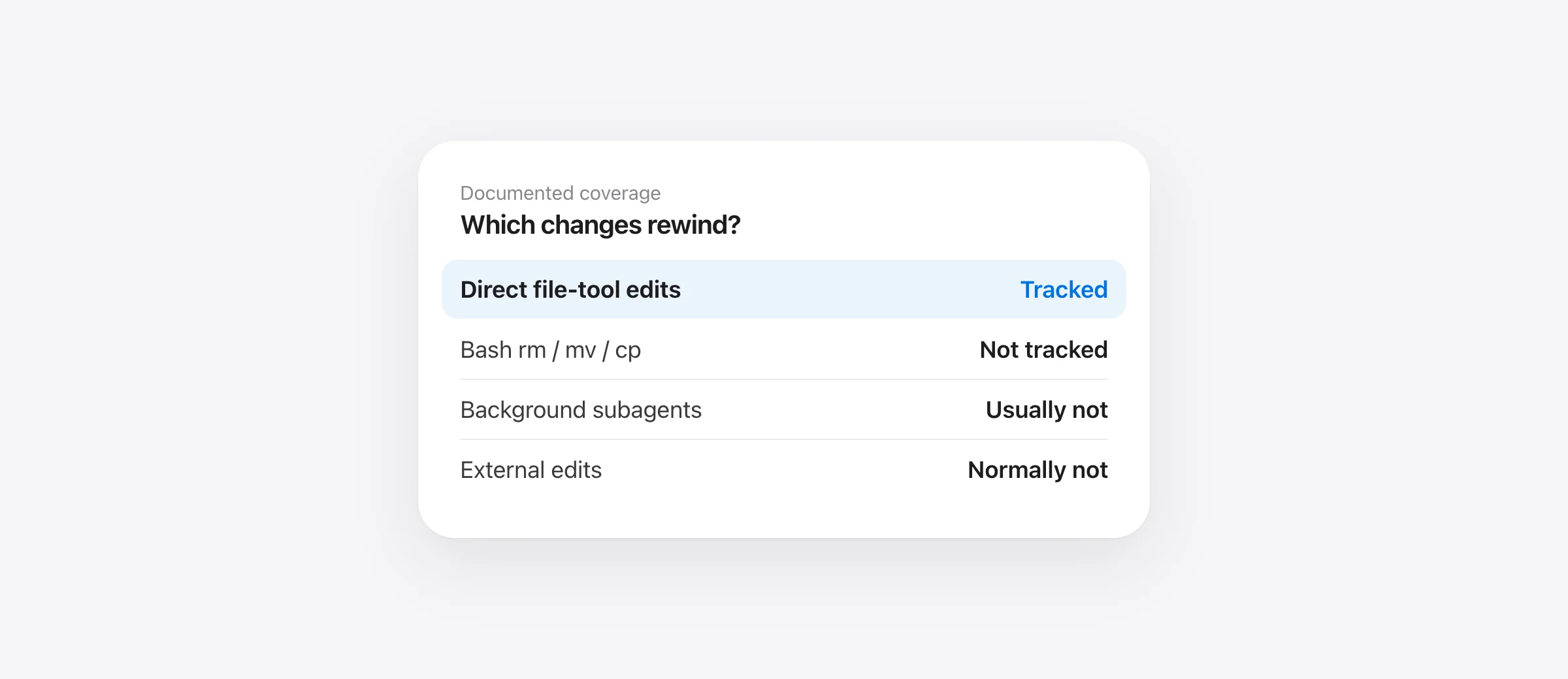
At a glance
Claude Code rewind tracks direct file-tool edits in the session. It does not track files changed by Bash commands. Most background subagent edits and external changes are also outside its usual coverage. Use Git or a backup for those paths.
Claude Code rewind is a fast way to return code or conversation to an earlier point. The command is /rewind. According to Anthropic's current checkpointing documentation, Claude makes a checkpoint before each prompt that starts a turn and tracks changes made by its own file editing tools. That scope is useful, but narrower than “everything the agent did.”
Pick the right rewind action
Open rewind from the same session. Choose the prompt before the unwanted edits. The menu can offer Restore code and conversation, Restore conversation, or Restore code. Code-only restore is the least disruptive choice when you want to keep the discussion and change only tracked files. If a checkpoint contains no tracked file edits, Claude does not offer a code restore for it.
Double Escape opens the menu only when the prompt is empty; with text in the input, it clears that text first. You can also run /rewind directly. Before selecting a point, review later edits you want to retain. A checkpoint is tied to a turn, so choosing an earlier turn can roll back several subsequent tracked edits.
Coverage depends on which tool changed the file
| Change | Claude Code rewind | Next place to look |
|---|---|---|
| Claude's direct file-edit tools | Tracked within the session | Rewind menu |
Bash rm, mv or cp | Not tracked | Git, Time Machine, earlier snapshot |
| Background subagent edit | Usually not restored | Git or earlier snapshot |
| Manual edit or another session | Normally not tracked | Editor history, Git, backup |
| Cloud database or external service | Outside local file checkpoints | Service backup and audit log |
Anthropic lists important exceptions in its documentation, including a foreground forked skill whose edits occur within your turn. It also says symlinked and hard-linked paths are skipped during rewind. If Claude shows a skipped-files warning, inspect the named paths rather than treating the restore as complete.
Run a two-file check before trusting any rollback
Use a disposable project with one file edited directly by Claude and another changed through a shell command. Make both files easy to recognize, such as edit-tool.txt and bash-tool.txt. In the session, ask Claude to make the first change with its file-edit tool and the second with Bash. Open /rewind and inspect the code restore for that turn. The direct edit should be within the documented checkpoint scope; the Bash change is outside it. Keep this drill outside a valuable repo so the test itself cannot remove work.
The point of the drill is not to prove a particular product version by anecdote. It makes the tool boundary visible in your own workflow. If your day-to-day agent work includes scripts, generators, package managers or commands that move files, plan a separate recovery source for their effects.
Why a Bash deletion can make rewind appear to do nothing
Suppose Claude runs rm -rf src/old-feature through Bash. The folder vanishes. The checkpoint from before your prompt exists, but the deletion was performed by a tool whose file effects Claude's checkpointing does not capture. The rewind menu may still rewind the conversation or other direct file edits, while the Bash-deleted folder remains absent. This is a documented limit, not proof that you chose the wrong checkpoint.
For an incident that already happened, use the recovery order in our Claude Code deleted-files guide. Start with read-only Git checks, then prior Time Machine or editor history. An app installed after deletion cannot recreate a missing copy.
Checkpoint retention is different from durable history
Claude's documentation says it keeps file snapshots for the 100 most recent checkpoints in a session. A cleanup sweep normally removes a session's file snapshots around 30 days after the session last saved one, unless configured otherwise. A conversation entry can therefore remain while the underlying file snapshot is gone. That is another reason to treat rewind as session recovery, not a long-term backup.
Git stores committed history and supports team collaboration. A system backup covers broader machine failure. Sandpiper fills a narrower local gap: it saves supported project files before agent turns and risky shell commands and shows those changes in a timeline. It uses hooks for Claude Code, Codex, Cursor and Gemini CLI. It must have run before the change, and excluded or oversized files may not have a restorable copy. It does not restore remote data.
Choose the recovery tool by the evidence
If Claude's Edit tool changed a tracked file a few prompts ago, try code-only rewind. If Bash deleted a committed file, inspect the Git version and restore that path. If the missing work was uncommitted or ignored, seek a pre-existing backup or editor history. If you want to reduce future risk, install per-turn protection before the next agent session and test it on a disposable project. Keep making normal Git commits and external backups.
Frequently asked questions
How do I open Claude Code rewind?
Run /rewind, or press Escape twice when the prompt input is empty. Choose a checkpoint, then a conversation or code restore option that is available for that checkpoint.
Does rewind undo terminal commands?
No. Claude Code documents that changes made by Bash commands are not tracked by its checkpoints.
Does rewinding remove conversation messages?
It depends on the selected action. Restore code keeps the conversation; Restore code and conversation rewinds both.
Is rewind a backup?
No. It is session-level recovery with documented retention and coverage limits. Keep Git history and a separate backup.
Sources

Telman Gadimov builds Sandpiper, a free local undo app for AI coding agents, and Murmur. We make Sandpiper. Claude Code behavior and limits here come from Anthropic's checkpointing documentation checked October 13, 2026.


