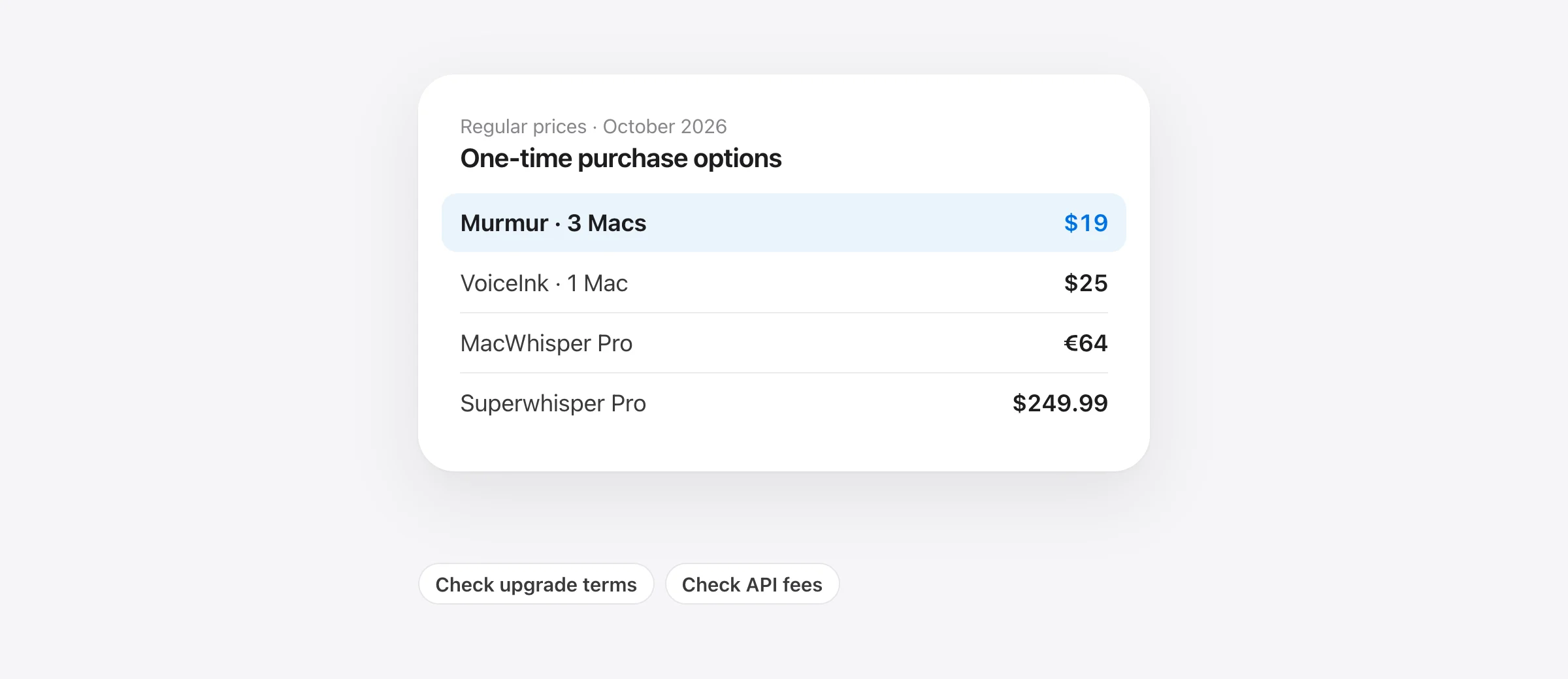
What to buy, by the job
- Everyday Mac writing with local AI: Murmur, $19 once for up to three Macs, subject to its system requirements.
- Configurable local dictation: VoiceInk, from $25 once.
- Files and recordings alongside dictation: MacWhisper Pro, €64 once.
- A broad Pro toolkit with a lifetime option: Superwhisper, $249.99 once.
- Occasional use or basic transcription: test a free option first.
If you want Mac dictation software without a subscription, you have several credible choices. The harder question is what the one-time payment buys. A license may cover one Mac or several, include local cleanup or require a separate service, and promise updates for a major version or for the product’s lifetime.
This guide compares the purchase decisions, not recognition accuracy. We make Murmur and include it here. Prices were checked against vendor pages on October 12, 2026; taxes, temporary discounts and optional third-party services are excluded.
One-time dictation purchases compared
| App | One-time price | License or update detail | Potential extra cost |
|---|---|---|---|
| Murmur | $19 | Up to 3 Macs; version 1 updates | Optional future major upgrade |
| VoiceInk | $25 / $39 / $49 | 1 / 2 / 3 Macs; lifetime updates | Optional cloud API usage |
| MacWhisper Pro | €64 | Lifetime updates advertised | Optional cloud AI services |
| Superwhisper Pro | $249.99 | Lifetime plan; unlimited Mac and Windows devices | Separately billed providers if you use your own keys |
See Murmur’s terms, VoiceInk’s license tiers, MacWhisper’s pricing and Superwhisper’s plans for the purchase details. Euro pricing is left in euros rather than converted at an unstated exchange rate.
Free, one-time and bring-your-own-key are different offers
A free tier can be enough for regular work if its limits match your needs. Check what remains after any introductory access expires. Getting a polished result during a Pro trial does not establish that the permanent free plan includes the same cleanup.
A one-time license pays for the described product access. It does not automatically include every future major version or every external service you connect. Read the update policy separately from the word “lifetime.”
Bring your own key means connecting your own provider account. The dictation app may have no recurring fee while the provider charges for the audio or text it processes. VoiceInk’s documentation explicitly separates its license from third-party API costs. Count those charges if you intend to use hosted models.
For buyers who want predictable spending, a local speech model plus local cleanup avoids per-use cloud processing charges. It still needs suitable hardware. An app you cannot run comfortably on the Mac you own is not a bargain.
What one and three years cost
The table below projects the listed license or subscription fee at today’s price. It assumes one individual, no optional API spending and no paid upgrades. This is a billing comparison: the products do not all include the same capabilities.
| Option | After 1 year | After 3 years | Basis |
|---|---|---|---|
| Murmur | $19 | $19 | Keep the purchased major version |
| VoiceInk Solo | $25 | $25 | One-Mac license, local processing |
| MacWhisper Pro | €64 | €64 | Local processing; no currency conversion |
| Superwhisper lifetime | $249.99 | $249.99 | One-time Pro purchase |
| Superwhisper annual | $84.99 | $254.97 | Three annual payments |
| Wispr Flow Pro, annual billing | $144 | $432 | $12/month equivalent, paid yearly |
The recurring-plan inputs come from Superwhisper and Wispr Flow. Subscription rows are included to explain the alternative to buying once, not because they meet a no-subscription requirement.
Calculation from the vendor prices linked above, checked October 12, 2026. MacWhisper’s €64 price is in the table, not converted for this chart.
Show the numbers
| 3-year cost (USD) | |
|---|---|
| Wispr Flow Pro · annual | $432 |
| Superwhisper · annual | $254.97 |
| Superwhisper · lifetime | $249.99 |
| VoiceInk Solo · 1 Mac | $25 |
| Murmur · up to 3 Macs | $19 |
The most useful same-product comparison is Superwhisper annual versus lifetime. Three annual payments total $254.97, which is $4.98 more than lifetime. After two annual payments, you have spent $169.98, still less than the lifetime purchase. The decision depends on whether you expect to keep using Pro into year three.
If you only need the software for a short project, lower upfront spending can matter more than a three-year total. “Pay once” is a billing preference, not proof that buying the largest lifetime package is economical for you.
Which purchase fits which buyer?
Murmur: everyday writing on a compatible Mac
Choose Murmur if the work is mostly messages, email, notes and prompts typed wherever your cursor is. The $19 regular license includes local speech recognition, local AI writing, per-app styles, snippets and a dictionary on up to three Macs.
You need Apple silicon and macOS 26 or later; AI polish and voice editing need Apple Intelligence. Use the first 2,000 free words to check your language and normal apps. Murmur does not import recordings or offer a Windows version.
The update policy is specific: version 1 updates are included; future major releases may be paid upgrades. Buying once lets you keep the version you purchased. It should not be described as a promise of every future version at no cost.
VoiceInk: a smaller upfront purchase with configuration choices
VoiceInk belongs on your trial list if you want to choose models and tune the text workflow. Compare the license for your actual number of Macs, then test the configuration you intend to keep. A one-Mac sticker price is not the total for a three-Mac setup.
Before paying, decide whether you will stay local or use a billed provider. That decision determines whether the license is your entire processing budget.
MacWhisper Pro: when dictation is one part of the job
Evaluate MacWhisper when you also need to turn recordings into documents or subtitles. The useful cost comparison is against the set of tasks it replaces. If a dictation-only app leaves you buying another tool for recordings, its lower sticker price may not mean lower total spending.
Check the edition, import/export features and live dictation workflow before buying. Keep your calculation in the checkout currency until you know the actual conversion and tax.
Superwhisper lifetime: when you already value its Pro features
A larger lifetime payment makes more sense after you have established that you use the product regularly. If Superwhisper’s modes and model choices already fit your work, evaluate lifetime against future renewals rather than moving purely to obtain a one-time bill.
If you are still deciding whether you like the app, a trial or shorter commitment can prevent an expensive unused license. Our Superwhisper alternatives guide includes a switching test.
When you should spend nothing
Start free if your task is occasional text entry or straightforward transcription. Apple Dictation is included with macOS. Spokenly offers free local models, and Superwhisper has a free local plan.
Give the free option a fair test: use a real paragraph rather than a perfectly rehearsed sentence. Check a person’s name, a date and a correction. If fixing the output is easy and you do not miss paid features, there is no reason to upgrade just to get a lifetime badge.
Five checks before you buy a lifetime license
- Confirm compatibility. Check macOS version, processor, memory, language and any AI requirements against the Mac you own.
- Price your real setup. Include every Mac you intend to activate and any external provider charges.
- Read the update policy. Distinguish access to a purchased version from included future major versions.
- Use the trial for your hardest task. Test the app, microphone, vocabulary and formatting you rely on. Test offline too if that matters.
- Check the refund window. Keep the receipt and license information where you can find them; complete your evaluation before the window closes.
If private, disconnected writing is part of the purchase decision, follow the offline dictation test before checkout. If your main goal is replacing Flow, the Wispr Flow alternatives guide covers the workflow trade-offs.
Frequently asked questions
Which Mac dictation apps have a one-time purchase?
Murmur, VoiceInk, MacWhisper Pro and Superwhisper Pro offer one-time licenses. Their features, device allowances, AI services and upgrade policies differ, so compare the package you actually need.
Does no subscription mean no extra AI costs?
Not necessarily. A license can cover the app while a cloud provider bills separately for API usage. Use included local processing if you want to avoid those provider charges.
Does a Murmur license include every future major version?
No. The license includes updates to version 1. Future major versions may be offered as paid upgrades; the version you purchased remains licensed for use. The regular $19 license covers up to three Macs.
Is it cheaper to keep a lifetime app I already own?
If it meets your needs, yes: keeping it avoids another upfront purchase. Evaluate a replacement for the specific work it improves rather than comparing it with a recurring fee you do not pay.
Can I use Mac dictation without buying anything?
Yes. Start with Apple Dictation or a free local tier such as Spokenly or Superwhisper. Check whether the free configuration includes the features you need rather than relying on a temporary Pro trial.
Sources

Telman Gadimov builds Murmur, a dictation app for Mac that runs entirely on-device. We make Murmur. Public prices were checked October 12, 2026. Cost projections are arithmetic at those prices, not a promise about future pricing or equal features.


