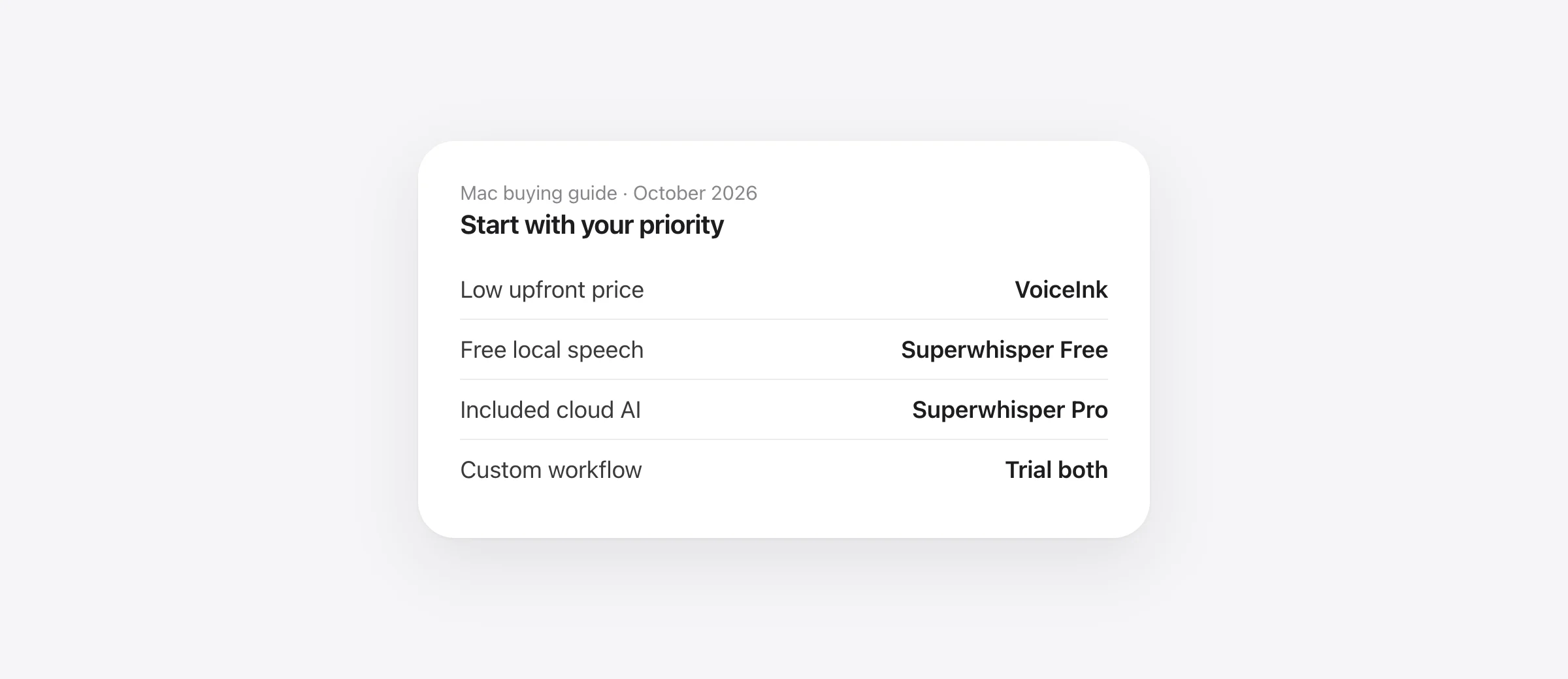
The buying decision
- Choose VoiceInk if you want an inexpensive Mac license and are comfortable selecting models and providers.
- Choose Superwhisper Pro if its included AI services, device coverage or integrations replace work you would otherwise configure yourself.
- Start with Superwhisper Free if basic local dictation is enough. There may be no purchase to make.
- Keep your existing lifetime app unless you can name the problem a replacement fixes.
VoiceInk vs Superwhisper is not simply cheap software versus expensive software. Both give you choices about how speech becomes text. The difference worth paying attention to is how much of your preferred workflow is included, how much you configure, and what it costs after the license.
We make Murmur, another Mac dictation app. This article answers the two-product comparison first and explains where our app fits at the end. Features and public prices were checked on October 12, 2026. Recommendations below are based on documented capabilities, not an invented accuracy score.
VoiceInk and Superwhisper at a glance
| Decision | VoiceInk | Superwhisper |
|---|---|---|
| Paid pricing | $25 for 1 Mac, $39 for 2, $49 for 3; one-time | Pro: $8.49/month, $84.99/year or $249.99 lifetime |
| Free starting point | 7-day trial documented in onboarding | Permanent free local dictation plan |
| Paid device coverage | Choose the Mac allowance you need | Pro covers unlimited Macs and Windows PCs, plus iPhone and Android |
| Local cleanup example | Refine on Apple silicon with 16 GB RAM or more | S1-mini for English Message and Mail modes |
| Hosted enhancement | Connect a provider; API charges are separate | Listed language models included with the license; own keys also supported |
Sources: VoiceInk pricing, installation and model choices; Superwhisper plans and language models. Prices exclude tax and temporary discounts. A Mac license does not establish the terms of a separate mobile purchase.
Price: compare the complete configuration
For one Mac, VoiceInk’s paid entry price is much smaller. That is a meaningful advantage if the local setup handles your work. It becomes a different calculation when you connect hosted enhancement and pay its provider separately.
Superwhisper’s free plan deserves a place in this decision. Do not compare a paid VoiceInk setup with Pro if the free configuration already meets your needs. If you do need Pro, use the trial to identify exactly which paid feature you would miss.
For example, suppose you dictate ordinary paragraphs and make small edits yourself. A free local transcription workflow may be sufficient. If you instead transform each note through an AI prompt, compare the cost and effort of managing a provider account with an included service. Neither arrangement is automatically better.
Count your Macs before comparing prices. A desktop and laptop are two activations in a device-limited offer. For longer-term billing calculations, use our one-time dictation purchase guide; this article focuses on choosing between the workflows.
Local AI: both can do it, within different limits
VoiceInk Refine is a local cleanup model with a fixed task. It requires Apple silicon and at least 16 GB of RAM. It does not accept custom prompts or context. For those features, evaluate another compatible enhancement provider, such as a locally hosted model.
Superwhisper’s S1-mini works locally in English Message and Mail modes. It is not a general replacement for every custom AI mode. If your usual prompt restructures a long note, verify the actual supported configuration instead of assuming that “local AI” covers it.
The purchase question is whether the local feature handles your task. A fixed cleanup model may be exactly what you want for removing filler and tidying punctuation. It is less useful if the job is converting a spoken project update into a template with several named sections.
Hardware comes before preference. VoiceInk’s installation guide currently says macOS 15+, while its landing page says 14.4+. If you are on an older release, confirm compatibility with the current installer before paying. Do not base an upgrade decision on the less restrictive of two conflicting pages.
Modes: compare one real task, not the settings count
VoiceInk’s mode editor combines triggers, transcription, enhancement and output choices. Depending on the provider, it can use a prompt and selected or visible text. That makes it worth evaluating if you want different behavior in different apps.
A useful comparison starts with a task such as: “Turn a spoken status update into Done, Blocked and Next sections, without inventing a deadline.” Build that in each app and dictate the same content. Look for missing constraints, additions, unwanted headings and the work required to fix them.
Keep the initial configuration small. A dozen modes that you do not use provide little value. One reliable mode for messages and one for longer writing may be enough. Add complexity only when it solves a repeated problem.
If you work with coding agents, Superwhisper has another documented distinction: its Mac integrations can surface agent questions and completion notifications. Test whether that interaction is useful to you. Dictating into an editor’s text field and connecting to an agent’s workflow are separate capabilities.
Privacy: inspect the settings you will keep enabled
VoiceInk’s data guide identifies separate choices for transcription, enhancement and Dictionary Auto Learn. A local speech model does not prevent an enabled cloud enhancement or learning provider from receiving text.
For either app, write down the path of a typical dictation: speech model, text-processing model, any supplied context, saved history and destination app. You need that configuration-level answer, not a single privacy label attached to the product.
Then repeat your usual task without a connection. This checks whether the chosen workflow functions offline; it does not establish what it sends when connected. Our offline dictation guide separates those questions and provides a longer checklist.
Accuracy: what a fair comparison should measure
We have not established that either app is more accurate. The final result combines speech recognition, vocabulary hints, cleanup and insertion. Changing any one of those can change what you receive.
Use two passes. First compare the raw transcription with enhancement disabled where possible. Then compare the configuration you would actually use every day. This helps distinguish a recognition error from a cleanup step that changes a correctly recognized word.
| Sample | What to inspect | Record for each app |
|---|---|---|
| A message with a name and date | Exact spelling and date | Corrections needed |
| A spoken change of plan | The final instruction, including any “not” | Meaning changed or preserved |
| A longer work note | Structure and missing details | Editing time after insertion |
| Your most-used destination | Shortcut and insertion behavior | Missed or misplaced text |
Allow about 15 minutes after installation and model downloads for a first comparison. Use the same microphone and room. If the result is close, repeat it over an ordinary workday before committing. A single unusually good sentence is weak evidence for a daily tool.
Which should you choose?
VoiceInk is the stronger starting point for a budget-conscious Mac buyer who wants to configure the workflow. Verify that the local models you intend to use suit your hardware. Include any hosted provider charges in your calculation.
Superwhisper is worth paying for when its package removes configuration or coordination work you care about. Test the specific Pro features that justify the higher price. If you only need the free plan, stay there.
If you already own one of them, switch only for a named improvement: fewer corrections, a needed integration, a usable local mode, or more reliable insertion. “The other app is cheaper” is not a saving after your current license is paid for.
Where Murmur fits
Murmur is a third option for someone who wants a focused Mac writing workflow rather than provider selection. Hold right ⌘ to dictate, use per-app styles, and hold right ⌥ to rewrite selected text. Speech and AI writing run on-device.
It costs $19 once for up to three Macs, with 2,000 free words to try. It needs Apple silicon and macOS 26 or later; AI features require Apple Intelligence. It does not replace a broad model catalog or file transcription. Version 1 updates are included; future major versions may cost extra.
For additional options, see Superwhisper alternatives. For developer-specific tasks, use our Mac dictation guide for developers.
Frequently asked questions
Is VoiceInk cheaper than Superwhisper?
For a paid Mac license, VoiceInk has the lower upfront price in this comparison. Superwhisper also has a permanent free plan. Compare the features and external provider charges in the configuration you need, rather than assuming every workflow requires a paid plan.
Which is more accurate, VoiceInk or Superwhisper?
This guide does not establish an accuracy winner. Compare both with your microphone, language, vocabulary and cleanup settings. Count errors in the final inserted text, especially names, numbers, negations and spoken corrections.
Can both apps keep speech and AI cleanup local?
Both document local configurations, with different requirements and restrictions. Check the speech model and enhancement model separately, then test the exact mode while disconnected.
Does a VoiceInk license include cloud AI usage?
Its documentation says third-party API usage is separate from the Mac license. If you connect a hosted provider, its prices and usage limits apply. Local processing is a different cost arrangement.
Should I switch if I already own Superwhisper lifetime?
Only if the replacement solves a specific problem or improves your workflow enough to justify another purchase. A lower sticker price does not save money against a license you already own and can keep using.
Sources

Telman Gadimov builds Murmur, a dictation app for Mac that runs entirely on-device. We make Murmur. This comparison uses vendor documentation checked October 12, 2026. We did not run a controlled VoiceInk-versus-Superwhisper accuracy or latency benchmark.


