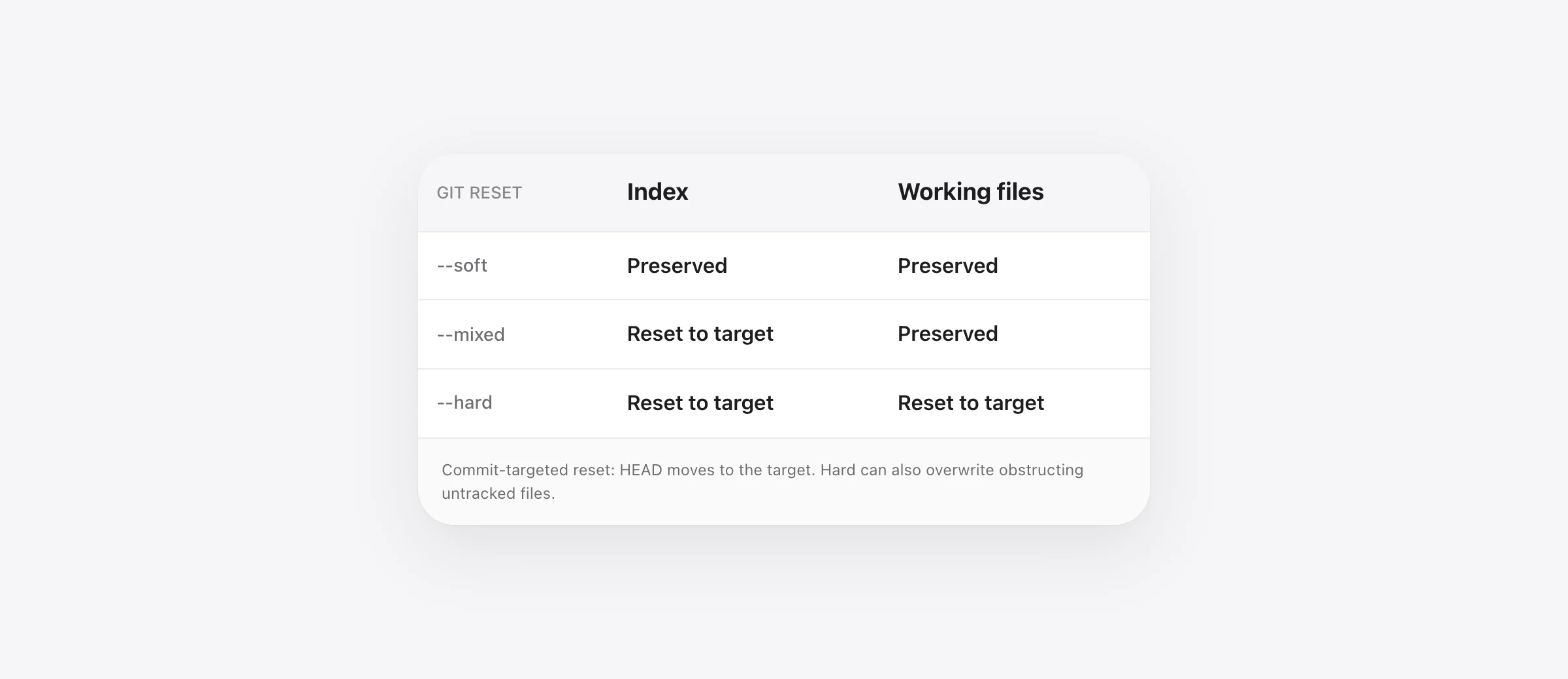
Choose the state you intend to preserve
Soft keeps staging and working files. Mixed keeps working files but resets staging. Hard resets both. For the commit form, each targets the selected commit. Inspect the repository before running a reset; hard can discard local work.
The difference between git reset soft, mixed and hard becomes clearer when a file has one committed version, another staged version and another version still on disk. “Keep my changes” is ambiguous until you decide which of those versions you mean.
If you already ran a reset and files are missing, start with the hard-reset recovery guide. This article is for choosing the command before the loss, with a tested example that separates the states.
The three places your file can have different contents
| State | Meaning here | Inspect with |
|---|---|---|
| HEAD | The current commit | git show HEAD:state.txt |
| Index | The version prepared for a commit | git show :state.txt |
| Working tree | The saved file on disk | Your editor or a file-reading command |
An unsaved editor buffer is another state outside this table. Git operates on files and its own stored objects, not text that exists only in an editor. Stop other writers and decide what to save or copy before changing the repository.
The Pro Git explanation calls these Git's three trees. You do not need to memorize the term. You need to know whether your desired version is committed, staged, saved only on disk, or not saved at all.
Soft vs mixed vs hard: the tested result
We created two commits in each disposable repository. The first contained A; the second contained B. Next we staged C and edited the working file again to contain D. Before reset, HEAD was B, the index was C and the working file was D.
Each mode targeted HEAD~1, the first commit containing A. Each ran in a fresh copy of that starting situation:
| Mode targeting A | HEAD afterward | Index afterward | File afterward |
|---|---|---|---|
| --soft | A | C | D |
| --mixed | A | A | D |
| --hard | A | A | A |
This is why “soft undoes the last commit and stages its changes” is incomplete when you had additional staged work. In our fixture, soft retained C, not merely B. Mixed kept the latest disk version D but lost the earlier staging boundary between C and D.
The reset reference defines those modes. Our fixture verifies the ordinary commit form with a single tracked file; submodules, sparse checkouts, merge states and other reset modes need their own review.
Undo an unpublished commit while keeping the staged version
If your last ordinary commit is local, has a parent and should be reworked, soft reset can move back without rewriting the index or saved files:
git status --short
git diff
git diff --cached
git log -3 --oneline
After inspecting and preserving anything important, the operation is:
git reset --soft HEAD~1Now inspect both diffs again. If you had staged more work after the commit, it remains staged too. Do not immediately recommit with a new message and assume the resulting commit contains only the old commit's change.
HEAD~1 means the first-parent ancestor one step back; it cannot select a nonexistent parent for an initial commit. If HEAD is a merge commit or you are detached, stop and identify the intended history rather than applying an ordinary linear-history example mechanically.
Keep the latest file contents but rebuild staging
Mixed reset is useful when the saved files are correct but you want to choose the next commit's contents again. To unstage while staying at the current commit, the target is HEAD:
git reset --mixed HEADIn a normal non-conflicted state, plain git reset is the default mixed reset to HEAD. It does not mean “go back one commit.” You can inspect the working changes, then stage selected paths or hunks.
To move back one ordinary local commit while retaining disk contents, the target changes:
git reset --mixed HEAD~1That preserves the file contents, not the old staged/unstaged split. In our C/D fixture, C stopped being the staged candidate and D remained on disk. If the distinction matters, preserve it before resetting rather than expecting the command to remember it for you.
For a single path, git restore --staged -- path/to/file expresses the narrower unstage intent. Path-based reset is also a distinct form: it updates index entries without moving the branch. Use the single-file restore guide when the task is about one file rather than commit history.
Hard reset can discard more than you expected
Do not run hard reset until you intend to replace the affected local state and have preserved anything you need. A branch or tag pointing at the current commit does not save all staged, unstaged, untracked or ignored files.
Our hard-reset fixture changed both the index and working state.txt to A. The staged C and working D versions were no longer the active file. An unrelated untracked loose.txt remained, which can lead to a misleading rule that hard reset never touches untracked files.
We tested the counterexample too. An earlier commit tracked obstruct.txt. A later commit removed it, and we created a new untracked file at that same path. Hard reset to the earlier commit replaced the untracked contents with the tracked target version.
That result matches the documented obstruction behavior. Do not use an untracked or ignored label as a backup strategy. If the task is to clean generated files, first distinguish that from resetting tracked state; the git clean guide explains the separate risks.
Verify a reset using both diffs
git status --short
git diff
git diff --cached
git log -3 --oneline
git diff compares working files with the index. git diff --cached compares the index with HEAD. An empty first diff does not prove that there are no staged changes, and an empty second diff does not prove that there are no working edits.
In our test, git status --short showed MM state.txt after soft: the file differed in both comparisons. After mixed it showed a working-tree modification. After hard the tracked file was clean. The unrelated untracked path appeared in all three cases.
Check actual contents as well as status. Then run the relevant project checks before treating a new commit as correct. Git can accurately produce the state you requested even when you requested the wrong one.
Use revert when the commit is shared history
Reset changes which commit your current branch names. If other people already rely on that history, moving it backward creates a coordination problem. For an ordinary shared commit, consider git revert, which records an inverse change as a new commit rather than removing the existing commit from the branch's visible sequence.
Revert can still conflict, and reverting a merge needs a parent choice with consequences for future merges. Do not substitute one command name for another without inspecting the situation. Agree on any deliberate shared-history rewrite with collaborators.
Preserve the work that has not reached a commit
Before a refactor, distinguish three protections: a useful commit, a captured copy of eligible local files, and a backup outside the machine. Each covers a different failure. Reflog is helpful for earlier commit tips; it does not reconstruct every overwritten working-file edit.
Sandpiper saves eligible local project files before agent prompts and risky shell commands. It can provide an earlier version when one was captured, including work that was not committed. It excludes some paths, does not retain content for files above 256 MB, and does not make a local snapshot survive every disk failure.
The agent backup guide combines those protections with a recovery drill. Choose the reset mode by the state you intend to keep, then verify that the earlier local copy actually exists before relying on it.
Frequently asked questions
What is the difference between soft, mixed and hard reset?
For a commit-targeted reset, soft changes HEAD while preserving the index and working files; mixed also resets the index; hard also resets the working tree to the target. Our table shows separate staged and unstaged versions so that each effect is visible.
How do I undo the last commit but keep the changes?
For an unpublished ordinary commit with a parent, --soft HEAD~1 keeps the existing staging area; --mixed HEAD~1 keeps working files but rebuilds staging from the parent. Inspect and preserve any additional staged or unstaged edits first. Use a history-preserving approach for shared commits.
What is the default git reset mode?
Mixed is the default. With no target, the target defaults to HEAD. In the ordinary commit form, git reset unstages changes while leaving working files intact; it does not necessarily move to the previous commit.
Does git reset --hard leave untracked files alone?
Unrelated untracked files survived our test, but an untracked file obstructing a tracked target path was overwritten. Do not use untracked status as protection against a hard reset.
Can reflog recover all files after a hard reset?
No. Reflog can help locate earlier commit tips. It is not a backup of every unstaged edit, ignored file or unsaved editor buffer. Use the separate recovery guide if a reset has already discarded work.
Sources

Telman Gadimov builds Sandpiper, a free local undo app for AI coding agents, and Murmur. We make Sandpiper. The A/B/C/D reset table and both untracked-file cases were reproduced in isolated Git 2.33.0 repositories on October 23, 2026. Commands in those tests ran only against disposable fixture data.


