Back to Sonoma Sandpiper now supports macOS 14 Sonoma and newer, including the app and command-line hooks. On Sonoma, the timeline opens at launch and grouped cards use simpler styling. macOS 15 and newer keep quiet startup after onboarding and staggered animations. Update feeds now use the app's minimum macOS version automatically.
A clean install The installer keeps the signed app free of Finder metadata, so installed copies pass strict signature verification. Release packaging now verifies the app inside the finished disk image before notarization.
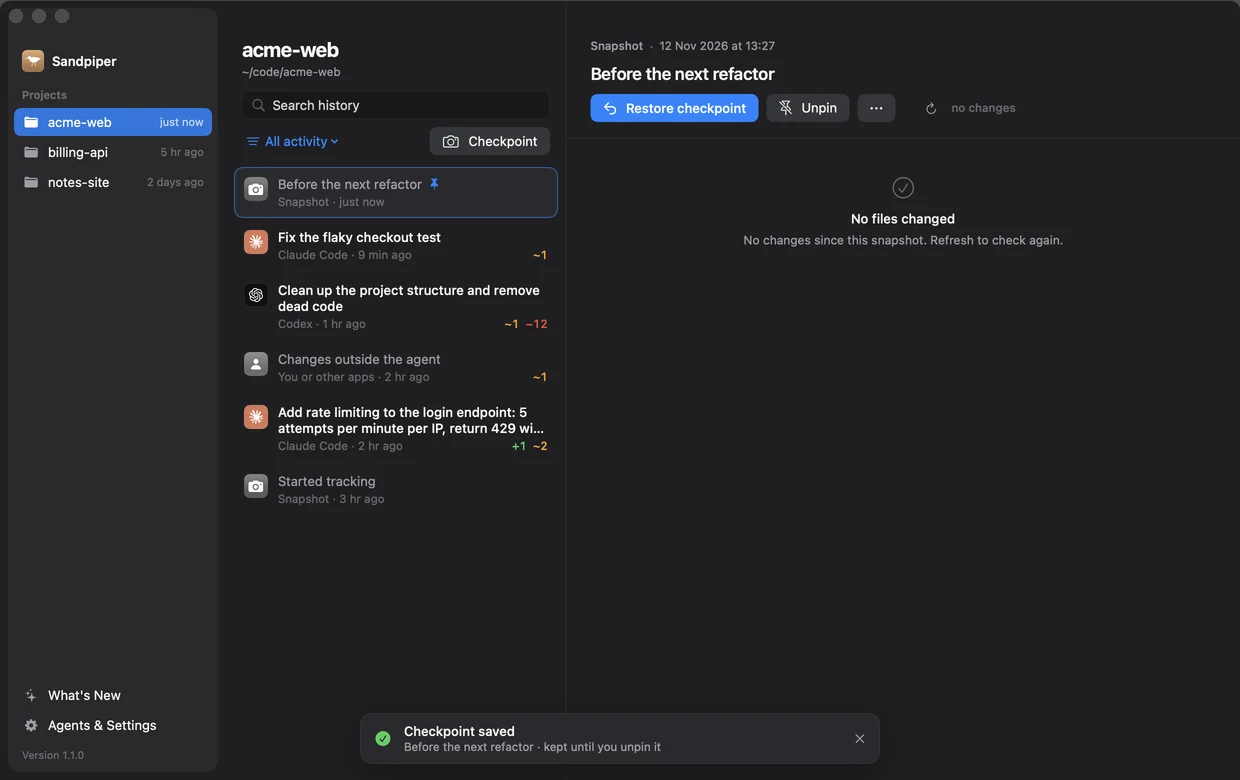
Find the change. Keep a way back. Search prompts and checkpoint names with Command-F, or filter history by coding agent. Save, restore and unpin named checkpoints from the timeline. Pinned snapshots survive automatic cleanup; whole-project restores ask for confirmation. Switch projects without old file lists or diffs appearing in the new selection. Finished turns refresh their details automatically. See real loading, empty and error states, retry unreadable history, and refresh live file changes. Read the changelog and roadmap inside the app. Empty projects now recover correctly after a damaged manifest. A named recovery point, ready for the next experiment. Sample project shown.
Less space, the same protection The vault leaves out rebuildable folders, caches, temporary files and Sandpiper's own history. The 5 GB vault limit is enforced after every save.
Updates that arrive on their own Sparkle checks for signed app updates once a day. Settings includes a manual update check.
A smaller vault Vault retention keeps 30 days, up to 5 GB, and Settings shows its size.
Undo anything your AI agent did A menu bar app with per-project turn history, file diffs, undo and restore. Hooks for Claude Code, Codex, Cursor and Gemini CLI save projects before prompts and risky commands. APFS snapshots, a vault for files outside projects, onboarding and launch at login. Already have Sandpiper?
Your next update Open Agents & Settings and choose Check Now . New here? Sandpiper is free for Apple silicon Macs running macOS 14 or later.
Explore Sandpiper ↗