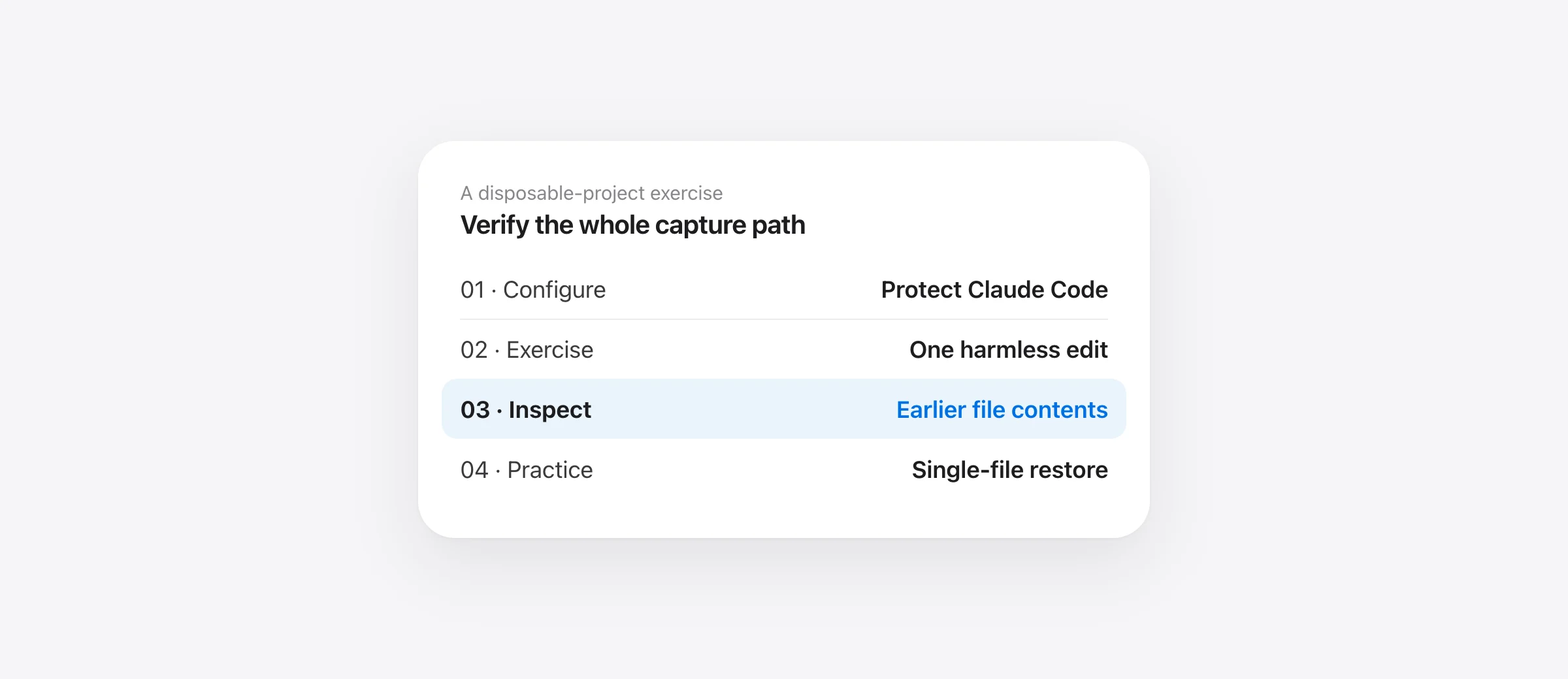
Verify the saved copy, not only the switch
- Enable Claude Code in Sandpiper's Agents & Settings.
- Use a disposable Git project containing a small test file.
- Submit a simple edit prompt in the Claude instance you actually use.
- Find that prompt in Sandpiper and inspect the file from before the edit.
- Test a narrow restore in the disposable project before relying on the setup.
Claude Code backup hooks on Mac are useful only when the lifecycle event reaches a working capture command and produces a usable earlier file. A settings entry proves that a configuration exists. It does not prove the right folder was captured or that the needed bytes are in history.
Sandpiper installs the integration for you and gives you a local timeline to inspect. This guide focuses on installation and verification. If a deletion has already happened, use the Claude Code recovery guide first: a new installation cannot recover a version it never captured.
Understand the three capture moments
| Event | Integration job | What it does not establish |
|---|---|---|
| UserPromptSubmit | Capture the project before prompt work | That every later external change has its own snapshot |
| PreToolUse, Bash matcher | Check shell commands and capture recognized risks | A universal understanding of every command's side effects |
| Stop | Record end-of-turn work | A synchronous backup before the change |
Those entries come from Sandpiper's current installer. The prompt and Bash handlers use synchronous command hooks; its Stop handler is asynchronous. Do not move the pre-change capture into background work just to reduce visible waiting: the earlier copy needs to exist before an overwrite.
Anthropic's hook reference defines the lifecycle and notes that matching hooks can run in parallel. Separate handlers are not a reliable ordered pipeline simply because you list one before another. Keep dependent capture and validation within a design that actually waits for the required result.
Install through Sandpiper's agent settings
Sandpiper is free for Apple silicon Macs on macOS 26 or later. Move the app to Applications and open it. During onboarding, select the supported agent you use. You can also open Agents & Settings in the sidebar and choose Protect for Claude Code.
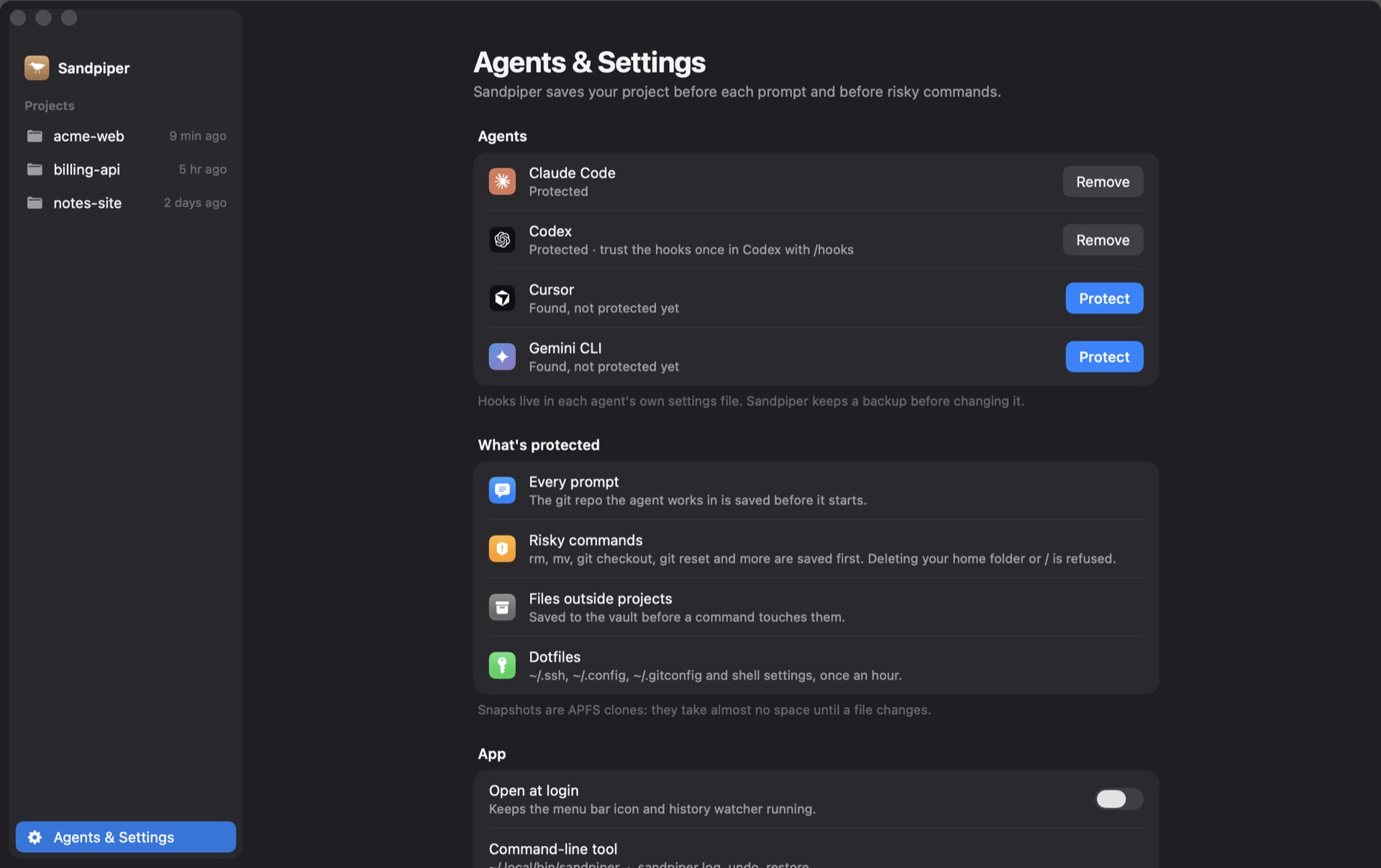
The installer merges its entries into the user-level Claude settings and keeps a backup of the settings file it changes. It is not a reason to replace an existing settings file with a short example from a tutorial. Preserve unrelated hooks and configuration.
Use Claude's /hooks view to inspect the active configuration in that session. Anthropic's setup guide uses that view for verification and documents common reasons hooks fail to appear or run. If you have multiple installations or hosts, verify the one that will execute your work.
Check the helper without editing settings by hand
For an installed command-line helper, the read-only commands sandpiper hooks status and sandpiper hooks print claude help inspect integration state and the generated block. The print command shows what Sandpiper would install; it is not by itself proof that the active Claude session loaded those entries.
The app can use a helper in ~/.local/bin or its bundled helper. An entry that points to a moved or removed executable will not capture successfully. Inspect the actual configured command and confirm the target exists. If a desktop process has a different PATH from Terminal, a command working in Terminal alone is insufficient evidence.
When diagnosing a failure, record the event, command path and project location. Avoid posting your whole settings file or hook payload publicly: it may contain paths, prompt text or other information unrelated to the problem.
Run a harmless end-to-end capture exercise
Create a disposable Git project with a small fixture.txt containing “before example.” Use that project only for the exercise. Do not use a real customer repository, secrets or a database as your first restore test.
- Confirm the baseline. Save the file and read its contents from disk.
- Submit a narrow prompt. Ask Claude to replace the line with “after example” and leave other files unchanged.
- Find the captured prompt. In Sandpiper, identify the correct project, time and prompt label.
- Inspect the earlier file. Confirm that the snapshot contains “before example,” not merely a filename.
- Practice a single-file restore. Review the proposed scope, restore the fixture, and confirm the resulting text.
For this article, we separately checked the installed helper using simulated UserPromptSubmit JSON and an isolated history directory. After changing the fixture between two events, the earlier file was readable from the first snapshot. That verifies the handler path in that test; it does not replace the live-session exercise above.
The separation matters. A helper can work when called directly while the agent never calls it. Conversely, an event can fire while capture targets the wrong project. The complete test needs both a real invocation and inspection of the earlier content.
Diagnose a missing snapshot by stage
| Observation | Check | Avoid assuming |
|---|---|---|
| No entry in /hooks | Settings location and running Claude instance | Another installation's config is active |
| Entry exists, no invocation | Event, matcher and session's loaded configuration | Any visible switch proves execution |
| Helper runs, no project history | Working directory, tracked project and capture errors | The process chose the folder you intended |
| Snapshot exists, file is missing | Capture time, path, exclusions and size limit | Every file beneath the project is kept |
| Earlier file exists, restore differs | Selected version, restore scope and later edits | File-level restore merges every later line |
Sandpiper automatically recognizes Git projects through the hook workflow. A different folder may need explicit tracking rather than an assumption that every directory is covered. Keep the app's project identity and the agent's working directory visible during the test.
The handler is designed not to stop an agent merely because the helper itself fails. That makes successful-capture verification essential. Recognized destructive-command guard decisions are separate from a blanket promise that every failed backup blocks execution.
Keep rewind, hooks and machine backup in their own roles
Claude Code rewind remains useful within its documented scope. Anthropic's checkpointing documentation says Bash file modifications are not tracked by rewind. A prior local snapshot can provide another source for supported files, including work affected by a shell command.
A shell hook is still not a complete sandbox. A command can have remote effects or a structure the guard does not recognize. For permission rules and deletion prevention, see the rm -rf protection guide; for the built-in boundary, see rewind limitations.
Sandpiper excludes Git internals and rebuildable directories, and files over its default 256 MB limit are listed without preserved content. It cannot restore a remote database or a state from before capture. Snapshots are on the Mac, so keep a separate machine backup for disk loss.
Use Git for meaningful milestones, snapshots for captured local changes between them, and a separate backup for the machine. Our agent backup guide covers that combined setup. If you want to deliberately shelve work before another task, the stash guide explains its different coverage and working-tree effects.
Repeat the drill from each agent checkout. The worktree coverage guide shows why a snapshot of the original folder does not establish coverage of a sibling worktree.
Frequently asked questions
How do I back up a project before Claude Code changes it?
On a supported Mac, install Sandpiper, enable Claude Code in Agents & Settings, and verify capture in a disposable Git project. Find the prompt snapshot and inspect an earlier file before relying on it. Keep commits and a separate machine backup too.
Which Claude Code hooks does Sandpiper install?
Its current integration uses UserPromptSubmit for prompt snapshots, PreToolUse matched to Bash for shell-command checks, and Stop for end-of-turn work. The Stop handler is asynchronous; it is not the pre-change capture boundary.
Why is no snapshot appearing?
Check whether the hook is configured in the running Claude instance, its command resolves to an existing executable, the event matches, and the correct project is tracked. Also inspect the snapshot path and any errors rather than assuming installation means capture succeeded.
Does a backup hook replace Claude Code rewind?
No. Rewind is useful within its documented scope; Anthropic says it does not track Bash file changes. Local snapshots provide another recovery source when supported files were captured. Neither replaces Git history or a backup on a separate device.
Does Sandpiper block all work if a backup fails?
No. Its hook handler is designed not to stop the agent merely because the helper fails. Some recognized dangerous commands have separate guard behavior. Verify successful capture and do not treat the integration as a universal sandbox or a guarantee that every operation has a saved copy.
Sources

Telman Gadimov builds Sandpiper, a free local undo app for AI coding agents, and Murmur. We make Sandpiper. Hook configuration and capture behavior were checked against its source and installed helper on October 18, 2026. An isolated handler check used simulated event JSON; it was not a live Claude session. Anthropic documentation supplies the lifecycle definitions. The screenshots show example projects.


