Superwhisper vs Wispr Flow comes down to one design choice. Superwhisper lets you pick where each step runs: local Whisper, Parakeet or Cohere models on your computer, or cloud models when you want them. Wispr Flow is cloud-only and does the cleanup for you with almost no setup. Superwhisper is cheaper ($84.99 a year or $249.99 lifetime vs $144 a year) and works offline; Wispr Flow is more polished out of the box, syncs across four platforms and has stronger team admin tools.
The short version (checked October 15, 2026)
- Pick Superwhisper for offline or on-device dictation, file transcription, Windows on ARM, deep customization, or a one-time $249.99 license.
- Pick Wispr Flow for clean text with zero configuration, synced dictionary and styles on Mac, Windows, iPhone and Android, voice editing with Command Mode, and SSO-managed teams.
- Free tiers: Superwhisper Free is unlimited but has no AI cleanup. Wispr Free has AI cleanup but stops at 2,000 words a week on desktop.
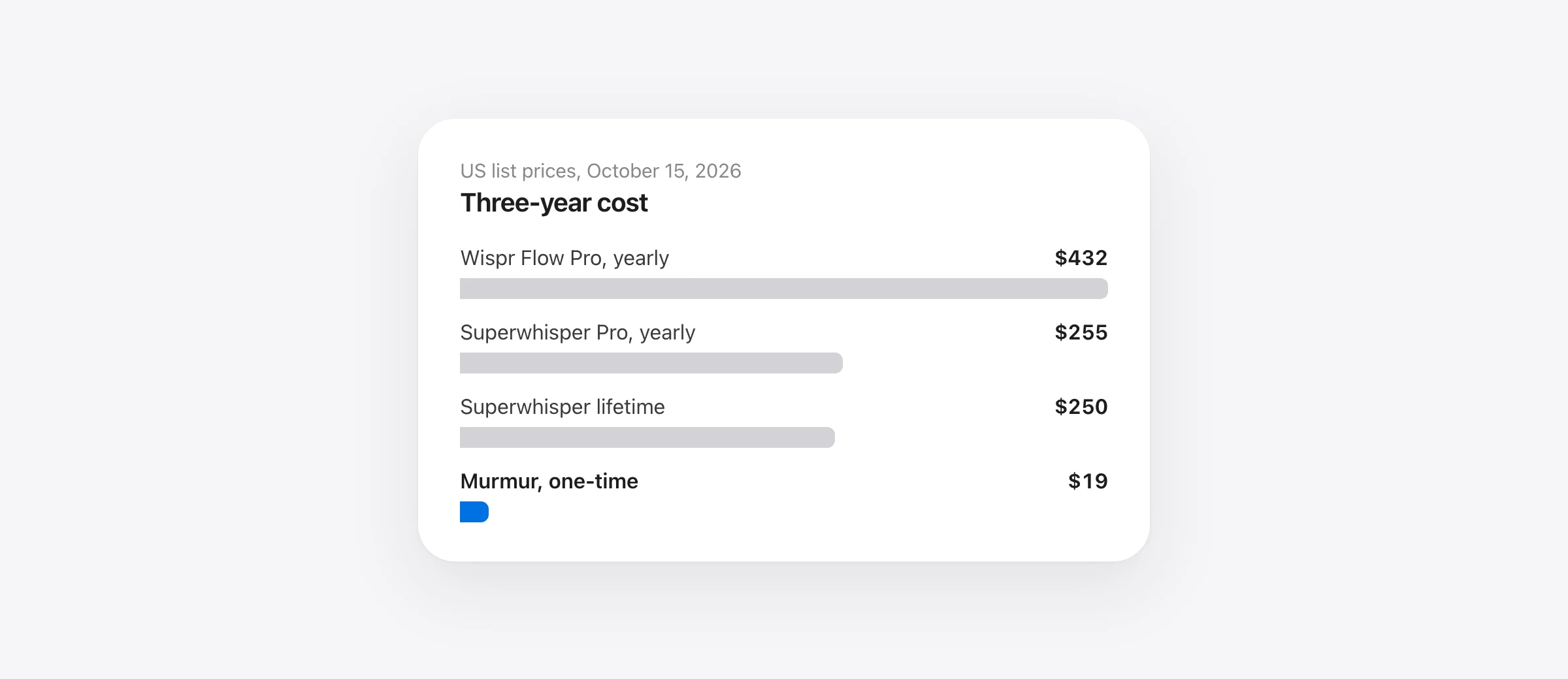
- Three-year cost: about $255 for Superwhisper Pro yearly vs $432 for Wispr Flow Pro yearly.
We checked every price and feature against each vendor’s own documentation on October 15, 2026. We make Murmur, a third Mac dictation app, and say where it fits only at the end. We have not run our own accuracy test of these two apps; where numbers appear, we say who measured them.
Superwhisper vs Wispr Flow at a glance
| Superwhisper | Wispr Flow | |
|---|---|---|
| Where speech is transcribed | Your choice: local models or cloud models | Always in Wispr’s cloud |
| Where AI cleanup runs | Cloud by default (S1-Language); local S1-mini for English Message and Mail modes | Cloud |
| Works offline | Yes, with local models | No (dictation) |
| Free plan | Unlimited local Whisper, no AI processing | 2,000 words/week desktop, 1,000 mobile |
| Pro price | $8.49/mo, $84.99/yr, $249.99 lifetime | $15/mo or $144/yr |
| Trial | 3,000 words of Pro | 14 days of Pro |
| Platforms | macOS 14+, Windows 10/11 (x64 and ARM64), iPhone, Android | macOS 12+, Windows 10/11 (x64 only), iPhone, Android |
| Settings sync | Mac-to-Mac via Filesync; per device elsewhere | Dictionary, snippets, languages, styles via account |
| Edit selected text by voice | Super Mode commands; custom modes | Command Mode (Pro, Mac and Windows) |
| Audio/video file transcription | Yes (Pro) | No |
| Team plans | Enterprise, seat-based, price not published | Pro teams, Growth $18–26/user/mo yearly, Enterprise |
Sources: Superwhisper plans, voice models and Windows docs; Wispr pricing, data controls and system requirements. Checked October 15, 2026.
How does each app work? Local models vs cloud-only
Every dictation goes through two steps: speech becomes raw text, then a language model optionally cleans it up. The two apps handle those steps very differently.
Superwhisper makes both steps configurable per “mode”. For speech, its model list includes free local Whisper models (Tiny at 75 MB up to Large v3 at 3 GB), Pro-only local models (Parakeet, Parakeet Multilanguage and Cohere Transcribe), and Pro cloud models (its own S1-Voice, Deepgram Nova and ElevenLabs Scribe). For cleanup, its language model list covers its own S1-Language (the default, in the cloud), models from Anthropic, OpenAI, Google and Groq, the local S1-mini, and your own API keys.
That default matters. A mode can use a local voice model and still send the transcript to a cloud language model. S1-mini, the local cleanup model, is English-only and works only in Message and Mail modes.
Wispr Flow has no model picker. Wispr’s data controls page says plainly: “Transcription always occurs on the cloud.” Its cleanup layer then removes fillers, applies self-corrections and formats lists. You trade control for a setup that works the moment you sign in.
AI formatting: Superwhisper modes vs Wispr auto-edits and Command Mode
Superwhisper’s built-in modes are Message, Super, Mail, Note, Meeting and Voice to Text (docs). Message removes fillers and fixes grammar, Mail adds greetings and sign-offs with a Casual-to-Formal tone slider, and Voice to Text skips AI entirely. Super Mode reads the active app, selected text and recent clipboard to fit your words to what is on screen. It also accepts commands on selected text, but Superwhisper says these work for formatting (“make this title case”), not for “summarize” or “rewrite this section”. For that, you write a custom mode with your own instructions and model, and you can set modes to switch on automatically in specific apps.
Wispr Flow’s editing is mostly automatic. Smart Formatting and Backtrack are on by default: say “let’s do coffee at 2, actually 3” and it writes “Let’s do coffee at 3” (docs). Auto Cleanup, still marked beta, offers None, Light or Medium, and “Undo AI edit” restores your original words. Writing Styles adjust tone by app category (Personal, Work, Email, Other), but styles apply in English only.
Command Mode is Wispr’s voice editor: select text, hold Fn + Ctrl on a Mac, and say “make this shorter” or ask a question that opens in Perplexity. It needs Pro or an active trial, works on Mac and Windows, and is off by default under Settings › Experimental (docs).
Context awareness exists in both, with different defaults. Wispr’s is on by default and can include the app, text before and after your cursor, and other on-screen text, though Wispr says it never takes screenshots (docs). In Superwhisper it is a Pro feature that is on by default only in Super Mode; custom modes let you choose which context types to send.
Which is more private?
Superwhisper can be fully local. Its sensitive-data guide says pairing a local voice model with a local language model (or no AI) means no audio or text leaves your machine. Transcription history is stored on your device, and Filesync syncs configuration only. When you use its cloud models, Superwhisper says it calls providers under zero-data-retention API terms and does not train on your data. One detail people miss: vocabulary words are sent with your audio as recognition hints when a cloud voice model is selected.
Wispr Flow is cloud-only, with opt-outs. According to Wispr’s data settings article, both “Improve the model for everyone” and “Dictation cloud storage” default to on unless an organization or agreement locks them. Turning off model improvement withholds your audio and transcripts from training but “does not stop cloud processing”, and metadata such as app name, URL, word count and duration is still uploaded. Wispr processes and stores customer data in the United States and says its third-party AI providers cannot train on your data (security FAQ).
Compliance paperwork is closer than it looks. Wispr publishes SOC 2 and ISO 27001 materials through its Trust Center and offers a HIPAA BAA, which locks training and cloud storage off. Superwhisper offers a self-serve DPA and BAA, and its SOC 2 report is available through its Trust Center under NDA (docs). Wispr’s own comparison page says Superwhisper advertises no certifications; that was no longer accurate when we checked.
If you are dictating client files, health data or unreleased code, the practical difference is this: with Superwhisper you can prove nothing left the device by disconnecting, while with Wispr you rely on settings and contracts.
Does either app work offline?
Superwhisper does, with limits. Local voice models transcribe without internet. Offline AI formatting needs S1-mini in the Message or Mail mode; Super, Note, Meeting and custom AI modes need the internet. Download models before you travel, then test in Airplane Mode.
Wispr Flow dictation does not work offline. The one exception is Notetaker on Mac and Windows, which can save meeting audio locally during an outage and transcribe it afterwards (docs).
Platforms and sync: Mac, Windows, iPhone and Android
Both apps now cover all four platforms, which several older comparisons (and Wispr’s own comparison page) get wrong about Superwhisper. The details differ:
- Mac: Superwhisper needs macOS 14 or later. Wispr supports macOS 12 or later on Apple silicon or Intel, with 8 GB of RAM recommended.
- Windows: Superwhisper runs on Windows 10 and 11 on x64 and ARM64, though on Snapdragon machines only Parakeet Multilanguage runs locally. Wispr does not support Windows on ARM at all.
- Phones: both use a custom keyboard on iPhone (no iPad) and a floating bubble on Android phones.
- License: one Superwhisper Pro license covers unlimited Macs and PCs plus iPhone and Android. A Wispr subscription follows your account across devices.
- Sync: Wispr syncs your dictionary, snippets, languages and writing styles through your account. Superwhisper’s modes and vocabulary are per device, except Filesync between Macs; Windows, iOS and Android don’t sync yet.
If you live on a Mac and an iPhone and want one dictionary everywhere, Wispr is noticeably less work.
Superwhisper pricing vs Wispr Flow pricing
Prices below are US list prices from each vendor, checked October 15, 2026.
| Plan | Superwhisper | Wispr Flow |
|---|---|---|
| Free | Unlimited local Whisper dictation, vocabulary, replacements, 2 modes without AI | 2,000 words/week on Mac and Windows, 1,000 on mobile, with AI formatting |
| Monthly | $8.49 | $15 |
| Yearly | $84.99 | $144 ($12/month) |
| Lifetime | $249.99 once | Not offered |
| Discounts | 40% off for students, educators and nonprofits (not on App Store purchases) | 50% off Pro for students and educators; free Student plan where eligible |
| Refunds | 30-day window on all individual plans | Cancel anytime |
Is Superwhisper free? Yes, permanently, but the free plan is a transcription tool. Cloud models, Parakeet and Cohere Transcribe, AI modes, context awareness, file transcription and speaker separation are all Pro. Superwhisper also notes that its iOS App Store and Google Play prices are higher than on its website because of platform fees.
Wispr’s free plan gives you the full cleanup experience, but 2,000 words is roughly a quarter of an hour of talking per week. For every Wispr tier, student rules and team billing, see our Wispr Flow pricing breakdown.
Sources: superwhisper.com/docs/billing/plans and wisprflow.ai/pricing, October 15, 2026. Excludes tax and student pricing.
Show the numbers
| 3-year cost (USD) | |
|---|---|
| Wispr Flow Pro, monthly | $540 |
| Wispr Flow Pro, yearly | $432 |
| Superwhisper Pro, monthly | $306 |
| Superwhisper Pro, yearly | $255 |
| Superwhisper Pro, lifetime | $250 |
| Murmur | $19 |
| Either free plan | Free |
The Superwhisper lifetime license pays for itself against yearly billing just before the three-year mark (about 2.9 years), and against monthly billing after about 29 months. Some third-party pages list different Superwhisper lifetime prices; Superwhisper’s own plans page showed $249.99 when we checked.
What hardware do Superwhisper’s local models need?
Superwhisper does not publish a minimum RAM figure. Its performance guide says local models need free memory, suggests closing memory-heavy apps, and recommends a smaller model such as Whisper Base, or a cloud model, if your machine struggles. A “voice model active duration” setting (10 seconds to 1 hour) trades memory for faster starts.
What it does publish:
- Download sizes: Parakeet 476 MB, Parakeet Multilanguage 494 MB, Cohere Transcribe 1.3 GB, Whisper Large v3 Turbo 1.6 GB, Whisper Large v3 3 GB.
- Apple silicon: Cohere Transcribe runs through MLX on Apple silicon, and its benchmark figures come from M4 and M4 Max Macs. Superwhisper warns not to assume those speeds carry over to an older Mac.
- Windows: Cohere Transcribe and Whisper Large v3 Turbo use a Vulkan-capable GPU or fall back to a much slower CPU path.
Wispr Flow needs no local model, so an older Intel Mac with 8 GB of RAM is fine, as long as it is online.
Speed and accuracy: what the published numbers say
We have not timed these two apps against each other. The only published head-to-head figures we found come from Superwhisper’s own benchmark (updated September 3, 2026), which ran Wispr Flow as an app with Auto Cleanup off and read back its raw transcript. Treat these as a competitor’s measurements, not neutral ones.
| Model (as measured by Superwhisper) | Runs | Word error rate | Wait after speech ends |
|---|---|---|---|
| Superwhisper S1 Voice | Cloud | 6.6% | 0.41 s |
| Wispr Flow (raw, cleanup off) | Cloud | 8.7% | 1.28 s |
| Cohere Transcribe | Local, Apple M4 | 8.4% | 0.45 s |
| Parakeet V3 | Local, Apple M4 | 10.7% | 0.07 s |
| Whisper Large V3 Turbo | Local, Apple M4 | 10.9% | 1.23 s |
Source: superwhisper.com/benchmarks and its per-model pages, checked October 15, 2026. Clips were 8 to 15 seconds long. Times cover speech recognition only; AI formatting in a Superwhisper mode adds its own step.
Three caveats matter. First, nobody reads Wispr’s raw transcript in practice; its cleanup pass can fix some errors. Second, Superwhisper’s figures exclude its own AI step, which runs in the cloud by default. Third, local speed depends heavily on your chip. In our own Mac speech-recognition timing test on an M1 Pro, Whisper large-v3-turbo took 3.8 seconds after a 29-second dictation, far slower than these M4 figures.
Wispr’s comparison page makes its own claims (“4x faster than typing”), based on user feedback rather than a published method. The fair summary: both are fast enough for everyday dictation on recent hardware, local Parakeet is the quickest option if you are on Apple silicon, and Wispr’s speed depends on your connection.
Languages
Both claim 100+ languages. Wispr detects one language per dictation, lets you narrow the list, and supports variants such as British English and Hinglish, but writing styles are English-only and it cannot detect Urdu, Hebrew or Ukrainian from speech alone (docs). In Superwhisper, coverage depends on the model: Whisper and S1-Voice cover 100+ languages, Parakeet Multilanguage 24, Cohere Transcribe 14, and the local S1-mini cleanup model English only. Most Whisper models can also translate speech into English.
How much setup does each take?
Wispr Flow: install, sign in with Apple, Google, Microsoft, SSO or email, grant Microphone and Accessibility, then hold Fn and talk. The defaults are the product.
Superwhisper: install, grant Microphone and Accessibility, pick a language, model and microphone in the setup wizard, then press ⌥ Space (push-to-talk is also available). The defaults work, but getting the most from it means choosing models per mode, writing custom instructions and deciding which context each mode sends. That flexibility is the reason power users pick it, and the reason some people bounce off it.
Which is better for coding?
Both target developers, in different ways. Superwhisper has coding-agent integrations for Claude Code, Codex, Cursor, OpenCode and others: it pops up when an agent asks a question or finishes a turn, and you answer or approve tool calls by voice. It also has a CLI and MCP server. These are macOS-only for now.
Wispr Flow focuses on the editor (docs). Variable recognition reads visible names in Cursor, Windsurf and VS Code, so “user ID” can become userId, and file tagging turns “check index dot ts” into an @-tag in Cursor and Windsurf chat. It also pastes long dictations into Claude Code and Codex CLIs in parts. Remember that context awareness sends visible code to Wispr’s cloud. Our guide to dictation apps for developers covers more options.
File transcription and meetings
Superwhisper Pro transcribes audio and video files from the menu bar, Finder or command line, using your active mode (docs). It also records system audio and separates speakers on Pro, and has a Mac-only meeting feature. Wispr Flow cannot transcribe an existing file on any plan (docs); its separate Notetaker records live meetings on Mac and Windows and stores transcripts in Wispr’s cloud. If recordings are your main job, see MacWhisper vs Superwhisper.
Team plans
Wispr is the more mature team product. Pro already includes a shared team workspace, shared dictionary and snippets, and central billing. Growth ($216 per user per year for dictation, $312 with Notetaker) adds SAML SSO, usage reports and org-wide HIPAA controls; Enterprise adds SCIM, MDM and invoicing, and model training is permanently off. Over three years, Growth costs $648 per dictation seat.
Superwhisper Enterprise is seat-based, billed monthly or yearly, with SAML SSO, SCIM, MDM deployment and an admin switch that can disable Superwhisper’s hosted cloud models or route everything through your own Amazon Bedrock or Azure endpoint. Seat prices are not published.
Which should you pick? By situation
| Your situation | Better fit | Why |
|---|---|---|
| Privacy-sensitive or regulated work | Superwhisper | Local voice model plus S1-mini or no AI keeps everything on the device |
| Mac and Windows PC | Either | Both cover both; Wispr syncs your dictionary, Superwhisper uses one license |
| Windows on ARM (Snapdragon) | Superwhisper | Wispr does not support ARM Windows |
| Heavy daily writer, wants zero setup | Wispr Flow | Strong default cleanup, Backtrack and per-category styles |
| Coder in Cursor or VS Code | Wispr Flow | Variable recognition and voice file tagging |
| Coder driving Claude Code or Codex agents | Superwhisper | Agent plugins for voice answers and approvals (Mac) |
| Tight budget | Superwhisper | Unlimited free local dictation; Pro is $84.99 a year |
| Offline travel | Superwhisper | Wispr dictation needs a connection |
| Transcribing recordings | Superwhisper | Wispr has no file transcription |
| Team rollout with SSO and admin reporting | Wispr Flow | Published Growth tier and the deeper admin feature set |
| iPhone and Android with one synced setup | Wispr Flow | Superwhisper modes don’t sync to phones yet |
| Older Intel Mac, always online | Wispr Flow | No local model needed; macOS 12+ |
Where each one wins
Superwhisper wins on control, price and privacy. It is the only one of the two that works offline, transcribes files, runs on Windows on ARM and sells a lifetime license. You choose the models, the prompts and exactly what context leaves your machine. The cost is setup time, cloud cleanup by default, and settings that don’t follow you to your phone.
Wispr Flow wins on polish, sync and teams. The cleanup is good without any configuration, Command Mode edits selected text by voice, your words and styles sync across four platforms, and its admin tiers are well documented. The cost is a subscription with no lifetime option, a cloud dependency for every word, and data settings you need to switch off yourself.
If you are unsure, run both trials on the same three tasks: a Slack reply, an email with a name and a number, and something technical. Superwhisper’s 3,000 Pro words and Wispr’s 14-day trial are both enough to decide.
If neither fits
Some people want Wispr’s hold-to-talk simplicity and automatic cleanup but Superwhisper’s privacy, on a Mac only, without a subscription. That is the gap Murmur was built for. Hold right ⌘, talk, and let go: Apple’s on-device SpeechAnalyzer transcribes and Apple Intelligence’s on-device model removes fillers, applies self-corrections and formats lists, so nothing leaves the Mac and it works offline. Hold right ⌥ to edit selected text by voice, and set Casual, Formal, Technical or Verbatim styles per app. It costs $19 once for up to three Macs.
What you give up: it is Mac-only (no Windows, iPhone or team plan), it needs macOS 26 or later on Apple silicon with Apple Intelligence for the AI polish, and it doesn’t transcribe files. If you need more options, compare our Wispr Flow alternatives and Superwhisper alternatives.
Frequently asked questions
Is Superwhisper better than Wispr Flow?
Neither wins outright. Superwhisper is better if you need offline dictation, local processing, file transcription, Windows on ARM or a lifetime license. Wispr Flow is better if you want polished text with almost no setup, synced settings across Mac, Windows, iPhone and Android, and team admin features.
Is Superwhisper free?
Yes, Superwhisper has a permanent free plan with unlimited dictation using local Whisper models, custom vocabulary and up to two modes. The free plan has no AI processing, so there is no filler removal or rewriting. New users also get 3,000 words of Pro access to try AI modes first.
Does Wispr Flow work offline?
No. Wispr’s data controls page says transcription always occurs in the cloud, so dictation needs an internet connection. Only Wispr’s Notetaker can record a meeting offline and transcribe it later. Superwhisper dictates offline with a downloaded local model.
Which is more private, Superwhisper or Wispr Flow?
Superwhisper can be configured so no audio or text leaves your device, using a local voice model and either no AI or its local S1-mini model. Wispr Flow always sends audio to its servers, and its model-training and cloud-storage settings are on by default for Free and Pro users. Both offer a BAA for HIPAA work.
How big is Wispr Flow?
Wispr, the company behind Flow, raised a $280 million Series B at a $2 billion valuation in August 2026, bringing total funding to $361 million, according to TechCrunch. The Mac app itself needs about 500 MB of free storage and 8 GB of RAM is recommended.
Is there a free alternative to Whisper AI?
OpenAI’s Whisper models are open source and free to run. On a Mac, Superwhisper’s free plan runs them locally, VoiceInk is open source, and Apple Dictation is built in. None of these free routes adds AI cleanup unless you pay or bring your own model.
What is the best speech recognition software?
It depends on whether you need offline use, cleanup, platforms or file transcription. In Superwhisper’s own September 2026 benchmark, its cloud S1 Voice model had the lowest word error rate of the six cloud models listed, but that is a vendor-run test. Try two apps on your own vocabulary before paying.
Sources
- Superwhisper: plans and pricing
- Superwhisper: voice models
- Superwhisper: language models
- Superwhisper: sensitive data best practices
- Superwhisper: compliance and trust
- Superwhisper: built-in modes and Super Mode
- Superwhisper: context awareness
- Superwhisper: Windows requirements and differences
- Superwhisper: iOS
- Superwhisper: Android
- Superwhisper: quickstart and system requirements
- Superwhisper: slow dictations and memory use
- Superwhisper: coding agents
- Superwhisper: file transcription
- Superwhisper: enterprise billing
- Superwhisper: manage subscription and refunds
- Superwhisper: speech benchmarks (vendor-run)
- Superwhisper: benchmark: Wispr Flow (raw)
- Wispr Flow: pricing
- Wispr Flow: plans and what’s included
- Wispr Flow: data controls
- Wispr Flow: security and privacy overview
- Wispr Flow: data sharing, cloud storage and local history
- Wispr Flow: Context Awareness
- Wispr Flow: Command Mode
- Wispr Flow: Auto Cleanup
- Wispr Flow: Smart Formatting and Backtrack
- Wispr Flow: supported devices and system requirements
- Wispr Flow: sync across devices
- Wispr Flow: multiple languages
- Wispr Flow: Cursor, VS Code and other IDEs
- Wispr Flow: audio file uploads
- Wispr Flow: offline meeting recording in Notetaker
- Wispr Flow: Flow vs superwhisper (vendor page)
- TechCrunch: Wispr raises $280M at $2B valuation (Aug 17, 2026)

Telman Gadimov builds Murmur, a dictation app for Mac that runs entirely on-device. We make Murmur, a Mac dictation app that competes with both products. Every price, limit and feature below was checked against Superwhisper’s and Wispr’s own pricing pages and help documentation on October 15, 2026. We have not run a head-to-head accuracy or speed test of Superwhisper and Wispr Flow. The benchmark figures quoted are Superwhisper’s own published results and are labeled as such.


