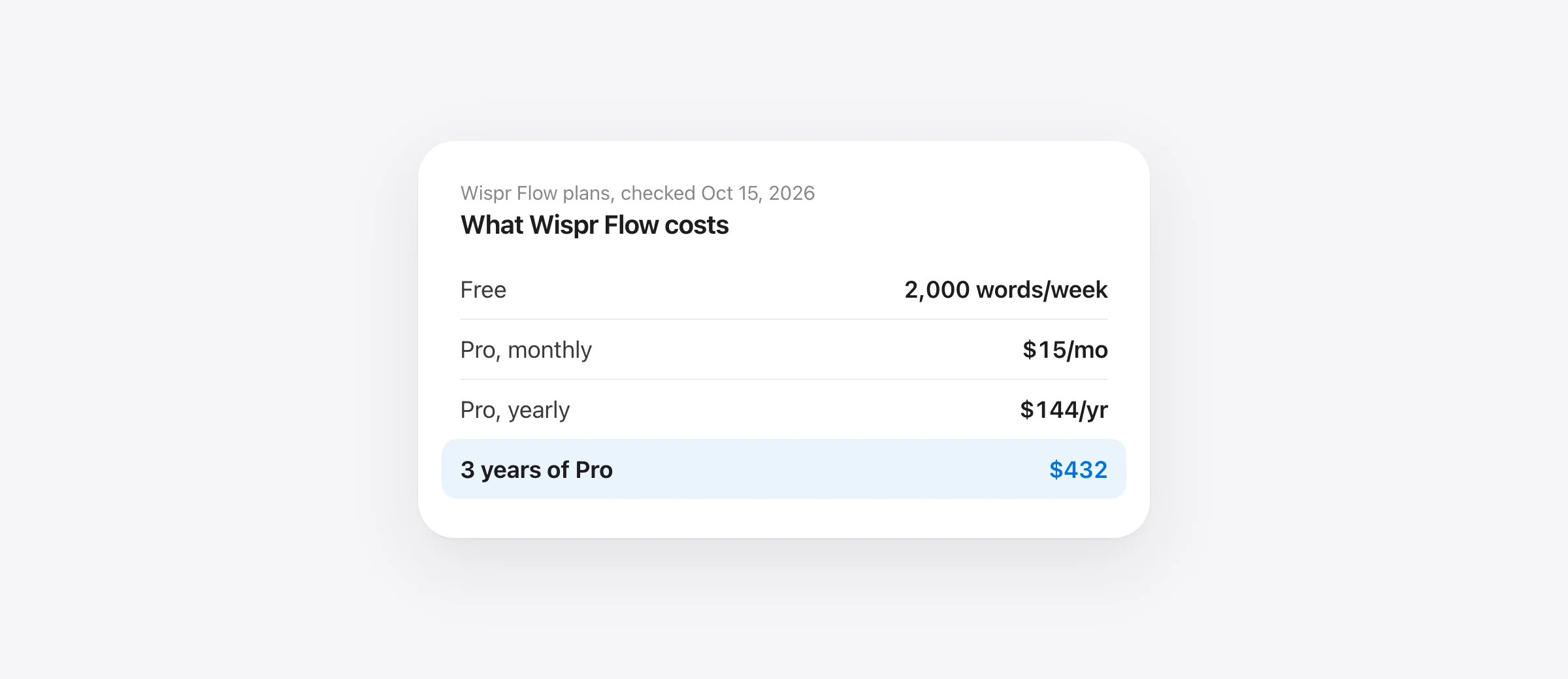
Wispr Flow pricing in 2026 is simple at the top: there’s a free plan, and Pro costs $15 a month, or $144 a year billed annually (the same as $12 a month). The free plan gives you 2,000 words a week on Mac and Windows and 1,000 a week on iPhone and Android; Pro removes the limit and adds Command Mode. New accounts get a 14-day Pro trial with no credit card, and students get 3 months of Pro free, then 50% off.
The short version (checked October 15, 2026)
- Free: $0, forever. 2,000 words a week on desktop, 1,000 on mobile, reset Sunday.
- Pro: $15/month or $144/year. Unlimited words, Command Mode, team features.
- Trial: 14 days of Pro, no card. 30 days through a referral link.
- Students: 3 months of Pro free, then $6/month billed yearly ($72/year).
- Teams: Pro per user with no seat minimum; Growth $18–26 per user per month yearly; Enterprise custom.
- Three years of Pro: $432 billed yearly, $540 billed monthly. No lifetime plan.
Below is every plan, the small print the pricing page leaves out (bonus words, mobile caps, taxes, refunds), and an honest answer to whether Pro is worth it for how much you actually dictate. We make Murmur, a Mac dictation app that competes with Wispr Flow, so every number here links back to Wispr’s own pages.
Wispr Flow pricing at a glance: every plan in 2026
| Plan | Billed monthly | Billed yearly | Who it’s for |
|---|---|---|---|
| Free | $0 | $0 | Light use: 2,000 words/week desktop, 1,000 mobile |
| Pro | $15/user | $144/user ($12/month) | Individuals and teams of any size |
| Pro Weekly (App Store only) | $4.49 a week | iPhone users who want short commitments | |
| Student | $7.50 | $72 ($6/month) | Verified students, after 3 free months |
| Growth: Dictation | $23/user | $216/user ($18/month) | Teams that need SSO, HIPAA enforcement, admin controls |
| Growth: Dictation + Notetaker | $33/user | $312/user ($26/month) | The same, plus unlimited Notetaker |
| Enterprise | Custom | Custom, annual only | SCIM, MDM, audit logs, invoicing, SLAs |
US prices from wisprflow.ai/pricing and Wispr’s plans article, checked October 15, 2026. The App Store lists Pro at $15.00 a month and $143.99 a year, plus the weekly plan and student plans at $7.49 a month or $72 a year.
Two things worth knowing up front. First, there is no lifetime or one-time plan. Second, older reviews and some of Wispr’s own past material call the free tier “Flow Basic”; today’s pricing page simply calls it Free. It’s the same plan.
If you’ve seen $144 a year quoted in older articles, including ours, it still holds: Wispr’s Pro price hasn’t changed since we last checked on October 11, 2026.
Is Wispr Flow free? What the free plan actually includes
Yes, Wispr Flow has a permanent free plan, and no credit card is needed to start. It isn’t a trial that runs out. It’s a weekly word allowance:
| Mac and Windows | iPhone and Android | |
|---|---|---|
| Weekly allowance | 2,000 words | 1,000 words |
| Hard maximum (with bonus words) | 5,000 words | 1,500 words |
| Resets | Sunday, 12 a.m. Pacific | Sunday (mobile count kept separately) |
| Unused words roll over? | No | No |
| At the limit | “Dictation limit reached” card | iPhone slows after 1,000, blocks at 1,500; Android blocks at 1,500 |
Desktop and mobile are counted separately, so a free user can dictate up to 2,000 words on a Mac and another 1,000 on a phone in the same week. Wispr sometimes grants bonus words (“Here are bonus words to keep dictating this week!”) that let you keep going past 2,000, up to the 5,000-word desktop maximum. You can’t buy them or count on them; they’re Wispr’s call.
Besides the words, the free plan includes dictation in 100+ languages in any app, the personal dictionary and snippets, learning of names and jargon, the option to opt out of model training, and limited access to Wispr’s Notetaker for meetings. What it doesn’t include is Command Mode, the feature that rewrites selected text from a spoken instruction. Wispr’s help center is blunt: on free and lapsed accounts the shortcut gets “no response or notification.”
How many minutes of dictation is 2,000 words a week?
Wispr counts words, but you experience it as time. Most people speak at roughly 130 to 150 words per minute when dictating normal prose, so here’s an estimate of what the free allowance buys (your pace and how much Flow trims your filler words will move these numbers):
| Allowance | At 150 wpm | At 130 wpm | Roughly equal to |
|---|---|---|---|
| 1,000 words (mobile) | 6.7 min/week | 7.7 min/week | 20 short texts of 50 words |
| 2,000 words (desktop) | 13.3 min/week | 15.4 min/week | 40 Slack messages, or 13 emails of 150 words |
| 5,000 words (desktop max) | 33 min/week | 38 min/week | Only with bonus words |
Put another way: the free plan is about 3 minutes of talking per workday. That covers someone who dictates the occasional message. It doesn’t cover anyone who has switched from typing to talking for real, because a single long email or a detailed AI prompt can be 300 to 500 words.
Wispr Flow Free vs Pro: what changes when you pay
| Free | Pro | |
|---|---|---|
| Price | $0 | $15/month or $144/year |
| Dictation | 2,000 words/week desktop, 1,000 mobile | Unlimited |
| Platforms | Mac, Windows, iOS, Android | Mac, Windows, iOS, Android |
| Command Mode (edit by voice) | No | Yes |
| Dictionary and snippets | Personal | Personal, plus shared with your team |
| Notetaker | Weekly meeting limit | Higher limits, longer history |
| Team workspace, billing, usage analytics | No | Yes |
| Support and new features | Standard | Priority support, early access |
The core speech recognition and AI cleanup are the same on both plans. You aren’t paying for better transcription; you’re paying to remove the cap, to edit by voice, and for team tools. That matters for the “is it worth it” question below.
Wispr Flow Pro pricing: monthly, annual or weekly?
Annual billing saves 20%: $144 a year instead of $180 (12 × $15), so $36 a year. Monthly makes sense for your first month or two after the trial, while you find out whether you really exceed the free cap every week. Once you know, annual is cheaper.
On iPhone, the App Store also sells a Pro Weekly plan at $4.49. That’s handy for a single heavy week, but kept for a year it comes to $233.48, more than either other option. Note that App Store subscriptions are managed and refunded by Apple, and they don’t earn referral credit.
One trap from Wispr’s plans article: switching billing interval (monthly to annual or back) can reset your billing cycle immediately and forfeit prepaid time. Upgrades take effect immediately with prorated charges; downgrades wait until the end of the period.
Wispr Flow free trial: how long it is and what happens after
- Standard trial: 14 days of Pro for new accounts, no credit card required.
- Referral trial: 30 days if you sign up through someone’s referral link.
- Student trial: 90 days (the “3 months of Pro for finals” offer).
- After the trial: if you haven’t paid, you get a 3-day grace period, then your account drops back to the free plan with its weekly limit. Your dictionary, snippets and history stay; Pro-only features come back if you upgrade later.
If you started a paid subscription during the trial, Wispr’s cancellation article says cancelling “stops the next renewal, including for an individual Pro subscription still in trial.” In other words, a subscribed trial renews unless you cancel. A trial you never added a card to simply ends.
Tip: use the trial on the busiest week you can. The question you’re testing isn’t “is Flow good?” (it is) but “do I go past 2,000 words a week?”. Check your word count in the app on day 7.
Wispr Flow student discount: free, 50% off or $72 a year?
Wispr’s pages describe the student offer three slightly different ways, so here is exactly what each says (checked October 15, 2026):
- Flow for Students page: “3 months of Flow Pro, then $6/month if you keep it,” billed annually, “50% off, just for students.” It auto-renews at the student rate unless you cancel.
- Pricing page: “Flow is free for everyone, students and non-profits included,” and students and educators with an education email get 50% off Pro.
- Help center plans article: lists a Student plan at $0 a year with everything in Pro for eligible students on Mac, Windows and iOS, claimed under Settings › Plans and Billing › Claim Free Plan. Where that free route doesn’t apply, paid student pricing is $7.50 a month or $72 a year.
Our reading: “free for students” means the free plan (which everyone gets), plus a 3-month Pro trial; the paid student rate is $72 a year, half of Pro. Some eligible accounts are routed to a free Student plan instead. Sign up with your .edu email, then open Plans and Billing to see which offer your account shows.
Eligibility: a .edu email activates the offer automatically. No .edu address, or studying online or outside the US? Wispr says you’re still eligible and accepts a student ID, enrollment confirmation, fee receipt or a screenshot of your student dashboard through support. Teachers, researchers and non-profit staff can apply for an educator or non-profit rate (Wispr doesn’t publish that price). Two catches from the help center: if you already pay for Pro through the App Store, you must cancel and let it expire first, and if you’re on a Pro trial, you must wait for it to end.
Wispr Flow for teams: Pro, Growth and Enterprise
| Pro | Growth | Enterprise | |
|---|---|---|---|
| Price per user | $12/month yearly, $15 monthly | $18–26/month yearly, $23–33 monthly | Custom |
| Seat minimum | None | Not stated | By contract |
| How you buy | Self-serve, card | Self-serve, card only | Sales; invoice or PO |
| Shared dictionary, snippets, central billing | Yes | Yes | Yes |
| SAML SSO, multiple domains | No | Yes | Yes |
| Org-wide HIPAA enforcement with BAA | BAA available | Yes | Yes |
| Model training on member data | Opt-out per user | Always off | Always off, in contract |
| SCIM, MDM, audit logs, SLAs | No | No | Yes |
The Growth range depends on whether you buy Dictation only ($216 per user per year) or Dictation plus Notetaker ($312). New team creators and joiners without a personal plan get a 14-day team trial; after it ends, admins have a 3-day grace period to add billing before members are removed. Wispr says it’s SOC 2 Type II audited and ISO 27001 audited, and that a HIPAA BAA covers dictation only. What those audits cover, and what Flow sends by default, is in our Wispr Flow safety review.
For budgeting: a five-person team on Pro billed yearly is $720 a year, or $2,160 over three years.
How to get Wispr Flow Pro for free (the legitimate ways)
There’s no secret coupon. These are the routes Wispr itself documents:
- The 14-day trial. Every new account gets it, no card needed.
- A friend’s referral link. Signing up through one gets you 30 days of Pro instead of 14.
- Referring others. You earn one month of Pro credit for each friend who dictates 2,000 words in total or starts a personal subscription (signing up alone doesn’t count). Credit applies as a billing discount, is capped at 1,000 referrals, and is banked if you’re on the free plan until you buy an individual plan on Wispr’s website. App Store, Google Play and Growth or Enterprise subscribers can send invites but earn nothing. Find your link under Flow Hub › Account › Refer a friend on Mac or Windows.
- The student offer. 3 months of Pro free with a .edu email, or the free Student plan if your account is routed to it.
- Ask support. Wispr says it will work with people with accessibility needs or financial hardship.
Wispr also runs occasional partner promotions, and its referral terms say promotional trials take precedence over referral trials. Anything else, especially “Wispr Flow Pro lifetime free” coupon pages, isn’t an official program; don’t hand your login to them.
Taxes, currencies and regional pricing
Wispr sets prices by the region you connect from, in 24 currencies, each with its own fixed list price rather than a live conversion from US dollars. Existing subscribers keep the price and currency they signed up with. Changing currency later goes through support, which cancels the subscription with a prorated refund and can trigger a new charge.
On tax, Wispr’s help center says it does not add VAT, GST or local sales tax at checkout, so the price you see is what you pay, and tax-exempt organizations pay the same amount. Its terms of service (updated August 19, 2026) still say you’re responsible for applicable taxes. Businesses can add a VAT, GST or ABN number at Stripe checkout so it appears on invoices. In App Store purchases, Apple sets local prices and handles tax.
How to cancel your Wispr Flow subscription (and refunds)
Cancel where you paid:
- Mac or Windows (card): open Flow, then Settings › Plans and Billing › Manage subscription. This opens Stripe’s billing portal, where you cancel. Team admins use Manage billing in the admin portal.
- iPhone (App Store): Settings › [your name] › Subscriptions › Wispr Flow › Cancel Subscription.
- Android (Google Play): Play Store › profile › Payments & subscriptions › Subscriptions › Wispr Flow › Cancel subscription.
Then check that the provider shows an end date. Pro stays active until the end of the period you paid for, then the account becomes free; nothing is deleted. Deleting your Wispr account or signing out does not cancel an App Store or Google Play subscription.
Refunds: Wispr’s terms say “Refunds are only issued if required by law.” The help center softens that a little: there’s no automatic prorated refund, but you can contact support to request one. Apple handles App Store refunds. If you only want to stop the next renewal, cancelling is enough; if you were charged for an annual renewal you didn’t want, contact support quickly. Wispr says it emails a reminder before annual plans renew.
What Wispr Flow actually costs you over 1, 2 and 3 years
A monthly price hides the real commitment. Here’s Wispr Flow’s cumulative cost at today’s US list prices, for one person (except the team row), with no price changes, no taxes and no referral credit:
| Plan | 1 year | 2 years | 3 years |
|---|---|---|---|
| Free | $0 | $0 | $0 |
| Student, paid rate ($72/yr) | $72 | $144 | $216 |
| Pro, billed yearly | $144 | $288 | $432 |
| Pro, billed monthly | $180 | $360 | $540 |
| Pro Weekly (App Store, 52 weeks) | $233 | $467 | $700 |
| Growth: Dictation, per user yearly | $216 | $432 | $648 |
| Team of 5 on Pro, yearly | $720 | $1,440 | $2,160 |
Another way to see it: if you’d dictate 3,000 words a week, just over the free cap, Pro’s $144 a year buys you about 52,000 extra words a year, or $2.77 per 1,000 words above the free limit. At 10,000 words a week (roughly 70 minutes of talking), the same $144 works out to about $0.35 per 1,000 extra words. Pro is great value for heavy users and poor value for people hovering around the cap.
Here’s how three years of Wispr Flow compares with the apps people usually weigh it against:
Sources: wisprflow.ai/pricing, aquavoice.com/pricing ($8/month yearly), superwhisper.com plans ($84.99/year), tryvoiceink.com ($25), saymurmur.app ($19). Checked October 15, 2026.
Show the numbers
| 3-year cost (USD) | |
|---|---|
| Wispr Flow Pro · monthly | $540 |
| Wispr Flow Pro · yearly | $432 |
| Aqua Voice Pro · yearly | $288 |
| Superwhisper Pro · yearly | $254.97 |
| VoiceInk · 1 Mac | $25 |
| Murmur · up to 3 Macs | $19 |
| Apple Dictation | Free |
Assumptions, stated plainly: prices stay where they are today (they may not); no taxes, promotions or referral credit; one user; paid plans only (each app also has a free option or trial). One-time apps assume you keep using the version you bought: VoiceInk advertises lifetime updates, and Murmur includes version 1 updates. The apps are not equivalent. Wispr Flow and Aqua Voice run in the cloud on several platforms; Murmur and VoiceInk are Mac-only and run on your Mac; Apple Dictation doesn’t clean up filler words on most Macs. Our guide to Mac dictation without a subscription goes deeper on what each one-time license includes.
Is Wispr Flow worth it? Who should pay and who shouldn’t
Start with how much you dictate in a normal week, because the free plan already gives you the full Wispr experience minus the cap and Command Mode.
| Your typical week | Approx. talking time* | Our take |
|---|---|---|
| Under 2,000 words | Under ~15 min | Don’t pay. The free plan covers you. |
| 2,000–5,000 words, some weeks | 15–38 min | Probably don’t pay yet. Bonus words may cover spikes; try monthly Pro for a heavy month. |
| 5,000+ words, every week | 35+ min | Pay, if you also want Wispr’s strengths below. Annual billing. |
| 15,000+ words (writing by voice daily) | 1.5+ hours | Pro is cheap per word. The question is privacy and platform, not price. |
*Estimated at 130–150 words per minute; your pace will differ.
Wispr Flow Pro is worth paying for if you:
- Dictate more than about 15 minutes a week, every week.
- Need it on Windows, iPhone or Android as well as a Mac, with one subscription. That’s where Wispr is hardest to beat.
- Want Command Mode to rewrite text by voice, or the Notetaker for meetings.
- Buy for a team and need shared dictionaries, SSO, a HIPAA BAA or SOC 2 paperwork.
- Are fine with cloud processing. Wispr’s documentation says transcription always happens in the cloud.
It’s probably not worth it if you:
- Stay under 2,000 words a week. You’d be paying $144 a year for headroom you don’t use.
- Work on one Mac and want dictation that works offline, or that never sends audio or on-screen text off your computer.
- Dislike subscriptions. Over three years, Pro billed yearly costs more than 20 times as much as a $19 one-time app.
- Are a student. Use the student offer instead of paying full price.
For a fuller picture of the trade-offs (privacy defaults, context awareness, account requirements), see our Apple Dictation vs Wispr Flow comparison, which tests whether the free option built into macOS is enough.
Is there a cheaper alternative to Wispr Flow?
Yes, at every price point, though each gives something up:
- Apple Dictation (free): built into every Mac, on-device on Apple silicon, no limit. It types what you said, filler words included.
- Aqua Voice ($8/month yearly): the cheapest Wispr-style cloud app, 1,000 free words to start.
- Superwhisper ($84.99/year or $249.99 lifetime): local or cloud models, Mac, Windows and phones, with a free local tier and 40% off for students.
- VoiceInk ($25 once): open source, local, Mac-only; AI cleanup needs your own API key or a local model.
- Murmur ($19 once, made by us): hold-to-talk dictation with on-device AI cleanup and voice editing, Mac-only, macOS 26 and Apple silicon required, no iPhone or Windows app and no team plan.
We compare them in detail, including what you lose by leaving Flow, in 7 Wispr Flow alternatives for Mac. If you’re still choosing your first app, start with the best dictation apps for Mac.
Frequently asked questions
How much is Wispr Flow?
Wispr Flow has a free plan. Pro costs $15 per month, or $144 per year billed annually ($12 a month). Team plans start at the same Pro price per user, Growth costs $18 to $26 per user per month billed yearly, and Enterprise is custom. Prices were checked on wisprflow.ai on October 15, 2026.
Is Wispr Flow completely free?
No. The free plan is permanent but limited: 2,000 words a week on Mac and Windows and 1,000 a week on iPhone and Android, counted separately and reset every Sunday. Command Mode, unlimited dictation and the team features need Pro or an active trial.
How do I get Wispr Flow Pro for free?
Use the 14-day Pro trial that every new account gets, sign up through a friend’s referral link for a 30-day trial, or sign up with a .edu email for the student offer. Existing users earn one month of Pro credit for each friend who dictates 2,000 words. Coupon sites promising “lifetime free Pro” are not a Wispr program.
Does Wispr Flow have a student discount?
Yes. Wispr’s student page offers 3 months of Pro free, then 50% off ($6 a month billed annually). The help center also describes a free Student plan with Pro features for eligible accounts. Sign up with your .edu email and check Settings › Plans and Billing to see which one your account gets.
Is there a cheaper alternative to Wispr Flow?
Yes. Apple Dictation is free on every Mac, Aqua Voice Pro is $8 a month billed yearly, Superwhisper Pro is $84.99 a year, and VoiceInk ($25) and Murmur ($19) are one-time purchases. They differ in platforms, privacy and AI cleanup, so cheaper is not automatically equivalent.
Can I get a refund on Wispr Flow?
Not automatically. Wispr’s terms say refunds are only issued if required by law, and its help center says there is no automatic prorated refund but you can ask support. App Store purchases are refunded through Apple. When you cancel, Pro stays active until the end of the period you paid for.
Does Wispr Flow have a lifetime plan?
No. As of October 15, 2026, Wispr Flow is subscription-only: monthly, yearly, or a weekly plan sold in the iPhone App Store. If you want to pay once, look at Superwhisper’s lifetime plan or one-time apps such as VoiceInk or Murmur.
Sources
- Wispr Flow: Pricing
- Wispr Flow Help Center: Flow plans and what’s included
- Wispr Flow Help Center: Free tier weekly word cap and bonus words
- Wispr Flow: Flow for Students
- Wispr Flow: Flow for Business
- Wispr Flow Help Center: Referral program
- Wispr Flow Help Center: Manage billing, invoices and cancellation
- Wispr Flow Help Center: Canceling your subscription
- Wispr Flow Help Center: VAT, GST and tax on invoices
- Wispr Flow Help Center: Command Mode
- Wispr Flow: Terms of Service (updated August 19, 2026)
- Wispr Flow on the App Store (in-app purchases)
- Superwhisper: Plans
- Aqua Voice: Pricing
- VoiceInk: Pricing

Telman Gadimov builds Murmur, a dictation app for Mac that runs entirely on-device. We make Murmur, a one-time-purchase Mac dictation app that competes with Wispr Flow. Every Wispr price and limit here was checked on Wispr’s own pages on October 15, 2026; cost projections are arithmetic at those prices, not a promise about future pricing.


