The practical choice
- Choose VoiceInk to evaluate local models and configurable providers. Account for setup time and any cloud usage fees.
- Choose Wispr Flow to evaluate a packaged cloud workflow. Test the devices you actually use, including any Windows or Android work.
- Include Murmur if you want focused local Mac writing. It bundles on-device speech and AI without a provider catalog.
VoiceInk vs Wispr Flow is largely a choice between configuring a Mac workflow and subscribing to a packaged service. Either can be a reasonable purchase. The right answer depends on what you want to configure, where you write, and what must work without the network.
Compare three costs: money, setup effort and correction effort. A cheap license is not a saving if the selected model struggles with your everyday vocabulary. A convenient subscription is not useful if your main requirement is local processing.
VoiceInk vs Wispr Flow: the decision table
| Question | VoiceInk | Wispr Flow |
|---|---|---|
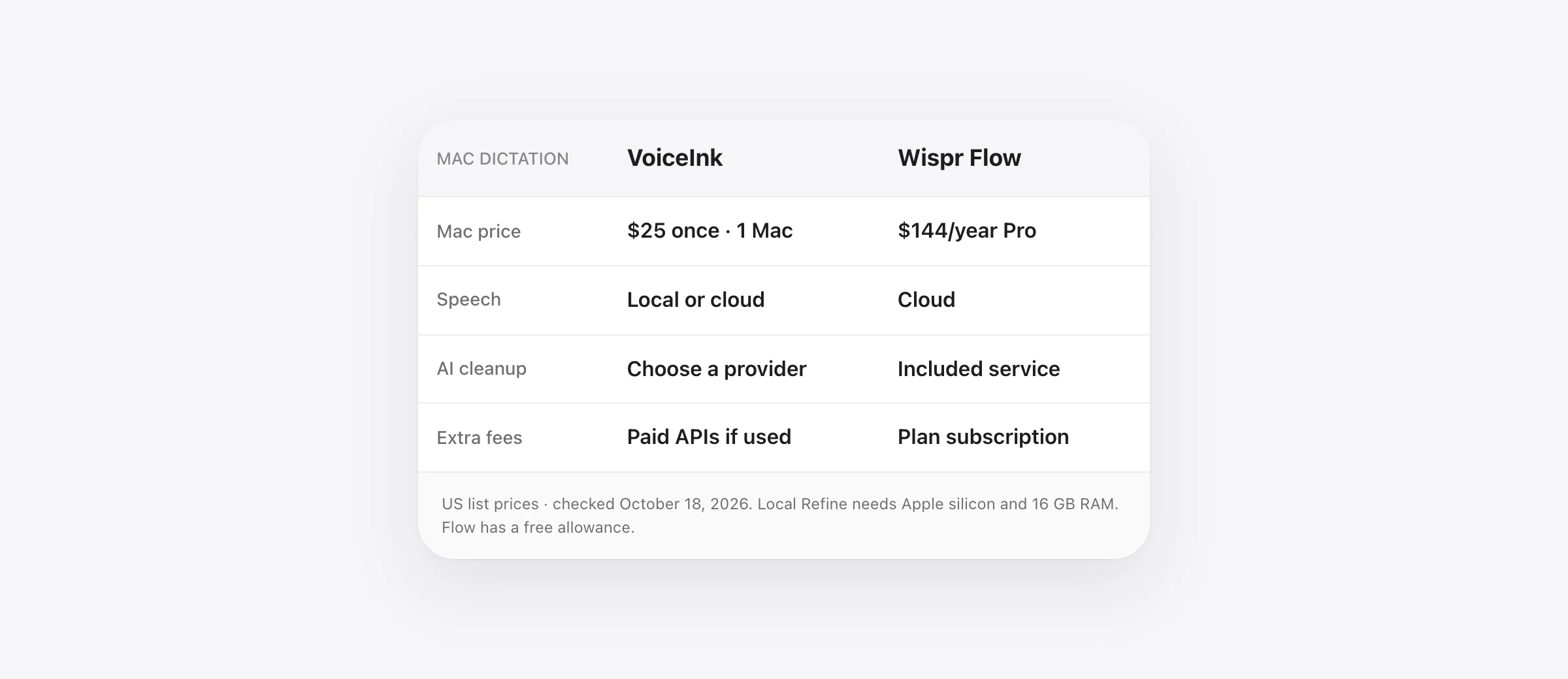
| How is Mac access sold? | $25 / $39 / $49 once for 1 / 2 / 3 Macs | Free allowance or Pro subscription |
| Where does speech run? | Selected local model or cloud provider | Cloud service |
| What about AI cleanup? | Separate enhancement choice; Refine is local with hardware limits | Part of the packaged service |
| What adds ongoing cost? | Any separately billed cloud providers you choose | Pro: $15/month or $144/year |
| What should you test first? | Your model, enhancement and output settings together | Your actual writing apps and device mix |
US-dollar prices checked October 18, 2026, excluding promotions and tax. Sources: VoiceInk and Flow. VoiceInk's Mac device tiers do not establish that a separate mobile purchase is included.
Compare the cost of your actual configuration
At unchanged list prices, two years of Flow Pro billed annually would be $288. VoiceInk Solo's listed Mac license is $25 once. The arithmetic difference is $263 before tax, provider usage or changes in pricing. It is a license-cost comparison, not a claim that the products include the same services.
A local-only VoiceInk setup avoids usage charges for hosted speech or enhancement. If you attach paid providers, add those bills. For an illustrative budget, a $25 license plus $5 a month in external usage totals $145 over two years. That $5 is a hypothetical allowance, not a measured VoiceInk bill or a provider quote.
Flow's free plan changes the calculation for occasional use. Do not compare a paid VoiceInk license only against Pro if your writing already fits a free allowance. Conversely, do not assume free usage will cover daily long-form work without measuring how much you dictate.
Our Wispr Flow pricing guide explains the difference between annual commitment, monthly billing and limited free access. If the subscription is your main concern, compare the wider no-subscription Mac dictation options too.
VoiceInk gives you separate processing choices
VoiceInk's data documentation separates speech transcription, text enhancement and Dictionary Auto Learn. Local transcription keeps that speech step on the Mac. A cloud speech provider receives audio; a cloud enhancement provider receives the transcript and enabled context. Auto Learn has its own selected review provider.
That separation is useful when you want control, but it also creates a configuration responsibility. For an on-device workflow, choose local speech, use no enhancement or a compatible local option, and disable Auto Learn or configure its local review route. A locally launched CLI can still contact a network service.
Write down your chosen pipeline in one sentence before testing: local speech, local cleanup, paste into Outlook, for example. If you cannot describe the pipeline, a surprising result will be harder to diagnose.
Local cleanup: check Refine's requirements
VoiceInk Refine is a text enhancement model, separate from the speech model. It requires Apple silicon and at least 16 GB RAM. Download it and configure it as an enhancement provider in a mode.
Its cleanup task is fixed: punctuation, capitalization, fillers, repetitions and spoken corrections. It does not take custom prompts, selected text, clipboard context or screen context. If you want to transform a rough thought into a specific response using surrounding material, that is a different enhancement requirement.
This creates a useful trial question: does the fixed cleanup produce an acceptable draft for your work? If yes, elaborate prompts may be unnecessary. If no, identify the missing behavior before adding a different provider. Changing speech and enhancement simultaneously makes it harder to see which change helped.
For comparison with another configurable app, see VoiceInk vs Superwhisper. If you already own VoiceInk, the VoiceInk switching guide starts with the settings worth preserving.
Flow removes some provider decisions, but still has privacy settings
A packaged cloud service can fit someone who wants to use dictation across their devices without choosing separate model providers. The convenience matters most when it removes work you repeat: maintaining keys, comparing models or rebuilding a routine on a second operating system.
Privacy still requires an explicit check. Flow's current security documentation distinguishes model improvement from Dictation Cloud Storage. Turning off model improvement does not disable storage or erase local history. Cloud processing also remains necessary to produce the transcript.
Check the settings on the account you will actually use, especially when it belongs to an organization. A managed account can have enforced choices. Compare what is enabled rather than relying on an older article's screenshot or a general privacy label.
Verify your Mac before buying a local setup
VoiceInk's public requirements are inconsistent: its homepage says Apple silicon and macOS 14.4 or later, while its installation guide says macOS 15 or later and recommends cloud transcription on Intel because local models are unreliable there. Confirm the current build against your exact Mac before purchasing.
The installation guide also gives feature-specific limits: Apple Speech needs macOS 26 or later, and Refine requires Apple silicon with 16 GB RAM. Being able to install an app and being able to run the model you want are separate checks.
Record your chip, macOS version and memory in the trial notes. Then test the model you intend to keep. A successful cloud demonstration on older hardware does not establish that the desired local configuration will work.
Try these three tasks before choosing
Use this original exercise to compare complete drafts. It is not a reported benchmark. Give each app a short setup period, then keep the microphone and room unchanged. Leave automatic sending or command execution disabled during the exercise.
| Task | Proposed passage | Check before accepting |
|---|---|---|
| Customer email | “The quote is 450 dollars, excluding the additional migration. Please confirm before we schedule the work.” | The amount, exclusion and need for confirmation |
| Project update | “First, review the import. Second, ask Mina about the mapping. Third, hold the release until the test passes.” | Order, name and release condition |
| Technical prompt | “Explain the failing test before editing. Keep the public function signature unchanged.” | The request to explain first and the constraint on edits |
Measure the time from starting the task to a draft you would use. Include manual corrections and repeated attempts. Also record meaning errors separately: a changed amount or missing condition matters more than a harmless formatting preference.
For VoiceInk, note the speech and enhancement model with every result. For Flow, note the device, target app and relevant settings. Otherwise, “it worked yesterday” provides little help when you try to reproduce the same result.
Finally, repeat the local workflow with networking off after downloads finish. Use a local document so a mail application's connection state does not confuse the result. If offline operation is a purchase requirement, this is a pass-or-fail check.
When Murmur belongs in this comparison
Murmur is for someone who wants on-device speech and AI writing in a focused Mac app. Hold right Command to dictate into the active field; use right Option to edit selected text by voice. It does not offer VoiceInk's provider catalog or Flow's cross-platform scope.
The price is $19 once for up to three Macs. The first 2,000 words are free without an account. Requirements are Apple silicon and macOS 26 or later; AI features need Apple Intelligence enabled. Download the speech assets before offline use. The purchase includes version 1 updates, with future major-version terms explained in the license.
Try it if your goal is fewer configuration decisions for messages, email and notes. Choose a broader product if its additional models, platforms or workflows solve work you actually have. The same three passages above make a useful comparison.
Frequently asked questions
Is VoiceInk better than Wispr Flow?
VoiceInk is worth evaluating if local models, provider selection and a one-time Mac license matter. Flow is worth evaluating if you want a packaged cloud workflow across Mac, Windows and mobile devices. Compare the finished text and configuration effort on your own tasks.
Can VoiceInk run entirely offline?
A suitable configuration can: use local transcription, no enhancement or compatible local enhancement, and disable Dictionary Auto Learn or give it a local review model. Download the required assets first. A local speech model alone does not make every optional feature offline.
Does VoiceInk include local AI cleanup?
VoiceInk Refine is a separate local text enhancement model requiring Apple silicon and at least 16 GB RAM. It performs a fixed cleanup task and does not accept custom prompts or context. Choose a different compatible provider if your workflow requires those features.
Is VoiceInk cheaper than Wispr Flow?
At the October 18, 2026 public prices, VoiceInk's Mac licenses were $25, $39 or $49 once for one, two or three Macs. Flow Pro was $15 monthly or $144 annually. VoiceInk cloud providers can add separate usage fees, while Flow also offers a limited free plan; compare the configuration you will actually use.
What Mac does VoiceInk require?
The public homepage says Apple silicon and macOS 14.4+, while the installation documentation says macOS 15+ and recommends cloud transcription on Intel. Apple Speech needs macOS 26+ and Refine needs 16 GB RAM. Verify the current download and your chosen model before purchasing.
Sources

Telman Gadimov builds Murmur, a dictation app for Mac that runs entirely on-device. We make Murmur, one alternative discussed here. Public vendor documentation was checked October 18, 2026. Cost examples are arithmetic, not billing forecasts. We have not run a controlled accuracy or latency comparison.


