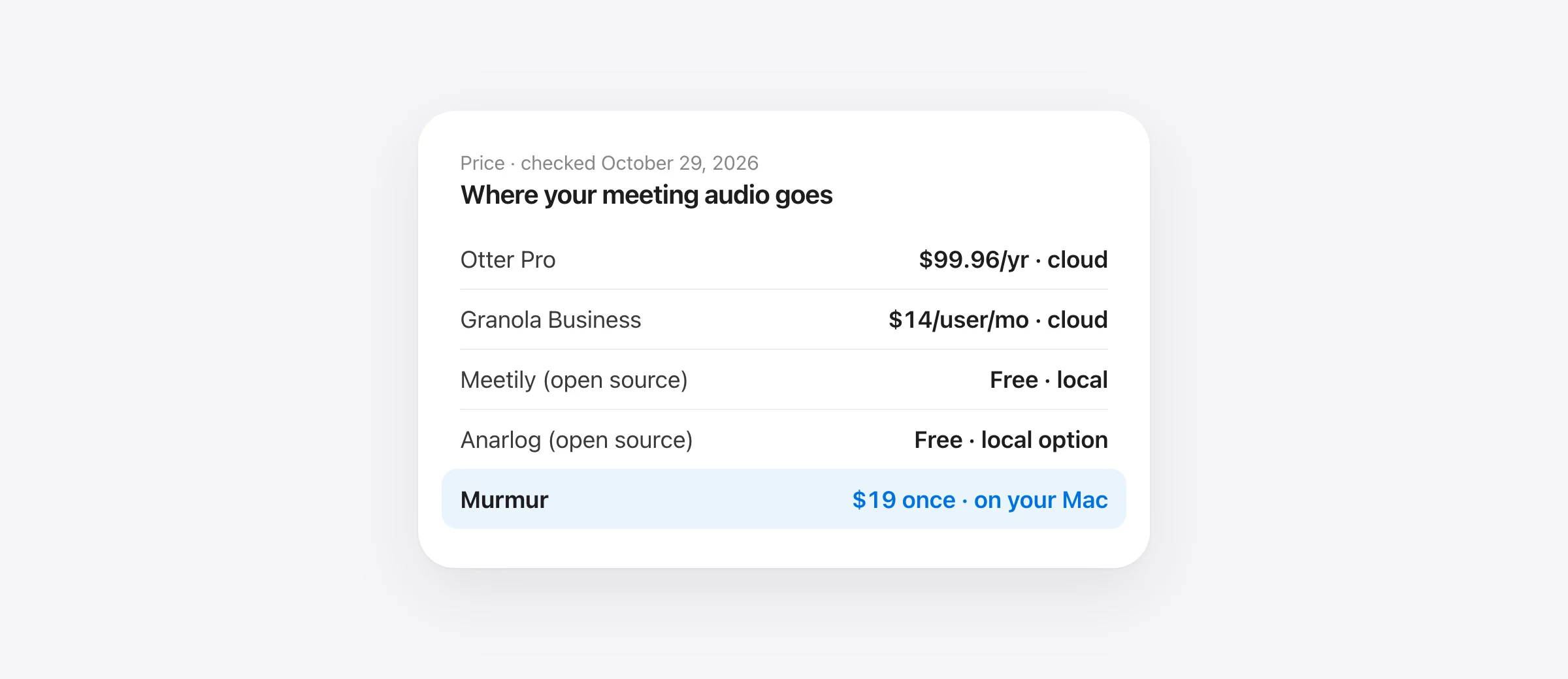
The best alternatives to Otter.ai for AI note taking in 2026, in one list
- Best overall for Mac users who want privacy: Murmur. No bot, the whole meeting is transcribed and summarized on your Mac, and it’s $19 once instead of $100–$240 a year.
- Free and open source: Meetily or Anarlog. Local transcription, more setup.
- You also transcribe interviews and video files: MacWhisper.
- Cloud is fine, you just want no 30-minute cap: Fathom (free) or Granola (no bot).
- Your company already pays for Microsoft 365: try Teams’ built-in transcription before buying anything.
Every price and policy below was checked on the vendor’s own pages on October 29, 2026.
Otter.ai made AI meeting notes mainstream: a notetaker joins your Zoom, Teams or Google Meet call, and a transcript and summary land in your inbox. It’s still a capable product. But most people searching for an Otter alternative want one of four things it doesn’t give them: longer free meetings, no bot in the call, audio that stays on their own computer, or no subscription. This guide sorts the options by which of those you care about.
Why people switch from Otter.ai
- The free plan runs out fast. Otter Basic gives 300 transcription minutes a month and cuts each conversation at 30 minutes. Most real meetings are longer than that. Pro raises it to 1,200 minutes and 90 minutes per conversation.
- The bot. Otter Notetaker joins calls as a participant that everyone can see, and once your calendar is connected it can join meetings automatically. Several universities now publish guides on stopping it from showing up uninvited. Otter’s desktop app for Mac and Windows can record “without a bot”, but the bot is still how most people meet Otter.
- Your meetings live in Otter’s cloud. Otter’s privacy policy names Amazon Web Services in the US for storage, and says Otter trains its own AI “on de-identified audio recordings and on transcriptions”. In August 2025 a proposed class action, Brewer v. Otter.ai, alleged that people in meetings were recorded without consent and without being told the recordings could train Otter’s models, NPR reported. Those are allegations, not findings, but the case is why many people started reading the fine print.
- The subscription keeps going. Pro is $16.99 a month, or $8.33 a month billed yearly. Business is $19.99 a month per user billed yearly. For one person taking notes on their own calls, that adds up.
| Otter plan | Price | Minutes per month | Longest conversation |
|---|---|---|---|
| Basic | Free | 300 | 30 minutes |
| Pro | $16.99/mo, or $8.33/mo billed yearly | 1,200 | 90 minutes |
| Business | $19.99/user/mo billed yearly | Unlimited | 4 hours |
| Enterprise | Contact sales | Unlimited | 4 hours |
Otter.ai alternatives compared
| Bot in the call | Where audio is transcribed | Free option | Paid | Platforms | |
|---|---|---|---|---|---|
| Otter.ai | Yes (desktop app can skip it) | Cloud | 300 min/mo, 30 min each | From $8.33/mo yearly | Web, Mac, Windows, mobile |
| Murmur | No | On your Mac | Trial, 2,000 words | $19 once | Mac (Apple silicon) |
| MacWhisper | No | On your Mac | Free tier | €64 once | Mac |
| Meetily | No | On your computer | Free, MIT | Pro $10/mo | Mac (Apple silicon), Windows |
| Anarlog | No | Local or your API key | Free, MIT | None | Mac; Windows, Linux beta |
| Granola | No | Cloud | 30-day history | $14/user/mo | Mac, Windows, iPhone |
| Fathom | Bot, or bot-free beta on Mac | Cloud | Unlimited recordings | From $16/mo yearly | Zoom, Meet, Teams |
| Teams transcription | No, built in | Microsoft cloud | With your Microsoft 365 plan | Included | Teams only |
| Apple Notes | No | On your Mac | Free | None | Mac with M1 or later |
Best private Otter.ai alternative for Mac
1. Murmur: your meetings never leave your Mac
Price: $19 once, up to 3 Macs, meeting notes and dictation included; first 2,000 words free with no account. Needs: an Apple silicon Mac with macOS 14 or later. AI summaries need macOS 26 with Apple Intelligence.
We make Murmur, so weigh this section accordingly. Here’s why we think it’s the best swap for anyone who uses Otter mostly for their own calls.
Nothing joins your call. When Zoom, Google Meet, Microsoft Teams, FaceTime, Slack or a browser call starts using the microphone, Murmur asks whether to take notes. Click yes, or press ⌃⌥M any time, including for an in-person meeting. There’s no “Notetaker” tile and no calendar access to grant.
It records the call properly. Your microphone and the call audio are captured as two separate tracks on the Mac. That means Murmur knows which lines are yours, and the other people are captured clearly even when you wear headphones. Voices are labelled on the Mac: you’re “You”, everyone else is Speaker 1, 2 and so on, and you can rename a speaker once for the whole meeting.
You get notes, not just a transcript. After the call, Apple Intelligence writes a summary on your Mac: a short overview, action items (with owners and due dates when someone said them), decisions and topics. Notes are searchable, and one click copies a meeting as Markdown, ready for Notion, Obsidian, a ticket or an email.
Private by default, not by setting. Speech recognition, speaker labels and the summary all run on the Mac. Murmur has no account, no analytics and no server that could receive your audio, and it works in Airplane Mode. Recordings delete themselves after 7 days by default (you can choose never to keep them, or 30 days, or forever), while your notes and transcripts stay.
It speaks your languages. Pick Parakeet for English or 25 European languages, or Whisper large-v3 turbo for 99 languages, and Murmur detects which one you’re speaking.
And it’s also a dictation app. The rest of the day, hold the right ⌘ key, talk, and let go: polished text appears in whatever app has the cursor. Otter doesn’t do that at all. See how Murmur compares with other Mac dictation apps.
| What you pay | 1 year | 3 years |
|---|---|---|
| Otter Pro, monthly | $203.88 | $611.64 |
| Otter Pro, yearly | $99.96 | $299.88 |
| Otter Business, yearly (1 user) | $239.88 | $719.64 |
| Murmur | $19 | $19 |
What you give up vs Otter: Murmur is a Mac app for one person. There’s no web app, no Windows or phone version, no shared team workspace, no calendar, and no CRM or Slack integrations; you share notes by copying them. It doesn’t transcribe imported audio or video files. Recording call audio needs macOS 14.2 or later, and on macOS 14 and 15 you get transcripts without AI summaries. If your team relies on shared Otter channels, that’s a real loss. If you mostly want good notes on your own calls, it isn’t.
2. MacWhisper: one-time, if you also transcribe files
Price: free tier; Pro €64 once. MacWhisper records Zoom, Teams, Webex, Discord and other calls without a bot, detects when a meeting starts and ends, transcribes with local Whisper models and labels speakers. Summaries can use a local model through Ollama or LM Studio, or a cloud provider you pick. Its real strength is files: if you also transcribe interviews, lectures or podcasts, it’s the better tool for that job. Check which meeting features need Pro before relying on the free tier. Our MacWhisper vs Superwhisper comparison goes through its editions.
Free and open-source Otter.ai alternatives
Searches for “otter ai alternatives open source” and “otter ai local alternative” keep landing on the same two GitHub projects. Both record your mic and system audio with no bot and can run entirely on your computer.
3. Meetily
Price: Community Edition free; Pro $10 per user per month. License: MIT. Platforms: installers for Apple silicon Macs and Windows. Meetily transcribes locally with Whisper or Parakeet and summarizes with Ollama by default, or with Claude, OpenAI or others if you add a key. Speaker labels, custom summary templates and automatic meeting detection are Pro features, so the free edition is the most hands-on option here.
4. Anarlog (formerly Hyprnote)
Price: free. License: MIT. Platforms: most mature on macOS; Windows and Linux in beta. The project, at fastrepl/anarlog, was called Hyprnote, then Char, and became Anarlog in May 2026. It transcribes on-device on supported Macs and can summarize with Ollama, LM Studio or your own API key. The team says it’s maintained, but its main focus has moved to a separate app, so expect less polish.
Both are good if you enjoy setting things up. If you want local transcription and on-device summaries that work the moment you install, that’s the gap our bot-free note taker guide shows Murmur filling.
Cloud alternatives to Otter
If you’re fine with the cloud and just want better limits or no bot, these are the closest swaps.
5. Granola: no bot, still the cloud
Price: Basic free with 30 days of visible history; Business $14 per user per month. Granola records your device’s audio instead of sending a bot, and fills in your rough notes from the transcript. It transcribes on its servers, so it needs the internet, and notes are stored in the US until you delete them. Our Granola alternatives guide covers its trade-offs in detail.
6. Fathom: the most generous free plan
Price: Free plan with unlimited recordings and transcriptions; Premium $16 a month billed yearly ($20 monthly); Team $15 per user per month yearly with a 2-user minimum. Fathom joins as a bot by default, with a bot-free option in beta on Mac. Some AI features are limited on the free plan. If Otter’s 30-minute cap is your only problem, this is the cheapest fix, but your meetings still go to Fathom’s cloud.
7. Microsoft Teams transcription: if you already pay for it
People searching “otter ai alternatives microsoft” usually already have it. Teams can transcribe a meeting from More actions › Transcribe, and transcription starts automatically when a meeting is recorded. The organizer and people from the same organization can start it; guests can’t. Transcripts are saved to the organizer’s OneDrive and show up in the meeting’s Recap tab. Translated transcripts and some permission controls need Teams Premium. It only works in Teams meetings, and your IT admin decides whether it’s on.
8. Apple Notes: free, for simple recordings
On a Mac with M1 or later, Notes can record audio inside a note and show a searchable transcript, and with Apple Intelligence it can summarize it. It’s free and processed on your Mac. It isn’t built for calls, though: it records through the microphone, doesn’t separate speakers, and the transcript is limited to a list of supported languages. Fine for a lecture or a one-on-one in a room. For calls, a dedicated app does much better.
Also considered: Fireflies joins calls as a bot and offers a Chrome extension that records without it. Its pricing page didn’t list prices or free-plan limits when we checked, so we left it out of the table.
How to switch from Otter without losing anything
- Export what you need. Open each conversation you want to keep and export its transcript and summary. Check what your plan allows before you cancel.
- Stop the bot. In Otter, go to Account Settings › Meetings and turn off auto-join, or switch to meetings you select manually. Events you toggled by hand keep their own setting, so check your calendar too. If it still shows up, disconnect your Google or Microsoft calendar from Otter.
- Run one real call in the new app. Use a call with at least two other people and check that it caught their voices, not only yours. On a Mac, that means granting the app permission to record system audio.
- Check the details. Compare names, numbers, dates and action items against what was actually said. A tidy summary that drops “not before Friday” is worse than a messy one.
- Test offline if privacy is the reason. Turn off Wi-Fi after the models download and record a short test. If it fails, the app depends on the cloud. The offline dictation guide uses the same test.
- Tell people you’re taking notes. With no bot in the call, nobody is notified automatically. Recording laws differ by place, and some require everyone’s consent.
Which Otter.ai alternative should you pick?
- You take notes on your own calls, on a Mac, and care where the audio goes: Murmur. One payment, no bot, nothing uploaded, and you get dictation too.
- You want free and don’t mind tinkering: Meetily or Anarlog.
- You mostly transcribe files: MacWhisper.
- Your team shares notes across Windows and Mac: Granola or Fathom, or Teams if that’s where you meet.
Frequently asked questions
What is the best free alternative to Otter.ai?
For privacy, Meetily’s Community Edition and Anarlog: both are free, open source and can transcribe on your own computer without a bot. For a cloud tool, Fathom’s free plan lists unlimited recordings and transcriptions, against Otter Basic’s 300 minutes a month and 30 minutes per conversation. On an Apple silicon Mac, Notes can also record and transcribe audio for free.
Is there an Otter.ai alternative that works offline?
Yes. Murmur transcribes calls on your Mac and works in Airplane Mode once its speech model is downloaded. MacWhisper with local models, Meetily and Anarlog with local models also transcribe on the computer. Otter, Granola and Fathom need an internet connection because transcription happens on their servers.
Is there an open-source Otter.ai alternative?
Meetily (github.com/Zackriya-Solutions/meetily) and Anarlog (github.com/fastrepl/anarlog) are both MIT licensed. They record your microphone and system audio without joining the call as a bot, transcribe locally, and can summarize with a local model through Ollama. Meetily has installers for Apple silicon Macs and Windows; Anarlog is most mature on macOS.
Does Otter.ai use my recordings to train AI?
Otter’s privacy policy says it trains its proprietary AI on de-identified audio recordings and transcriptions. A proposed class action filed in August 2025 (Brewer v. Otter.ai) alleges people in meetings were recorded without their consent and without being told recordings could train Otter’s models. The case had not been decided in the reports we checked.
How do I stop Otter from joining my meetings?
In Otter, open Account Settings › Meetings and turn off auto-join for all meetings, or choose only meetings you select manually. Events you changed by hand keep their own setting, so check your calendar too. If it still appears, disconnect your Google or Microsoft calendar from Otter.
Sources
- Otter: pricing and plan limits
- Otter: desktop app
- Otter: privacy policy
- NPR: Lawsuit claims AI service Otter secretly records private chats (Aug 15, 2025)
- Carleton College: what you should know about Otter AI’s Notetaker
- MacWhisper
- Meetily on GitHub
- Meetily pricing
- Anarlog on GitHub
- Anarlog: Char is now Anarlog
- Granola: pricing
- Granola: security, privacy and data FAQs
- Fathom: pricing
- Microsoft Support: live transcription in Teams meetings
- Apple: Record and transcribe audio in Notes on Mac
- Fireflies: pricing
Telman Gadimov builds Murmur, a dictation app for Mac that runs entirely on-device. We make Murmur, our first pick. Otter and competitor facts were checked on official pages, help centers and repositories on October 29, 2026; the lawsuit details come from NPR’s report. We did not run an accuracy benchmark across these meeting apps, and Murmur is not the right fit for every team.


