The short version
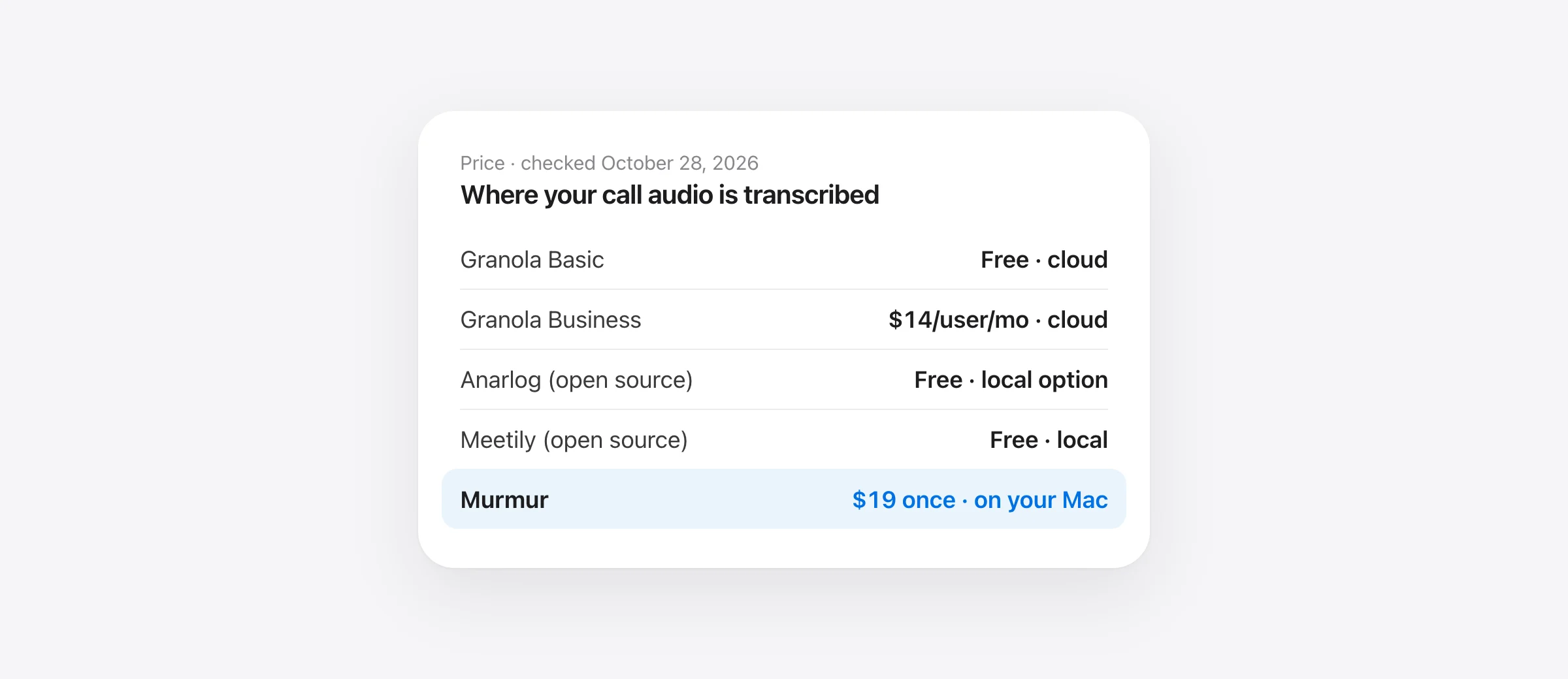
- No subscription, audio never leaves the Mac: Murmur, $19 once. Or MacWhisper (€64 once) if you also transcribe files.
- Free and open source: Anarlog (formerly Hyprnote) or Meetily. Both are MIT licensed and can transcribe locally.
- Closest to Granola, imports your history: Wispr Flow Notetaker. Still a cloud service.
- Cloud is fine, but you want EU hosting: Jamie. Team already lives in Notion: Notion AI Meeting Notes.
Before you switch, export your Granola notes (Settings → Profile → Generate CSV). The export includes notes older than the 30 days the free plan shows.
This guide is about Granola the AI meeting notepad (granola.ai), not the breakfast food. Every price and policy below was checked on the vendor’s own pages on October 28, 2026.
Why people look for a Granola alternative
Granola got popular for a good reason: it doesn’t send a bot into your call. It records your mic and your computer’s audio, you type rough notes, and it fills them in from the transcript afterward. The reasons people leave are usually one of these four.
- Price. The free Basic plan has unlimited meetings, but only shows 30 days of history and limits AI chat to automatic model choice. Business is $14 per user per month and unlocks full history, Notion, Zapier and HubSpot integrations, pre-meeting briefs and API access. Enterprise is $35. The pricing page lists no yearly discount.
- Audio leaves your device. Granola says it “captures on the device and processes in the cloud.” On Mac and Windows it transcribes in real time on its servers, and it “needs an internet connection to transcribe meetings and generate notes.” Audio is deleted after transcription, but notes and transcripts sit on AWS in the US indefinitely unless you set an auto-delete period. There is no EU data residency.
- You want free or open source. Granola is closed source. Data use for model improvement is on by default on Basic and Business, and you opt out per user.
- Platforms and teams. Granola runs on Mac, Windows, iPhone and Apple Watch, and on Android since July 1, 2026, but Android only captures in-person conversations. Calls are recorded from the desktop apps. Workspace-wide training opt-out, retention rules and SSO are Enterprise features.
| Granola | Basic (free) | Business |
|---|---|---|
| Price | $0 | $14 per user per month |
| Meeting history | 30 days | Unlimited |
| Bot in the call | No | No |
| Transcription | Cloud, needs internet | Cloud, needs internet |
| Audio kept | No, deleted after transcription | No |
| Model-improvement data use | On by default, per-user opt-out | On by default, per-user opt-out |
| Notion, Zapier, HubSpot | No | Yes |
Granola alternatives compared
| Bot-free | Transcribes | Free option | Paid | Platforms | |
|---|---|---|---|---|---|
| Granola | Yes | Cloud | 30-day history | $14/user/mo | Mac, Windows, iOS, Android* |
| Murmur | Yes | On your Mac | Trial, 2,000 words | $19 once | Mac (Apple silicon) |
| MacWhisper | Yes | On your Mac | Free tier | €64 once | Mac |
| Jamie | Yes | Cloud (EU, UK, CH) | 10 notes/mo, 30 min | From €21/mo | Mac, Windows, iOS, web |
| Anarlog | Yes | Local or your API key | Free, MIT | None | Mac; Windows, Linux beta |
| Meetily | Yes | Local | Free, MIT | Pro $10/mo | Mac (Apple silicon), Windows |
| Wispr Flow Notetaker | Yes | Not stated | Weekly meeting limit | Pro $12/mo yearly | Mac, Windows |
| Notion AI Meeting Notes | Yes | Cloud | Limited trial | Business $20/member/mo | Mac, Windows, mobile mic |
*Granola on Android captures in-person conversations only. “Local” for Anarlog and Meetily means transcription on your computer; summaries are local only if you point them at a local model. Prices checked October 28, 2026.
If price is the reason: Granola alternatives without a subscription
On macOS 26, first check whether Apple Intelligence can take your meeting notes: it can summarize a recording, but it doesn’t record Zoom, Meet or Teams calls.
1. Murmur: on-device meeting notes, $19 once
Price: $19 once, up to 3 Macs, meeting notes included; try 2,000 words free with no account. Needs: Apple silicon, macOS 14 or later (AI summaries need macOS 26 with Apple Intelligence).
We make Murmur. It started as a hold-to-talk dictation app, and meeting notes came with version 1.1 at no extra cost. When Zoom, Google Meet, Teams, FaceTime, Slack, Telegram, WhatsApp or a browser call starts using the mic, the notch asks “Take notes on this Mac?” You can also start and stop with ⌃⌥M, which covers in-person meetings. Like Granola, no bot joins. Murmur records your mic and the call audio as two tracks, transcribes each line on the Mac as people stop talking, and labels you as “You” and others as Speaker 1, 2 and so on. Click a name to rename it everywhere.
After the call, Apple Intelligence writes the summary on your Mac: a title, an “In short” overview, action items with owners and due dates when someone said them, decisions and topics. Notes you typed during the call are folded in, and ⌃⌥B marks a moment. Nothing from a meeting is uploaded, and recordings delete themselves after 7 days by default.
What you give up vs Granola: calendar integration, templates and recipes, shared folders and team sync, Windows, iPhone and Android. You copy notes out as Markdown instead. Murmur doesn’t transcribe imported audio or video files. On macOS 14 and 15 you get transcripts without AI summaries, and call audio needs macOS 14.2 or later.
2. MacWhisper: one-time, if you also transcribe files
Price: free tier; Pro €64 once with lifetime updates. MacWhisper records Zoom, Teams, Webex, Skype, Chime, Discord and more, detects when a meeting starts and ends, and doesn’t send a bot. Transcription runs on local models, it labels speakers, and summaries can use Ollama, LM Studio or a cloud provider you choose. Its home page doesn’t say which meeting features need Pro, so test before you count on the free tier. It’s the better fit if you also transcribe interviews, lectures or video files. Our MacWhisper vs Superwhisper comparison covers its editions in detail.
If privacy is the reason: what Granola sends, and where to go
Most “Granola privacy concerns” come down to one fact: bot-free doesn’t mean local. Granola captures audio on your computer, then streams it to the cloud for transcription. Its help center says audio is “temporarily cached during the meeting for transcription only” and deleted after, and that OpenAI and Anthropic may not train on your data. Transcripts and notes stay on Granola’s servers in the US until you delete them.
If you’re staying, change two settings in Settings → Preferences → Data & sharing: turn off “Use my data to improve models for everyone”, and set an auto-delete period for notes and transcripts (it takes effect after a one-week cooldown).
If you’re leaving, decide how far you need to go. Murmur, MacWhisper, Anarlog and Meetily can keep both the audio and the transcript on your computer. Jamie is a middle ground.
3. Jamie: still cloud, but EU-hosted and audio-free
Price: free for 10 AI notes a month and meetings up to 30 minutes; paid plans from €21 a month (Plus), Pro €39 a month billed annually. Platforms: Mac, Windows, iPhone and web.
Jamie is bot-free, says audio is “streamed, never stored”, keeps storage and processing in the EEA, Switzerland and the UK, and doesn’t train models on your data. It also records in-person meetings from a laptop or phone. Pick it if your worry is US hosting or stored audio rather than the cloud itself. What you give up: it still needs the internet, and the free plan’s 30-minute cap rules out most real meetings.
Free and open-source Granola alternatives (GitHub)
Search “granola alternative github” and two projects come up again and again. Both record mic and system audio with no bot, and both let you pick a local transcription model and a local summary model.
4. Anarlog (formerly Hyprnote and Char)
Price: free. License: MIT for the community app; enterprise components are commercial. Platforms: macOS is the most mature build; Windows and Linux are in beta, mobile in beta.
The naming is confusing, so here it is plainly. Hyprnote was renamed Char, and in May 2026 the meeting notetaker was renamed again to Anarlog, with the license moving from GPL to MIT. “Char” now refers to a separate todo app from the same team. The repo, fastrepl/anarlog, describes itself as an “Open source Granola AI Alternative”. On supported Macs, built-in transcription models run on-device, and summaries can go to Ollama, LM Studio or your own API key. What you give up: polish and a guaranteed roadmap. The team says Anarlog is still maintained, but its daily focus is the new Char.
5. Meetily
Price: Community Edition free; Pro $10 per user per month or $120 a year, with a 14-day trial. License: MIT. Platforms: installers for Apple silicon Macs and Windows; Linux from source.
Meetily transcribes locally with Whisper or Parakeet and summarizes with Ollama by default, or Claude, Groq, OpenRouter or OpenAI with your key. Its pricing page says recordings and audio never leave your device. What you give up: speaker diarization, custom summary templates and automatic meeting detection are Pro features, and calendar integration is listed as coming soon. The free edition is the most hands-on option here.
If you need Windows, Android or team features
Local apps are mostly Mac-first. If your team mixes Windows and Mac, or shares notes in a workspace, these cloud tools are closer to what Granola Business does.
6. Wispr Flow Notetaker: closest to Granola
Price: included in Wispr Flow. Free has a weekly meeting limit (recordings under 5 minutes don’t count); Pro is $15 a month or $12 billed yearly for unlimited use. Platforms: Mac and Windows; mobile is on the roadmap. Our Wispr Flow Notetaker guide covers its limits and privacy settings.
Launched August 5, 2026, it records on your computer with nothing joining the call, and it offers to import your whole meeting history from Granola or Otter, with summaries and transcripts. Wispr says audio is stored temporarily on your device and “in some cases” in its cloud, then deleted. It doesn’t say where Notetaker transcribes. Wispr Flow’s dictation is cloud-only, so assume the same until Wispr documents otherwise. Our Wispr Flow privacy guide covers its data settings, and our Wispr Flow alternatives list covers the dictation side.
7. Notion AI Meeting Notes: if the team lives in Notion
Price: Business plan, $20 per member per month (up to 20% off yearly); Free and Plus get a limited trial. Needs: the Notion desktop app 4.7.0 or later, macOS 13 or later or current Windows.
The desktop app captures mic and system audio with no bot, and notes land in the page your team already uses. Transcription happens at Notion’s sub-processors, including OpenAI, Anthropic and AssemblyAI. Speaker labels work in English only, and the browser and mobile apps hear only your microphone. What you give up: any on-device option, and a cheap seat if you only want meeting notes.
Also considered: Krisp records bot-free on its Core plan ($8 per user per month billed yearly, $16 monthly), but has only a 7-day free trial and lists on-device transcription for Enterprise only.
Granola vs Otter, Fathom and Fireflies
These three come up in “Granola vs” searches, but they work differently: they send a bot into the call by default. Leaving Otter instead? See our Otter.ai alternatives for Mac.
| How it records | Free plan | Paid (billed yearly) | |
|---|---|---|---|
| Granola | Device audio, no bot | Unlimited meetings, 30-day history | $14/user/mo |
| Otter | Joins Zoom, Teams and Meet | 300 min/mo, 30 min per conversation | Pro $8.33/mo |
| Fathom | Bot by default; bot-free beta on Mac | Unlimited recordings, some AI features limited | Premium $16/mo |
| Fireflies | Notetaker bot; Chrome extension can record without it | See pricing page | See pricing page |
A bot is visible to everyone, which some teams prefer for consent. It also means the vendor’s servers hear the whole call. If bot-free capture is why you chose Granola, stay with the bot-free tools above.
What you give up leaving Granola
To be fair to Granola, it does several things none of the local options match:
- Calendar. It signs in with Google or Microsoft 365, shows the next 7 days of meetings and reminds you before each one. Murmur and Meetily’s free edition have no calendar.
- Templates and recipes. Custom note templates are on every plan, including Basic.
- Sharing. Shared folders and Slack are on every plan; Notion, HubSpot and Zapier on Business.
- Phones and the Watch. iPhone, including phone calls, plus Android for in-person meetings and an Apple Watch app.
- Chat across meetings. Ask questions over months of notes. Local apps mostly work one meeting at a time.
- Paperwork. SOC 2 Type II and a DPA on every plan, HIPAA workspaces on Enterprise.
If those matter more than where the audio goes, Granola Business may still be the right $14. If you take notes alone on one Mac, you’re paying for features you don’t use.
How to switch from Granola without losing notes
- Export first. In Granola, open Settings → Profile → Generate CSV. You get an email within a few hours with each note’s title, summary and transcript. The link works for 24 hours, and you can request one export a day.
- Check what’s missing. Deleted notes and notes without a summary aren’t exported. On Basic, the CSV still includes notes older than 30 days that the app no longer shows, so it’s worth running even if you stay.
- Turn off training and set auto-delete in Settings → Preferences → Data & sharing before you stop using the account.
- Run one real call in the new app. Use a call with at least two other people. Check that it caught their voices (system audio permission), not just yours.
- Compare the two notes side by side. Check names, numbers, dates and every action item. A tidy summary that drops “don’t ship before Friday” is worse than a messy one.
- Test offline if privacy is the reason. Turn off Wi-Fi after models download and record a short test. If it fails, the app depends on the cloud. Our offline dictation guide uses the same test for dictation.
- Tell people you’re taking notes. Recording laws differ by place, and a bot-free app won’t announce itself.
Frequently asked questions
Is there a free alternative to Granola?
Yes. Anarlog (formerly Hyprnote, then Char) and Meetily’s Community Edition are free and open source, and both can transcribe on your own computer. Fathom and Otter have free plans but join calls as a bot by default. Granola’s own Basic plan is also free, with unlimited meetings but only 30 days of visible history.
Is there an open-source Granola alternative on GitHub?
Two are actively maintained: Anarlog (github.com/fastrepl/anarlog), MIT licensed, most mature on macOS with Windows and Linux in beta; and Meetily (github.com/Zackriya-Solutions/meetily), MIT licensed, with installers for Apple silicon Macs and Windows. Both record your mic and system audio without a bot and can summarize with a local model through Ollama.
Does Granola record or store my audio?
Granola captures your mic and computer audio on the device, then transcribes it in the cloud in real time. Its help center says audio is cached only for transcription and deleted afterward, from its systems and third-party services. Notes and transcripts are kept on AWS in the US indefinitely unless you set an auto-delete period.
Does Granola use my meetings to train AI?
On Basic and Business, Granola may use anonymised data to improve its own models by default. Turn it off in Settings → Preferences → Data & sharing, under “Use my data to improve models for everyone”. Granola says OpenAI and Anthropic are not allowed to train on your data.
What’s the difference between Granola and Otter or Fathom?
Granola never joins the call; it records audio on your computer. Otter and Fathom join Zoom, Meet or Teams as a visible bot by default. Fathom has a bot-free Mac option in beta. Otter’s free plan caps you at 300 minutes a month and 30 minutes per conversation.
Sources
- Granola: pricing and plan comparison
- Granola: security, privacy and data FAQs
- Granola: local-first vs cloud (how Granola processes audio)
- Granola: exporting notes
- Granola: syncing your calendars
- Granola for Android
- Granola: getting started (system requirements)
- Anarlog: Char is now Anarlog
- Anarlog on GitHub
- Meetily on GitHub
- Meetily pricing
- MacWhisper
- Jamie
- Jamie pricing
- Wispr Flow Notetaker
- Wispr Flow pricing
- Notion Help: AI Meeting Notes
- Notion pricing
- Krisp pricing
- Otter pricing
- Fathom pricing
- Fireflies pricing

Telman Gadimov builds Murmur, a dictation app for Mac that runs entirely on-device. We make Murmur, one of the alternatives listed. Granola and competitor facts were checked against official pricing pages, help centers and repositories on October 28, 2026. We have not run a controlled accuracy benchmark across these meeting apps. Grouping by reason for leaving is our editorial judgment; Murmur is not the right pick for everyone.


