Edit with your voice
Select text, hold ⌥, say what to change.
⌥ “make it friendlier”
Hey team, the launch is delayed because the build failed again.
Launch price $19$29
Hold right ⌘ anywhere on your Mac and speak. Polished text appears, written by AI that never leaves your Mac. It takes notes on your calls, too.
2,000 words freeNo accountmacOS 14 or later
Murmur is a Mac app. Send the link to your Mac.

Try it: hold right ⌘ on your keyboard
Mail, Slack, ChatGPT, Xcode, Terminal. If it has a text field, Murmur types into it.
Guides: ChatGPT Voice vs dictation · dictate Claude Code prompts
Writers, developers, lawyers, clinicians and students. See how Murmur fits your day.


 Writers
Draft chapters, posts and newsletters out loud
See how


 Developers
Talk your prompts into Claude Code, Cursor and the terminal
See how


 Lawyers
Dictate memos, emails and time entries without a cloud vendor
See how

 Clinicians
Write notes and letters by voice, transcribed on the Mac
See how


 Students
Talk through essays and notes, pay once
See how


 Dyslexia and ADHD
Say it messy, get clean text
See how
Same words, the right tone for wherever you are.
You said: “um hey can we uh push the sync to tomorrow i'm still on the deck”
 SlackNatural
Can we push the sync to tomorrow? I'm still on the deck.
New in Murmur 1.1
No bot joins the call, and nothing is uploaded. When you hang up, the notes are already written.


 Zoom, Meet, Teams and more


When FaceTime, Zoom, Meet, Teams, Slack or a browser call starts, Murmur offers to take notes. No bot joins. For a meeting in the room, press ⌃⌥M.
Your mic and the call are separate tracks, transcribed on your Mac in the language each person speaks. ⌃⌥B marks a moment.
Apple Intelligence writes the summary, decisions and who does what by when. Search every meeting, or copy it as Markdown.
Included in the $19, with no minutes to run out of. Recordings delete themselves after 7 days unless you keep them. Summaries need macOS 26 with Apple Intelligence.
Tell Murmur which languages you speak. It hears which one you're using every time you talk, so you never switch a setting mid-sentence. Up to 99 languages, all on your Mac.
Təqdimatı cümə gününə qədər göndərə bilərsən?
Languages you speak
Murmur’s new Speech models page shows what each model hears and downloads it with one click. Pick the languages you speak, and it suggests the model for them.
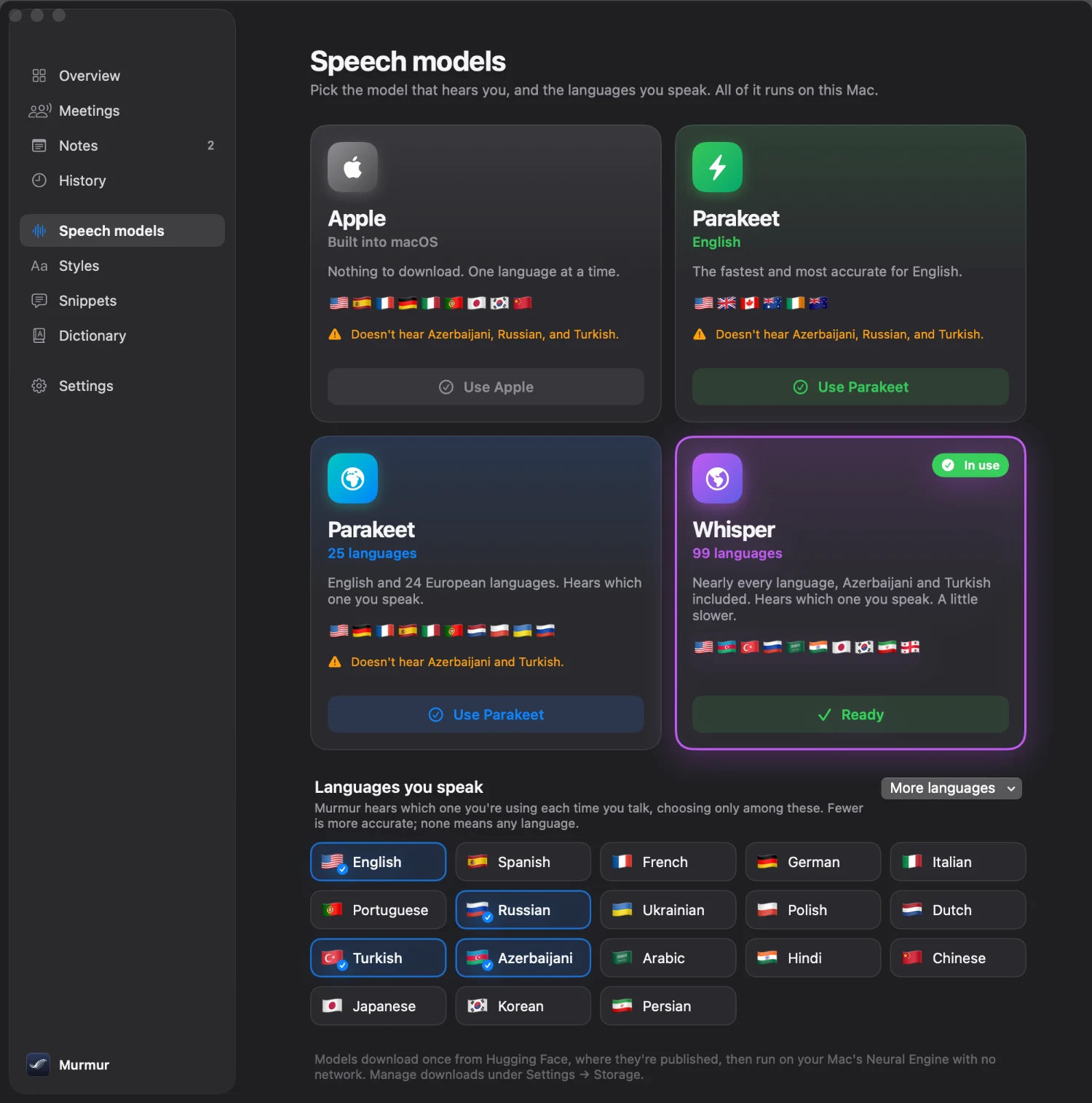
Every model runs on your Mac’s Neural Engine: it downloads once, then works offline. AI polish works in the languages Apple Intelligence supports; in others, Murmur tidies text with its own rules.
Select text, hold ⌥, say what to change.
Fillers out. Corrections in.
Say a phrase, get the text.
Take back the last dictation.
Sent to the wrong window? Put it here.
Speech and AI run on your Mac. Even in Airplane Mode.
Nowhere to type? It's saved to Notes.

Double-tap right ⌘ and talk as long as you like.
Names and jargon go in the dictionary.
A dot on the menu bar icon means a new version is ready. One click.
Your voice never leaves your Mac. Speech recognition runs on it. So does the AI. So do your meetings. No account. No cloud. No bot on your calls.
Pay once. Use it forever. Cloud dictation costs about $144 a year. Murmur costs $19, once, with meeting notes included.
Goes up to $29 when the launch copies run out.
or try 2,000 words free. No account, no card.
7-day refund, no questions. Email and get your money back.
Post about Murmur and get up to all of it back. How it works
Two years of dictation
You keep $269.
What the subscription doesn't give you
Subscription: Wispr Flow, Typeless and Willow Pro, billed yearly. October 2026.
Apple silicon Macs with macOS 14 Sonoma or later. On macOS 26 Tahoe with Apple Intelligence turned on, you also get Apple's speech model, AI polish, voice editing and meeting summaries. On Sonoma and Sequoia, Murmur dictates with Parakeet or Whisper and tidies your text with its own rules.
Yes. After a one-time model download (Apple's, or Parakeet or Whisper at 480 to 630 MB), dictation and meeting notes run entirely on your Mac, even in Airplane Mode.
Up to 99. Pick the languages you speak in Settings: Parakeet covers English and 24 European languages, Whisper covers 99, including Azerbaijani, Turkish and Japanese, and both hear which one you're using each time you talk. Apple's built-in model covers 9 languages, one at a time. AI polish works in the languages Apple Intelligence supports; in others, Murmur tidies text with its own rules.
When Zoom, Google Meet, Teams, FaceTime, Slack or another call app starts using your microphone, the notch asks whether to take notes. You can also press ⌃⌥M to start any time. Murmur records your microphone and the call's audio on your Mac, writes down who said what, and Apple Intelligence writes a summary with action items and decisions. No bot joins the call, and meeting notes are included in the one-time price.
Murmur doesn't join the call or announce itself, so it's up to you to tell people you're taking notes. In many places the law requires it, and Murmur reminds you.
Microphone to hear you while you hold the key, Accessibility to paste into the app you're using, and System Audio Recording only for meeting notes, so they include the other side of the call. Nothing else.
Murmur checks for a new version once a day. When one is ready, a dot appears on its menu bar icon, and one click installs it and keeps your settings. Updates are free.
Your first 2,000 words are free, no sign-up. Add your email for 3,000 more. After that it's $19, once. Your history, notes and settings stay either way.
Yes. It works on 3 Macs. Deactivate the old one in Settings to free a slot.
Find it in the customer portal, or write to .
 SandpiperFree
Undo anything your AI agent did. Saves your project before every prompt and every rm -rf.
Learn more →
 WrenFree
A light Markdown reader for Mac, made for the .md files AI tools write.
Learn more →
2,000 words freeMeeting notes included7-day refund